54
Status Screens
The status of the compressor can be viewed from a group of status screens as described below. Consecutive uses
of the QUIT key will return the user to the main
STATUS SCREEN.
Compressor Main Status Screen
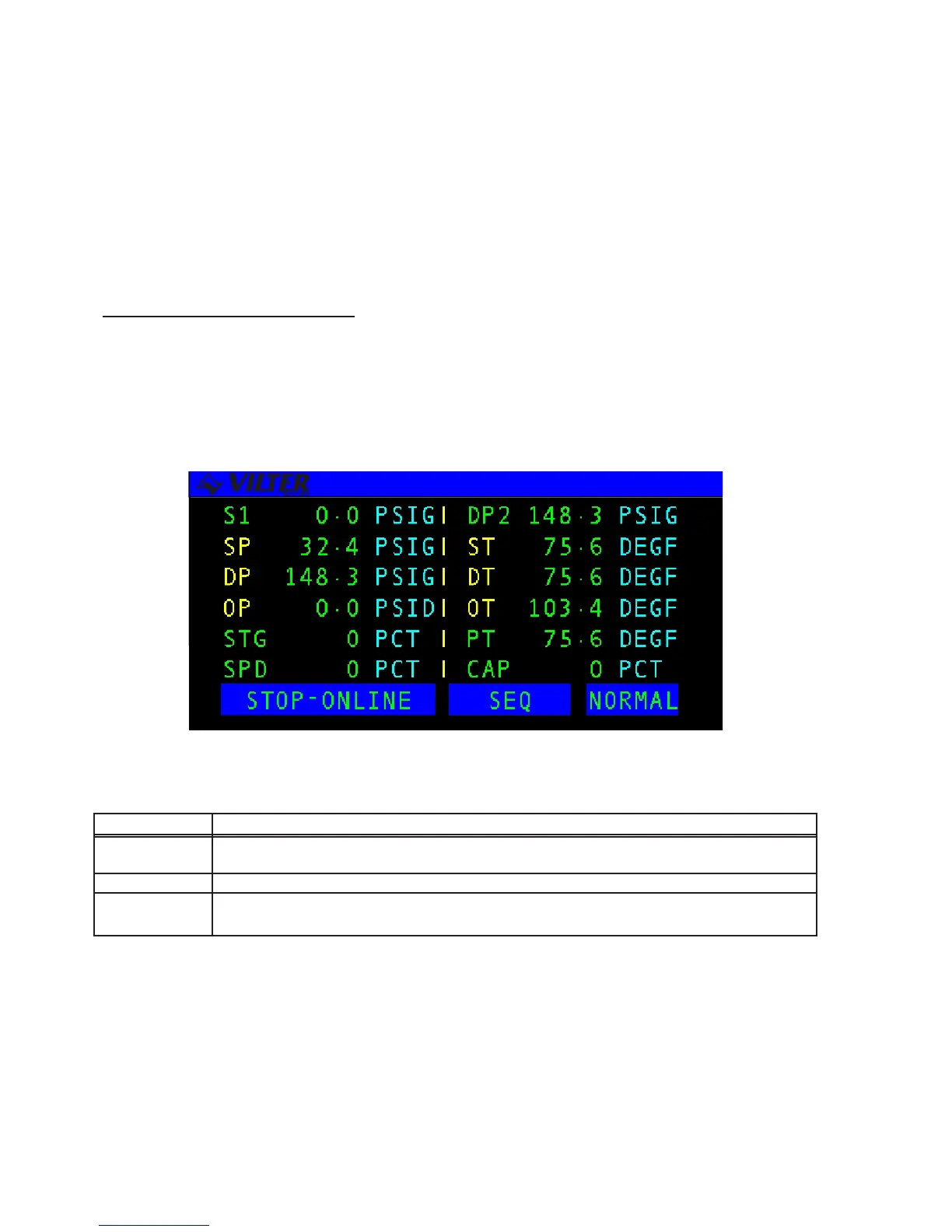
The COMPRESSOR STATUS SCREEN shows a numerical summary of the compressor analog and state
parameters. The values are continuously updated in real-time to reflect the current state of the compressor.
For example, in the figure below, the current state of the system is STOP-ONLINE. The system’s mode of
operation is SEQ (Sequenced) and the alarm status of the system is NORM (normal). There are also two
system functions which may be performed from this screen: Capacity adjustment when in Manual mode and
the clearing of alarms and failures.
The following table lists the additional keys available on the RECIP status screen.
KEY FUNCTION
UP ARROW Loads the compressor when RECIP is in Manual or Local mode. One stage is added each time
the UP arrow key is pressed.
DOWN ARROW Unloads the compressor when RECIP is in Manual or Local mode, or if one stage is removed.
CLEAR Stops manual capacity loading or unloading. Acknowledges alarms and failures and stops the
alarm horn from sounding.
Manual Capacity changes are discussed in the Capacity Control section and Alarms and Failures are discussed in
the Alarm/Failure section of this manual.
RECIP Status Screens
RECIP Status Screen Keys



 To Next Page