FaroArm® Quantum
August 2017
53
Chapter 3: Operation
WLAN
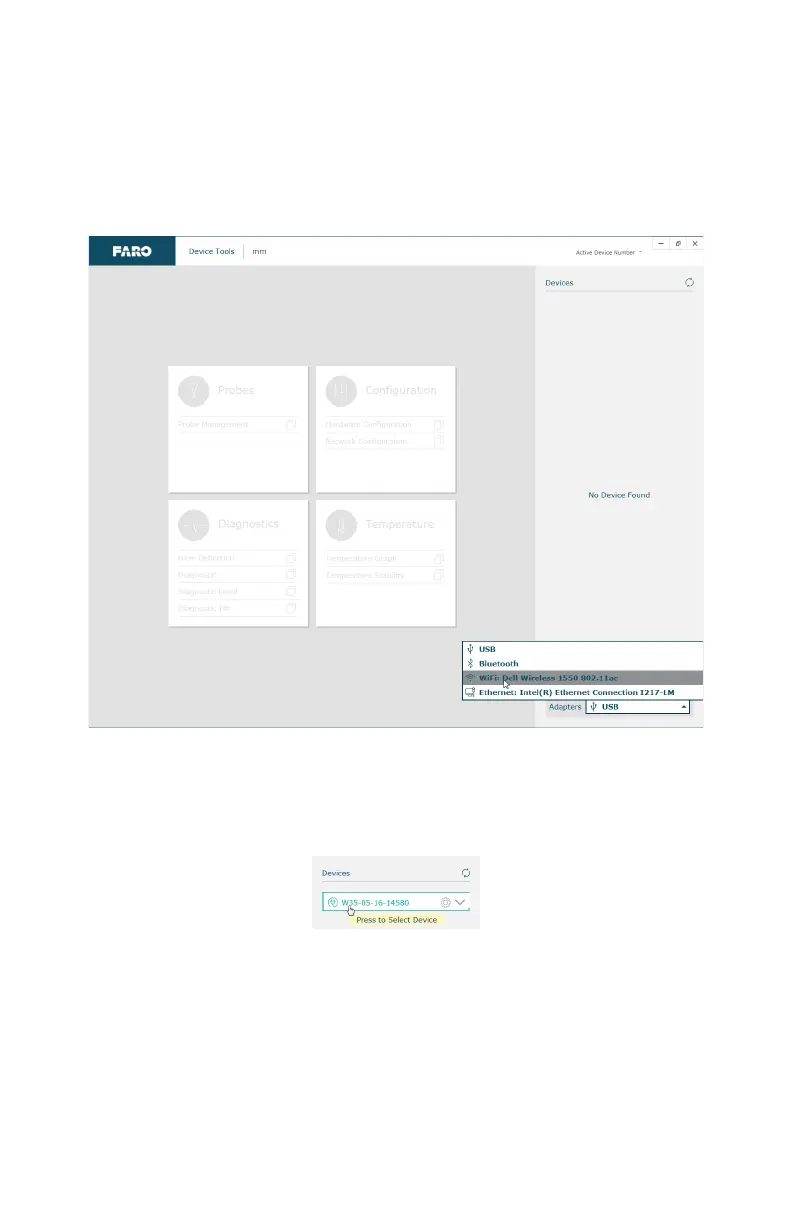
Choose WIFI if you connection is using the wireless ethernet connection. Your
Quantum will appear at the top of the D
EVICES list. If necessary, click the
R
EFRESH button to search the computer for your Quantum.
NOTE: Ensure the Quantum’s WLAN On/Off button is on and your
computers wireless receiver is on.
• Click your Quantum to make it the active device.
There are two WLAN settings depending on your wireless hardware
configuration. The default setting is WLAN to PC/Laptop.
For more information,
see “Network Configuration” on page 77.
Figure 3-25 WLAN Connection
Figure 3-26 Choosing the Active Device
08m80e00_FaroArm_Quantum.book Page 53 Tuesday, August 22, 2017 11:03 AM


 To Next Page