Chapter 4 Installation and Wiring
PAGE 4-58
4-9-1 TCP/IP Setup Procedures (Windows®)
The Ethernet settings on the PC side may need to be changed in order to communicate to the
controller via Ethernet. The “default” TCP/IP settings of the controller are set at the factory, however,
it’s possible they may have been changed. You can confirm the current settings using the MFC unit
display. The TCP/IP settings are confirmed by D-Nos. “011” to “016” of the system setting mode
(PAR No. indication part: “SYS”) of the Display Unit. The IP Address set in the MFC unit can also be
changed using the MFC display (at the parameter Data Numbers listed below).
● Set Values of Factory Settings (System Parameters)
SYS D-No. “011, 012”: IP address
192.168.11.10
SYS D-No. “013, 014”: Subnet Mask
255.255.255.0
SYS D-No. “015, 016”: Default Gateway
192.168.11.1
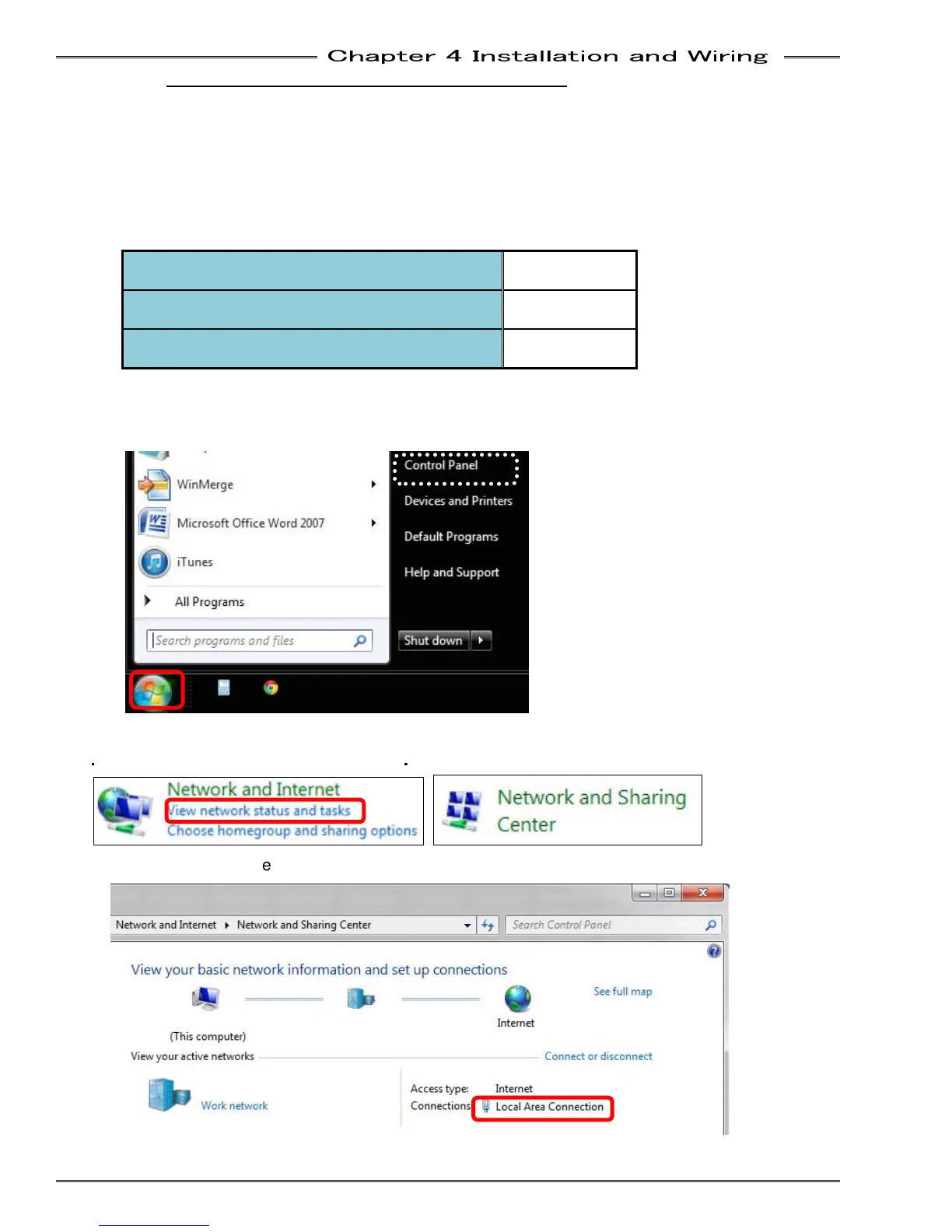
The TCP/IP setting method (in the case of Windows 7) is described below.
● Windows 7 setup
1. Select Control Panel from the Start menu.
2. Select “View network status and tasks” or “Network and Sharing Center” from the Control Panel.
・
“Category” View
・
“Large Icons” View
3. Select “Local Area Connection” from Network and Sharing Center.



 To Next Page