Chapter 8 System Operation
PAGE 8- 22
8-5 System Mode Change-Over – Multi / Single System
In order to change the system type, the controller must be turned to BYPASS Mode and Par No.000,
D-No.003 “Function Version” needs to be changed in the Parameter Edit Mode. Then the control power
must be rebooted.
8-5-1 Multi System → Single System
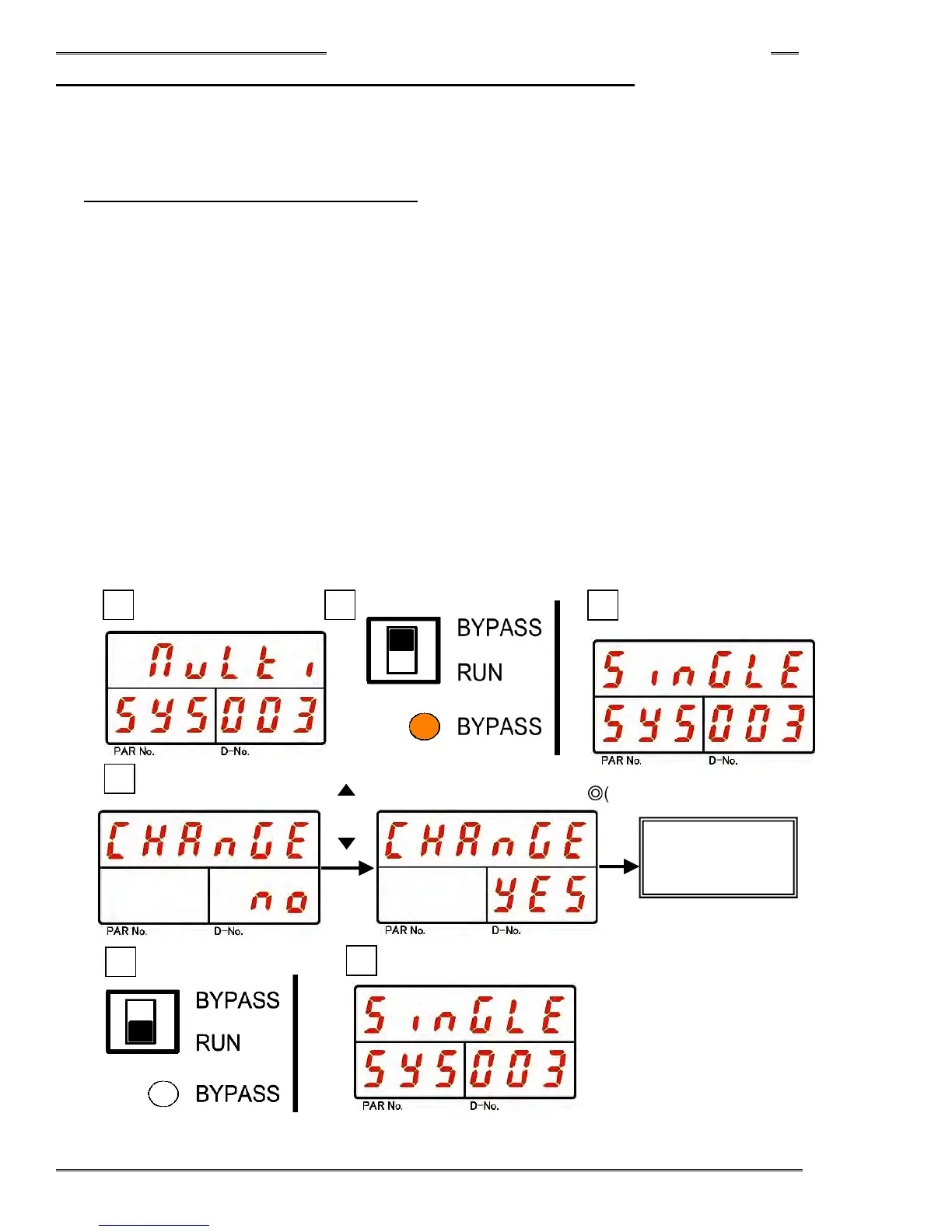
1. Operate the arrow pushbuttons to make “System Display,” with “SYS” indicated in the PAR No. display
and “003” indicated in the D-No. display. (In case of a multi system, “Multi” is indicated on upper area of
the display (DATA))
2. Change the RUN/BYPASS switch of the Controller to the BYPASS position and then press the [SET]
pushbutton.
3. After transition to the Parameter Edit Mode, use the [▲] or [▼] pushbuttons to change to “Single.”
4. After pressing the [SET] pushbutton, use the [▲] or [▼] pushbuttons to change the indication from
“NO” to “YES” within 2 seconds, and then press the [SET] pushbutton again.
5. Change the RUN/BYPASS switch of the Controller to the RUN position.
6. Turn OFF the control power to the Controller.
7. By turning on the control power 10 seconds later, changing to the single system is accomplished.
8. To confirm the change to the single system, confirm that “Single” is indicated at the upper part of the
display in “System Display,” with “SYS” indicated in the PAR No. display and “003” indicated in the
D-No. display, in the System Parameter Display Mode.
[ ]
or
[ ]
8
5
3
4
1
Change of
System
◎
(SET)
2



 To Next Page