Chapter 4 Installation and Wiring
PAGE 4-49
4-8-4 RS-232C Fastening Result Output (Multi System)
Setup as a Multi system, the RS232C data format is programmable with the AFC3000 User
Console software. Either an ASCII format or BCD format can be selected as the data output format.
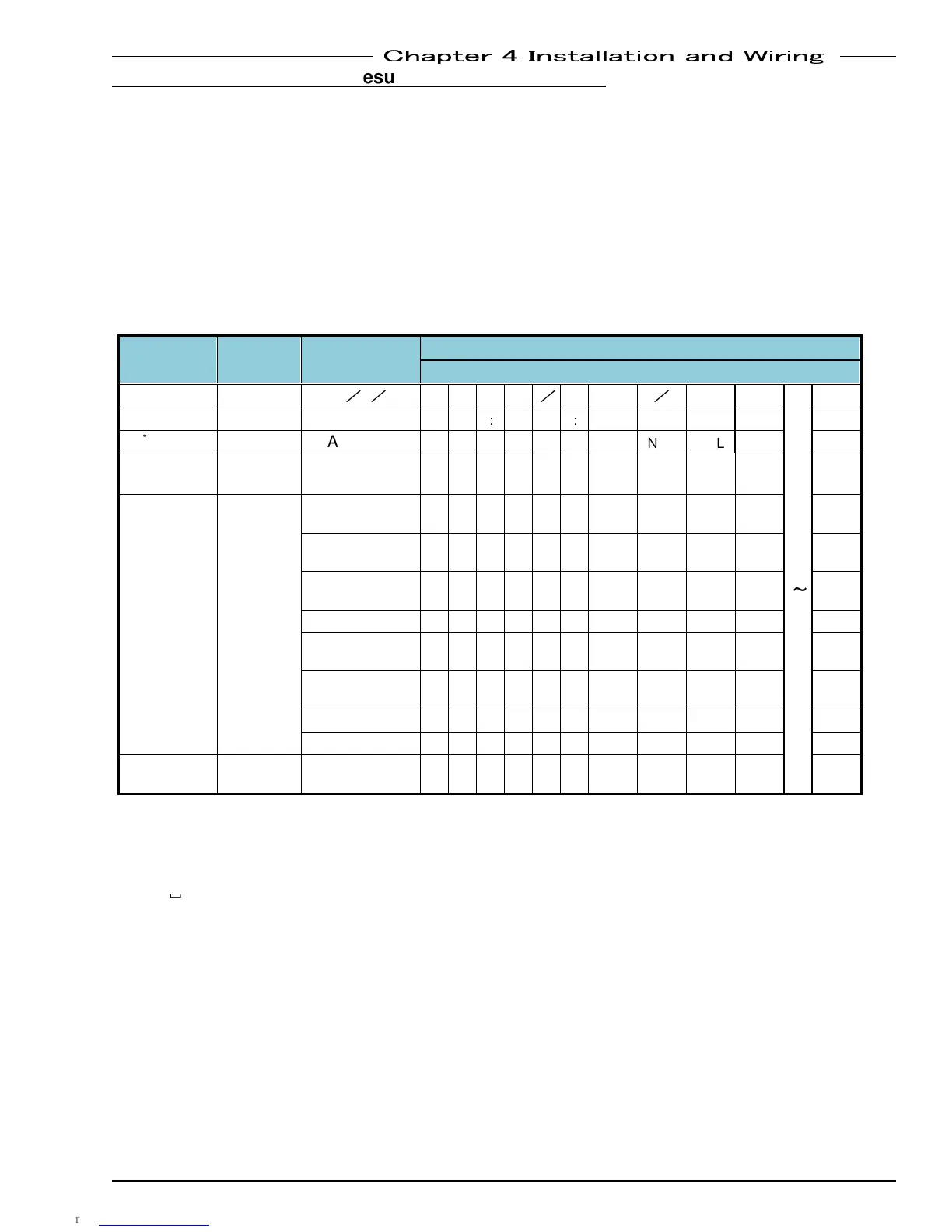
The configuration/placement of the output data items is user programmable in the “RS232C Output
Format” screen of the AF3000 User Console. The data items that can be output are shown below.
● Output Data Format (ASCII)
The ASCII format fastening result data is output in the order as follows: “Header” → “Spindle 1
data” → Spindle No. 2 → thru → Spindle No. 32 → “Footer” (the output conditions of the header can
be changed). The spindle (Axis) data is output for the number of spindles that are configured in the
system.
・Multi Format Output Items
Output
Items
Number
of Bytes
Fastening
Data
Multi Format
PLC Input Data “Character String”
Date 10
2013
/
5
/
28
2 0 1 3
/
0 5
/
2 8
~
Time 8 12:34:56 1 2
:
3 4
:
5 6
ID
*1
32 ABCDEF A
B
C
D
E
F
NUL NUL NUL NUL
NUL
SEQ No.
(1 to 32)
2 2
]
2
SEQ
Judgment
*2, *3
4
REJECT R
E
J
]
ACCEPT A
C
C
]
ABNORMAL A
B
N
]
STOP S
T
O
P
RESET STOP
R
S
T
]
BYPASS B
Y
P
]
START OFF S
O
F
F
IN CYCLE I N
C
Y
SEQ Cycle
Count
8 123456
]
]
1 2 3 4 5 6
*1: The number of output bytes of the ID is fixed at 32 bytes (16 words). NULL letters are set as unset
values.
*2: Please refer to “Sequence Judgment” regarding the details of SEQ Judgment.
*3:
␣
(20H) is the space code (space).



 To Next Page