Chapter 6 Power up and Initial Checks
PAGE 6-3
6-1-2 Items to be checked when the power is turned on
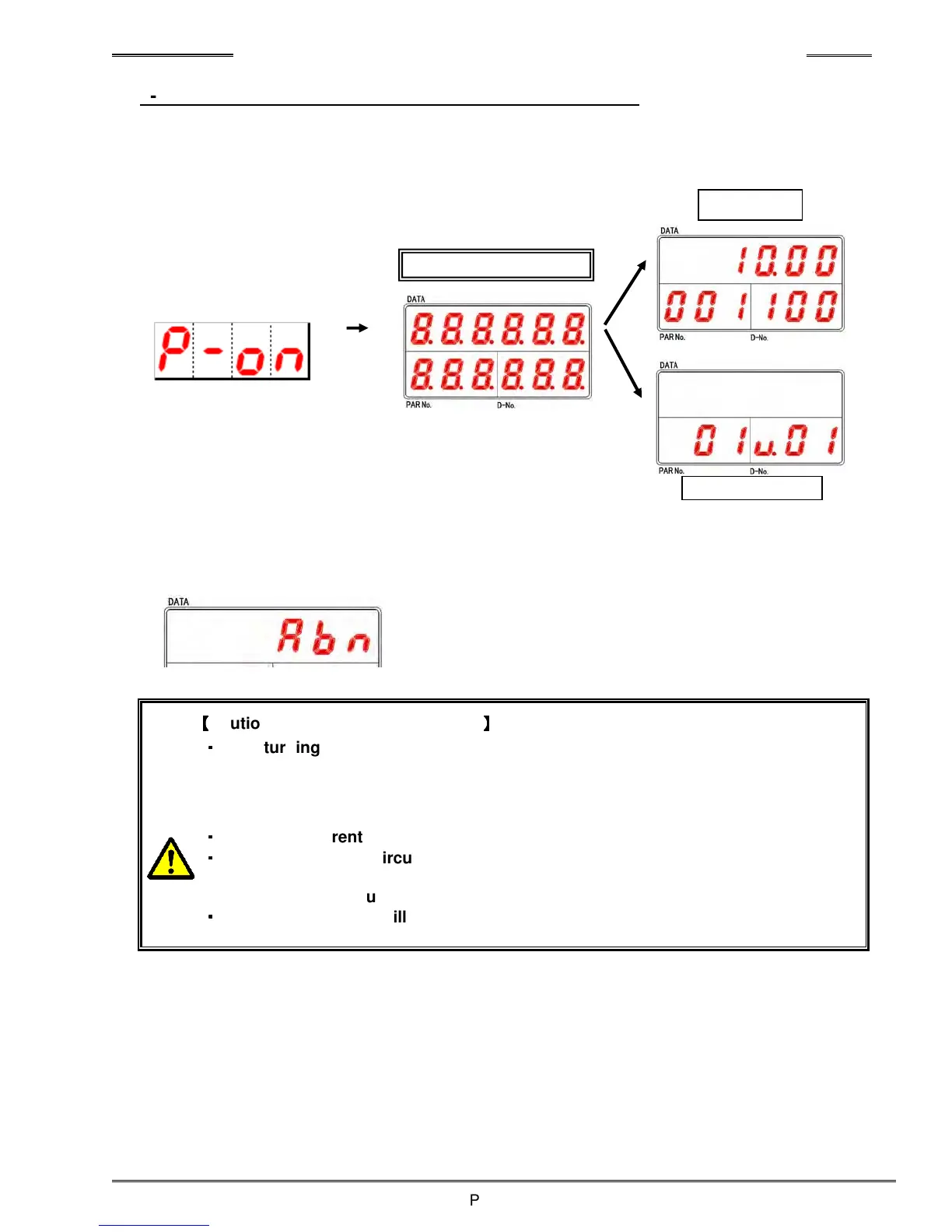
When the power is turned on, check that the display unit will change. (See a figure below)
If an “Abn” indication (just like below) is displayed on the upper portion of the display device when the
control power is turned on, correct the cause of the abnormal and reboot the control power with care.
(See Troubleshooting section for abnormal definitions)
【
【【
【
Caution concerning Power ON/OFF
】
】】
】
・
・・
・
After turning OFF the power, do not turn power back ON without a brief wait.
(recommended 20 seconds before turning power back on) Single or random
incidents of powering up with less waiting time is acceptable. However, multiple
power ON/OFF in succession may cause the following;
・
・・
・
The inrush current protection circuit would shut down the power supply circuit.
・
・・
・
The power supply circuit would then automatically shutdown. As a result, the
power supply circuit will not work even if the
control power is turned back on.
(Auto Protection Circuit keeps OFF condition.)
・
・・
・
If the control power will not turn back on, wait for at least 5 minutes to reset the
protection circuit and try again.
RUN Mode
Display lights all
digits for approx..
BYPASS Mode



 To Next Page