Chapter 3 System Description
PAGE 3-9
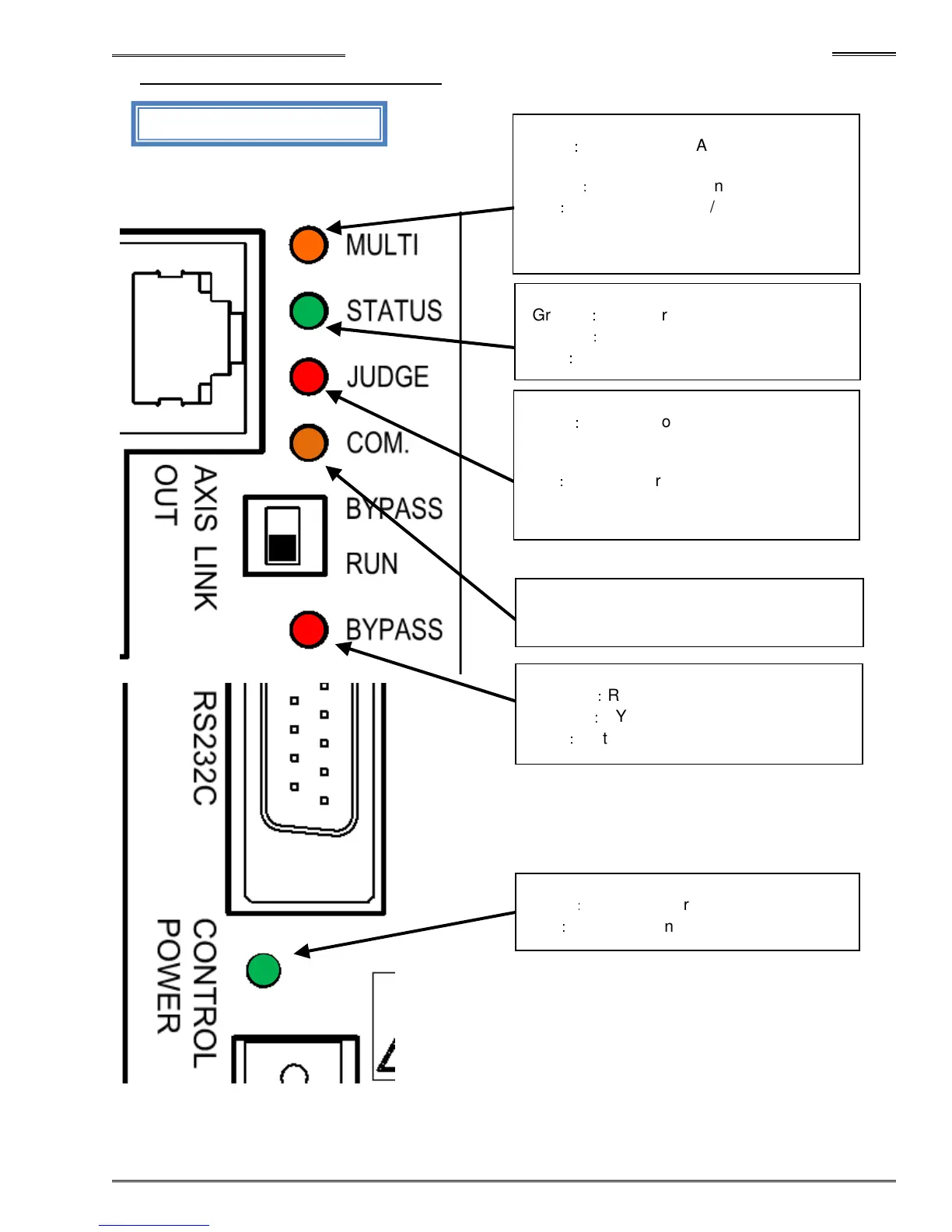
3-2-2 Controller Front Panel LED
MFC-S024・
・・
・MFC-S060
Light off
:
RUN (Operation) Mode
Orange
:
BYPASS (BYPASS) Mode
Red
:
Motor power off (3 phase AC)
Green
:
System ready (to operate)
Orange
:
In cycle (CW / CCW)
Red
:
System Abnormal
Green
:
Fastening or CAL/Zero Level check
judgment ACCEPT (within acceptable limits)
(this spindle)
Red
:
Fastening or CAL/Zero Level check
judgment REJECT (outside of acceptable
limits) (this spindle)
Orange: PC Communication in process
(AFC3000 User Console Software)
Green
:
Control power on (24VDC)
Red
:
Unit operation error / CPU Error
Green
:
Fastening or CAL/Zero Level check
overall judgment ACCEPT (all spindles)
Orange
:
Fastening sequence operating
Red
:
Fastening or CAL/Zero Level check
overall judgment REJECT (all spindles)
ot used in SINGLE system mode


 To Next Page