Chapter 8 System Operation
PAGE 8- 6
8-3 RUN State
The operational modes available in the Run State are identified below. Under this condition, the BYPASS
switch on the front panel is in the RUN position and the BYPASS external signal is not active (the BYPASS
LED is off).
The fastening operation can only run while in the RUN state.
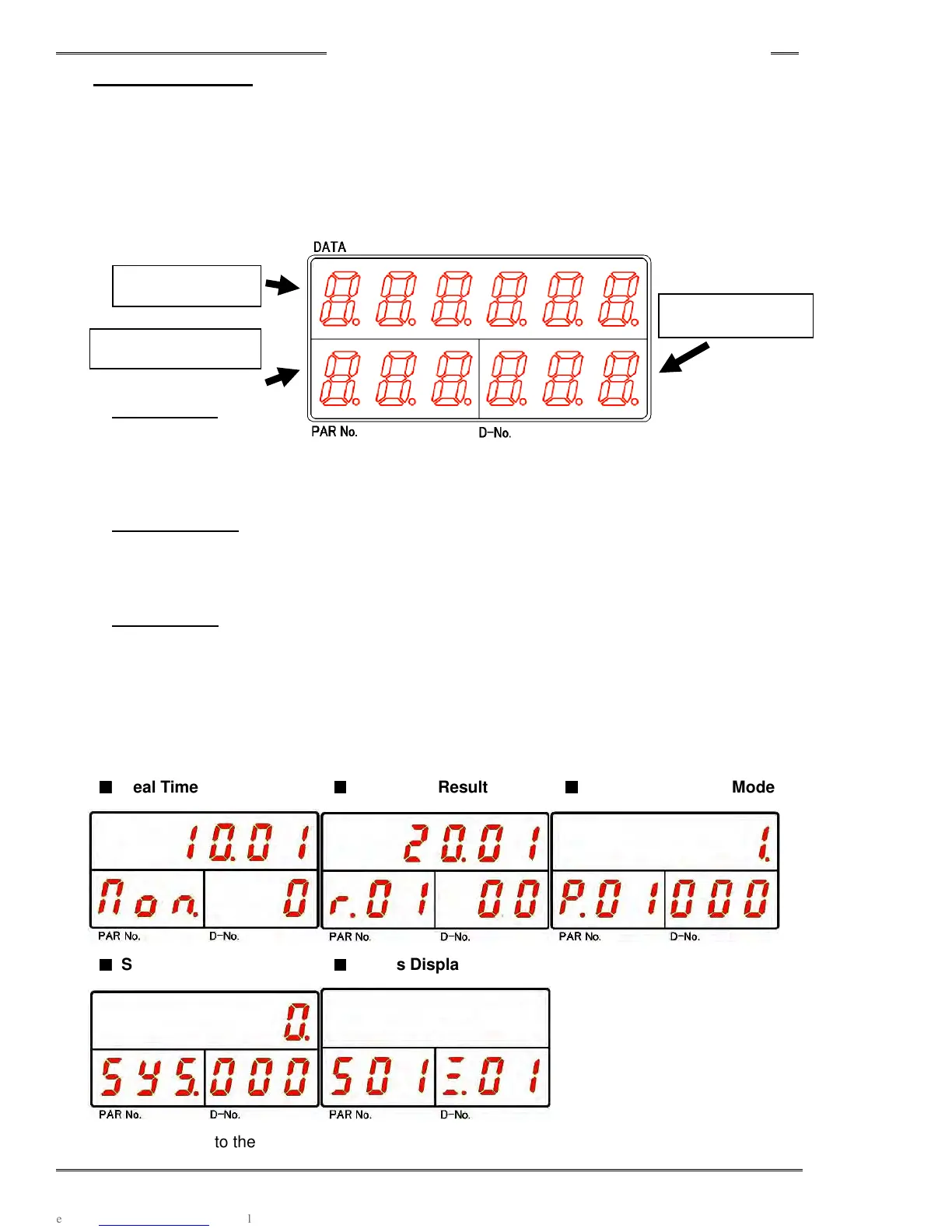
<Controller Display (RUN Mode)>
• DATA Display
In the real time mode, fastening result mode, and parameter (system) setting mode, the fastening result,
set value (parameter), or executed value is indicated here as designated by the D-No.
• PAR No. Display
The fastening parameter No. (Or Sequence No. for the Master) is displayed. When an abnormal
condition occurs, the abnormal No. will be displayed in Status Mode.
• D-No. Display
The data number of the data which is displayed on the upper digits will be displayed. The operating
speed is displayed (while in cycle) in the Status display mode. The Controller setting and spindle
number are displayed when not in cycle. When an abnormal condition occurs, the abnormal No. sub
code will be displayed.
■
■■
■
Real Time Mode
■
■■
■
Fastening Result Mode
■
■■
■
Parameter Setting Mode
■
■■
■
System Setting Mode
■
■■
■
Status Display Mode
Please refer to the following pages concerning the respective modes in the RUN state.
DATA Display
PAR No. Display
D-No. Display



 To Next Page