Chapter 8 System Operation
PAGE 8- 24
8-6 Parameter Copy / Erase the Fastening Results History
NOTE: Copying parameters is performed easier using the AFC3000 Software – this is provided in the
case software is not available
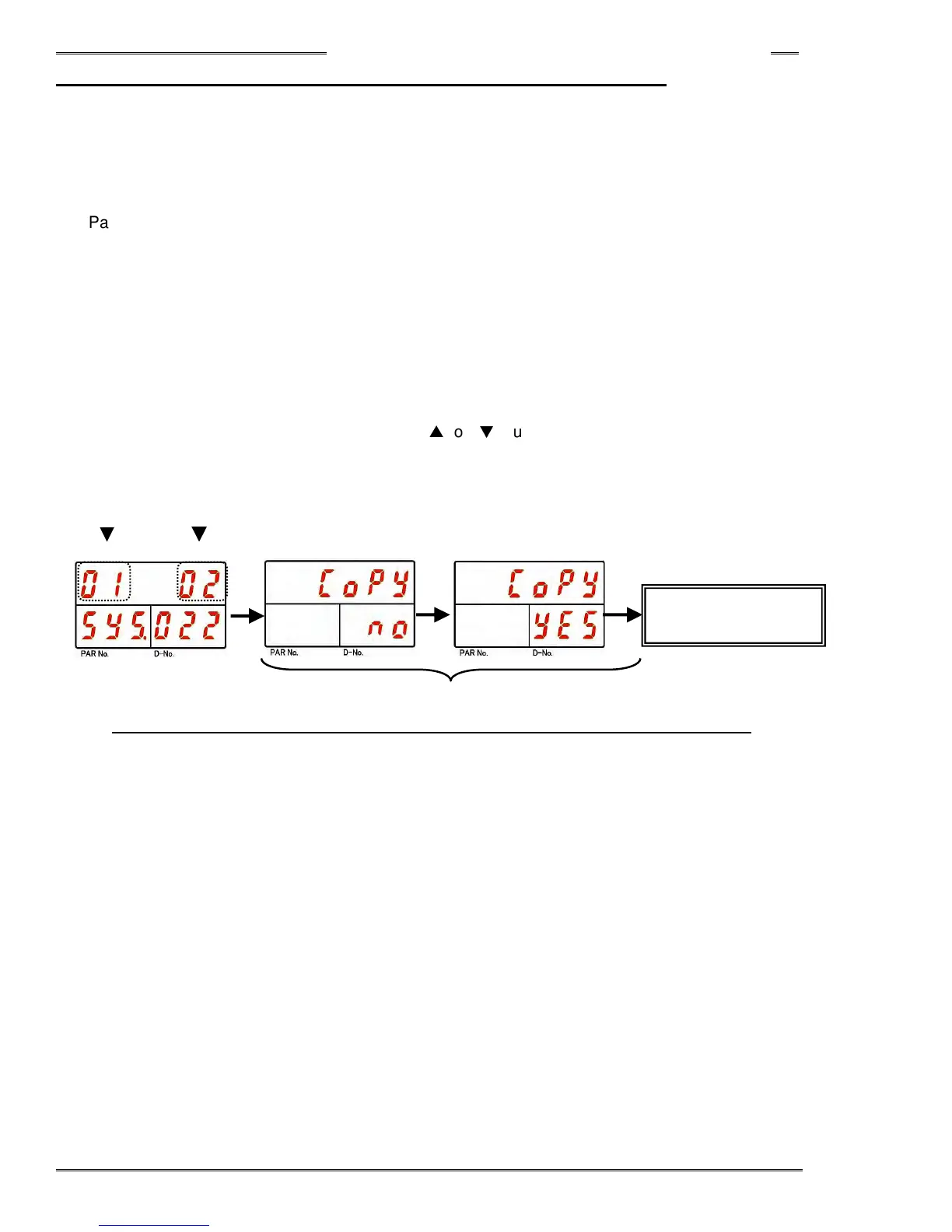
When multiple parameter sets need to be set, one parameter can be copied to another parameter while in
the parameter edit mode.
Parameter copy can be implemented using the following procedure.
1. Operate the arrow pushbuttons to make “Copy,” with “SYS” indicated in the PAR No. display and
“022” indicated in the D-No. display.
2. Change the RUN/BYPASS switch of the Controller to the BYPASS position and then press the
[SET] pushbutton.
3. Select the copy source parameter No. in the first 2 digits of the upper stage of the display (DATA).
4. Select the copy destination parameter No. in the last 2 digits of the upper stage of the display
(DATA).
5. Press the [SET] pushbutton, press the [
▲
] or [
▼
] pushbuttons to change the indication from “Copy
NO” to “Copy YES” within 2 seconds, and then press the [SET] pushbutton again within 2 seconds.
6. Copying one parameter to another parameter is complete.
<Procedure for batch parameter copying>
SET
Copy a parameter
to a parameter
SET
[
▲] or [▼]
Copied FROM
Copied TO
*If neither YES or NO is selected within 2 seconds, the command will be cancelled.



 To Next Page