SCREEN KEY DESCRIPTIONS
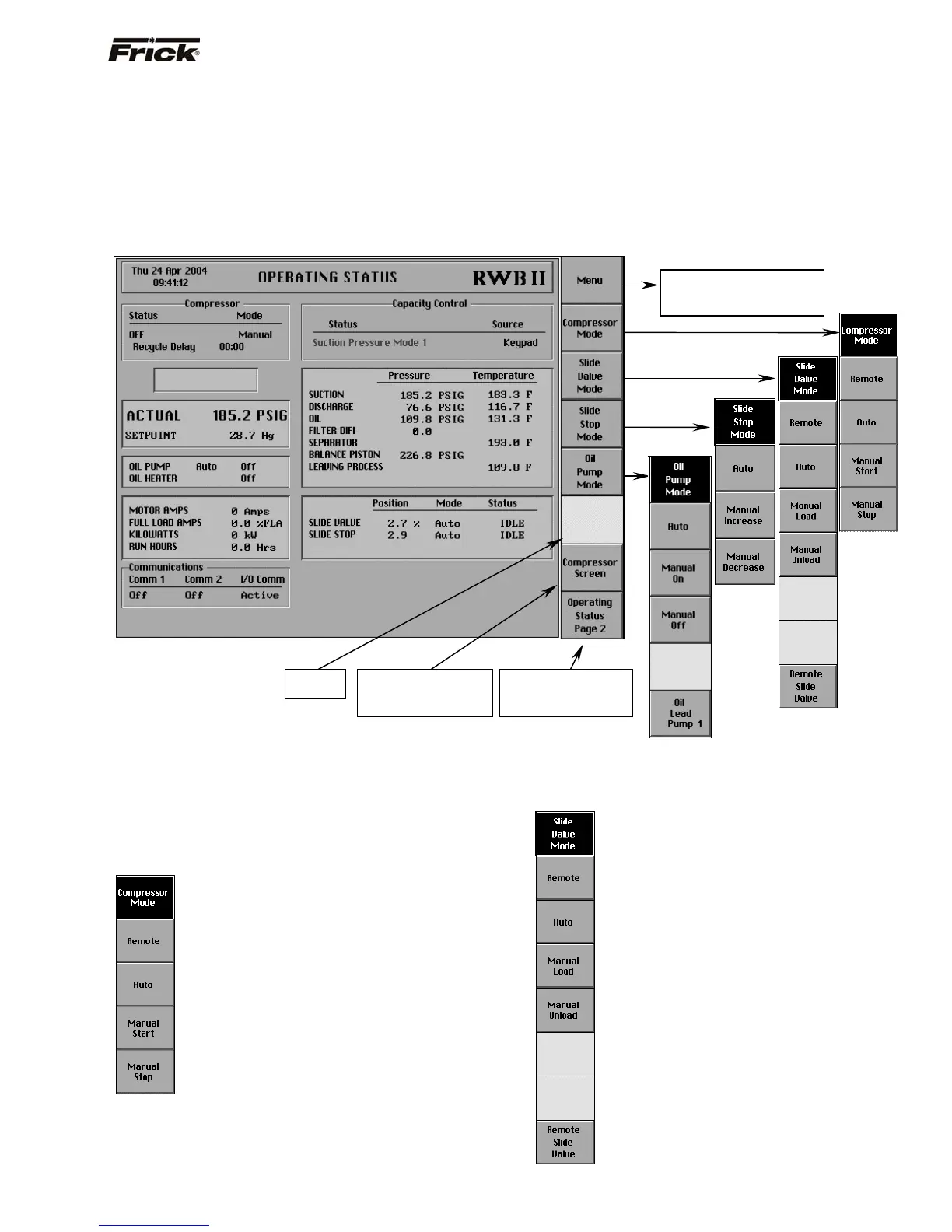
This section shows the major operating screens within the
Quantum™ operating system. To the right of the following
screen is a brief description of each of the keys. Some
keys will call up other screens, while other keys will
provide additional key selections, while keeping the same
screen.
Note: Based upon the particular factory setup options for
each compressor, it is possible that some of the actual
compressor panel keys/screens will appear slightly
different than those shown in this manual. The first
example for this screen, shown below, represents what
might be displayed for an RWBII variable VI unit.
OPERATING STATUS
Following are the screen key selections for the Operating
Status screen:
[Menu] - shows the Main Menu screen.
[Compressor Mode] -The following are the Compressor
Mode screen command keys:
[Remote] – Selects the compressor to be
controlled by a remote device.
[Auto] - Selects the compressor to be
controlled from the automatic cycling
setpoints.
[Manual Start] - Places the compressor unit
in the start mode for running.
[Manual Stop] - Stops the compressor unit.
Depending on the compressor model, either [Slide Valve
Mode] or [Capacity Mode] is present (Reference
Compressor Model Differences).
[Slide Valve Mode] - (If applicable, reference
Compressor Model Differences). The following are the
Slide Valve Mode screen command keys:
[Remote] – The Slide Valve loading and
unloading is controlled by a remote device.
[Auto] - The Slide Valve loading and
unloading is under automatic Capacity
Control settings.
[Manual Load] - Sends a load signal for the
duration the key is pressed.
[Manual Unload] - Sends an unload signal
for the duration the key is pressed.
[Remote Slide Valve] - This key will appear
if Slide Valve Position Control is enabled as
a selectable option in Panel Setup. This key
selects to control the Slide Valve based on
the (4-20 ma) analog signal of the Remote
Slide Valve Position input. The Slide Valve
position control will screen as a Slide Valve
%.
Pressing this key will
cause the Compressor
screen to appear.
Pressing this key will
cause the Operating
Status 2 appear.
No
Function
Pressing this key will cause
the Main Menu screen to
appear.
FRICK
QUANTUM™ COMPRESSOR CONTROL PANEL S90-010 O
OPERATION Page 11



 To Next Page