Pressure Calibration
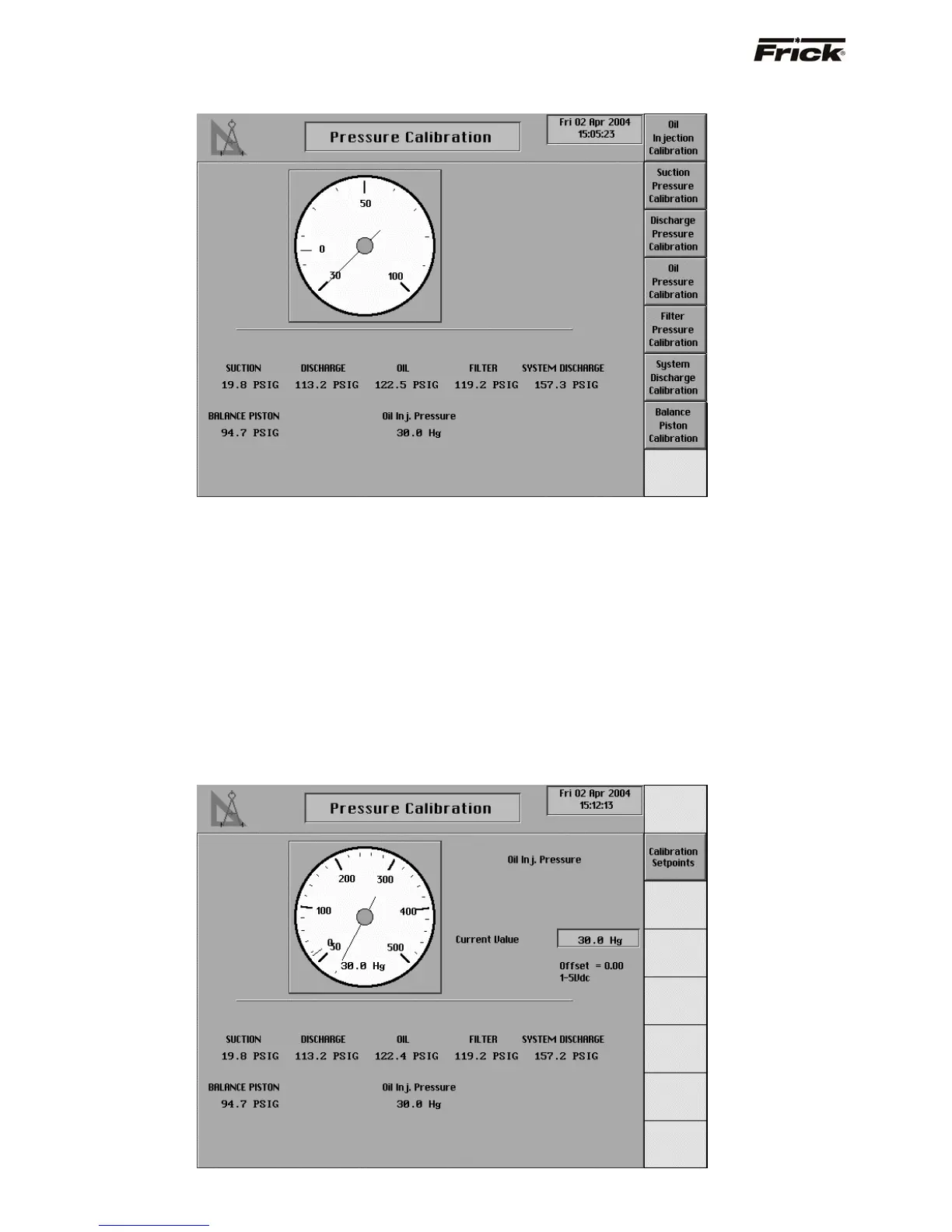
This screen shows a picture of a pressure gauge, current
pressure readings are shown below the gauge for:
• Oil Injection Pressure (If applicable)
• Suction
• Discharge
• Oil
• Filter (If applicable)
• System Discharge (Required for Condenser
Control)
• Balance Piston (If applicable)
A screen key exists for each of the displayed pressure
readings. When a pressure calibration key is pressed, the
identification of the pressure transducer and its settings
are shown. It is at this time that the gauge will also show
the current reading. Select the [Calibration Setpoints]
key to modify the present calibration, see the screen
shown below. The Setting for the Current Value is blank
until a pressure for calibration is selected from the screen
keys.
Note: The measurement range of transducers is usually
given in PSIA. If another pressure unit has been selected
in Panel Setup, the operator can temporarily change the
pressure units in Panel Setup to use PSIA, then enter the
PSIA ranges for all the transducers and finish by returning
the pressure units in Panel Setup to the prior selection.
Pressure Calibration
S90-010 O FRICK QUANTUM™ COMPRESSOR CONTROL PANEL
Page 66 OPERATION



 To Next Page