FRICK
QUANTUM™ COMPRESSOR CONTROL PANEL S90-010 O
OPERATION Page 89
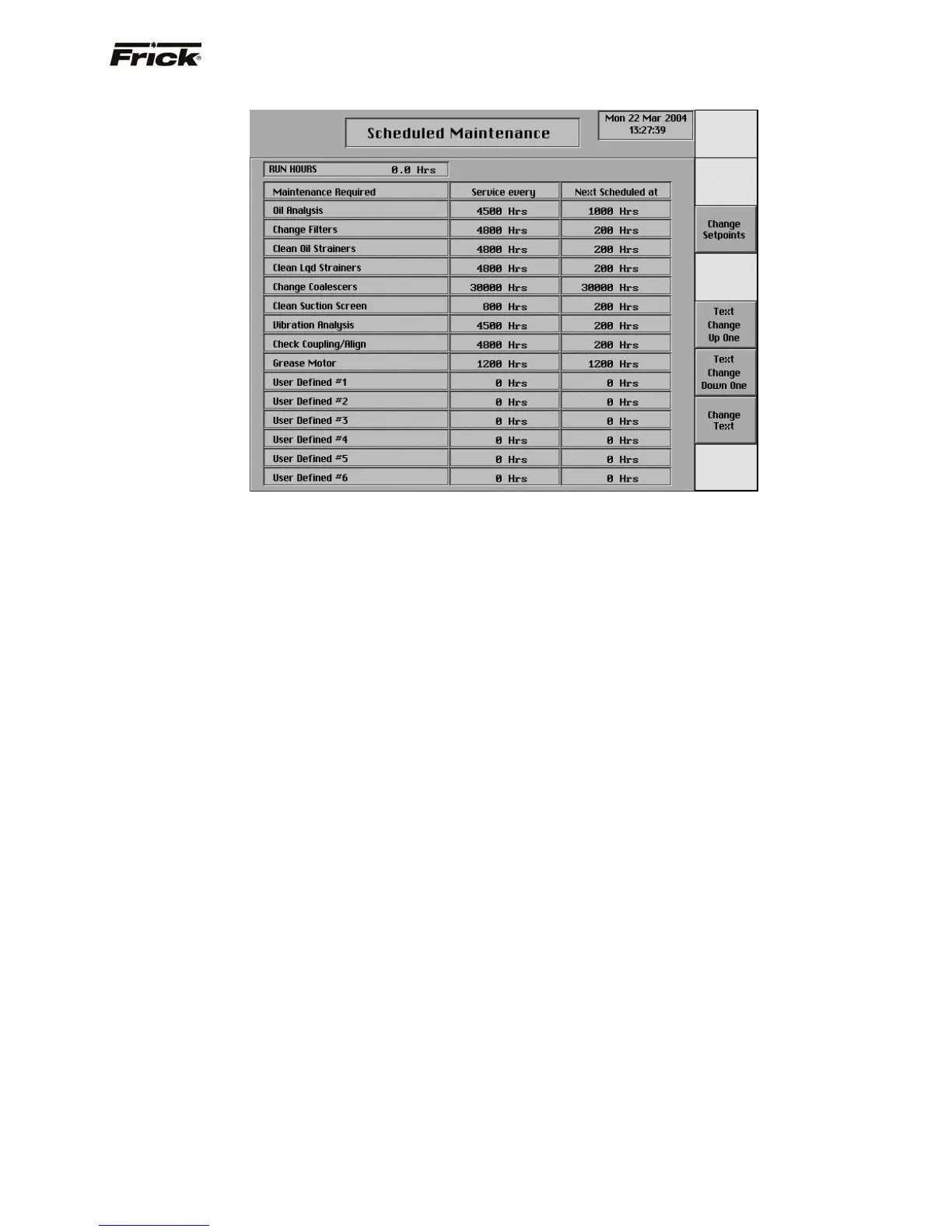
Scheduled Maintenance
This screen has been provided to help the service
technician and can be accessed from the service screen.
From here, the technician can view up to six (6) user
definable maintenance schedules (fifteen if Other
compressor type). Each of the schedules may be custom
named. This screen is based upon the Maintenance
Schedule that is provided in the IOM manual for the
specific compressor package.
The usage of this screen is that the user can define up to
fifteen different areas of compressor operation that they
would like to schedule routine maintenance for. As an
example, the above screen shows a row labeled as Oil
Analysis. The next column (Service Every) on the same
row has a value of 10000 Hrs. The last column (Next
Scheduled At) of this row has a value of 1000 Hrs. When
the compressor is running, this time value is being
clocked. After 1000 hours of compressor run time, an
alarm will be generated alerting the user with an alarm
message which will read Maintenance -- Oil Analysis. This
is to notify the operator that it is time to have the Oil
checked. At this point, the operator should notify the
proper maintenance personnel that the appropriate
maintenance be performed.
Once the alarm has occurred, the values for the row that
the alarm occurred in will be automatically updated, with
new values as predetermined by an internal programmed
maintenance schedule, based upon the type of
compressor. The values for the Next Scheduled at column
are based upon the Compressor Run Time hours.
The left most column is the user defined Maintenance
Required column. This is where custom names may be
entered for the various items that the user would like to
track.
A toggle key is provided for each of the data selections:
[Change Setpoints] - Pressing this key will highlight
the top box of the center column. Values in the range
of 0 - 11000 (hours) may be entered in the Service
every column (values of 10% of the IOM values 0-
999999, if other compressor type). Use the arrow
keys on the keypad to maneuver to the remaining
selectable boxes. Values in the Next Scheduled at
column are in the range of 0 - 999999 (hours).
[Text Change Up One] – Pressing this key causes
the box above the highlighted one in the Maintenance
Required column to become highlighted. Pressing this
key when the top box is already selected has no
affect.
[Text Change Down One] – Pressing this key causes
the box below the highlighted one in the Maintenance
Required column to become highlighted. Pressing this
key when the bottom box is already selected has no
affect.
[Change Text] – Upon using the [Text Change Up
One] or [Text Change Down One] keys to highlight a
box in the Required Maintenance column, pressing
this key allows the operator to change the name of
text within the box. An alphanumeric keypad screen
(see Alpha Select screen on the next page) will
replace the current screen. The user may type in a
custom name up to 20 characters long.



 To Next Page