High RPM Alarm - If the RPM is greater than or
equal to this setpoint, for the alarm time delay, an
alarm occurs.
High RPM Shutdown - If the RPM is greater than or
equal to this setpoint, for the shutdown time delay, the
compressor will shut down.
High RPM Alarm Delay - The minimum time in
seconds that the RPM is greater than or equal to the
High RPM alarm setpoint before notification of the
alarm.
High RPM Shutdown Delay - The minimum time in
seconds that the RPM is greater than or equal to the
High RPM shutdown setpoint before the compressor
will shut down.
Low RPM Stop Load - If the RPM is less than or
equal to this setpoint, the compressor will be
prevented from further loading until the RPM is
greater than this setpoint. This setpoint helps avoid
forced unloading.
Low RPM Force Unload - If the RPM is less than or
equal to this setpoint, the compressor will be forced to
unload until the RPM is greater than this setpoint.
This setpoint helps avoid a low RPM alarm or
shutdown.
Low RPM Alarm - If the RPM is less than or equal to
this setpoint, for the alarm time delay, an alarm
occurs.
Low RPM Shutdown - If the RPM is less than or
equal to this setpoint, for the shutdown time delay, the
compressor will shut down.
Low RPM Alarm Delay - The minimum time in
seconds that the RPM is less than or equal to the Low
RPM alarm setpoint before notification of the alarm.
Low RPM Shutdown Delay - The minimum time in
seconds that the RPM is less than or equal to the Low
RPM shutdown setpoint before the compressor will
shut down.
Confirmed Running (RPM) - The value that the RPM
is greater than or equal to consider the compressor
running.
Starting Maximum Delay - The time delay required
for the Slide Valve to unload below the Highest Slide
Valve position to allow starting the compressor
setpoint and the engine RPM’s to reach the confirmed
running RPM’s setpoint.
NOTE: See Electric, VFD, Engine, Turbine flowchart
for further information.
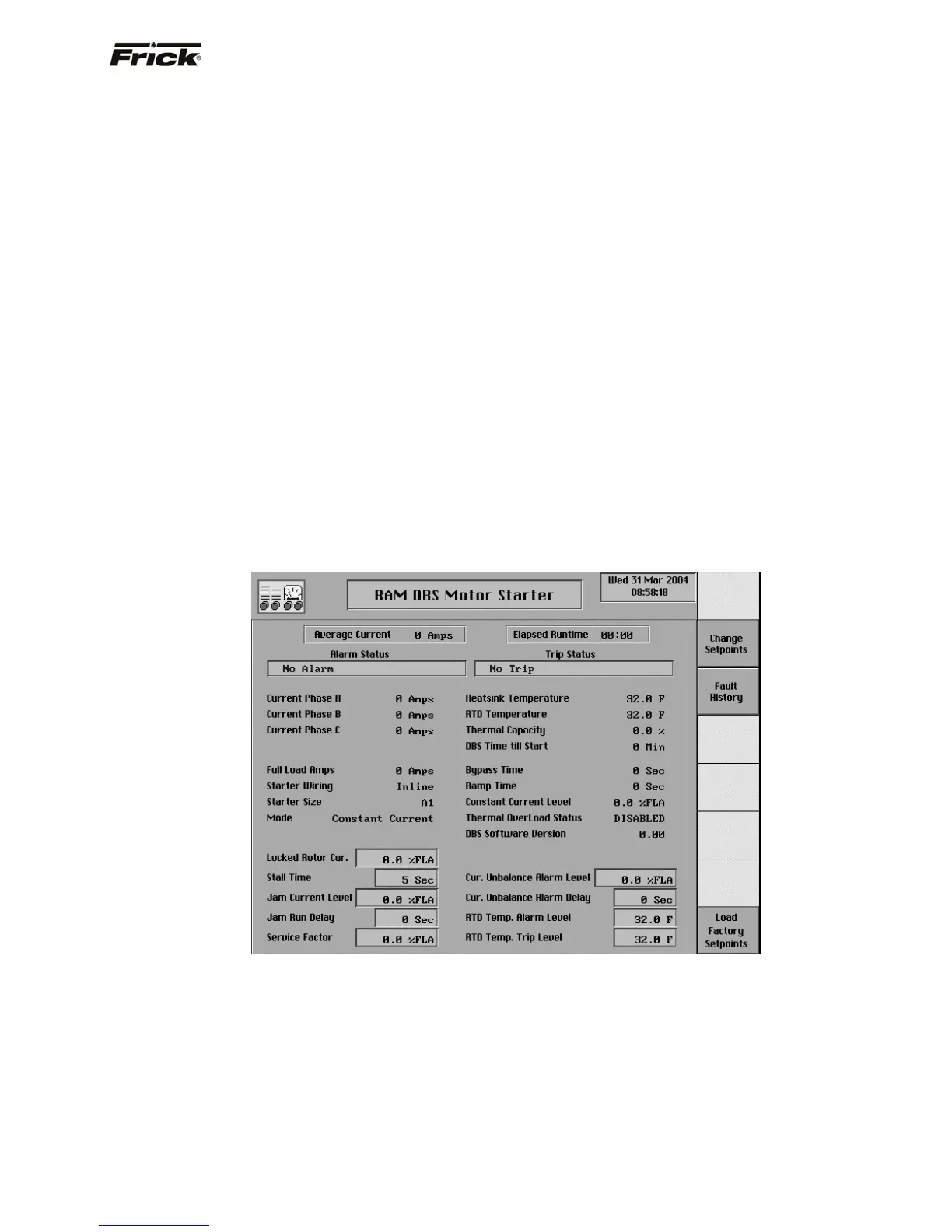
RAM DBS Motor Starter
This screen is available if a RAM DBS motor starter has
been set up for use with the Quantum™. The DBS
accelerates the motor in a smooth, stepless motion,
therefore it reduces supply voltage dip during motor start,
and mechanical shock on the compressor. Reference the
DBS Operator’s Guide and Instruction Manual or contact
RAM Industries Inc., in Leesport, Pennsylvania at 800-
220-8697 with any further questions concerning the setup
and operation of the RAM DBS.
The current system conditions of the RAM DBS are
displayed for monitoring. The Time Till Start value will also
be displayed on both the Motor Control screen and this
screen. This value and the current Recycle Delay timer
must be zero prior to allowing the compressor to restart.
These timers are intended to prevent damage to the motor
from successive restarts. Both timers can be cleared by
pressing the [Clear Remaining Delay] key on the Motor
Control screen. The Time Till Start is read from the RAM
DBS.
The following RAM DBS setpoints are modifiable from this
screen:
• Locked Rotor Current
• Stall Time
• Jam Current Level
FRICK QUANTUM™ COMPRESSOR CONTROL PANEL S90-010 O
OPERATION Page 29



 To Next Page