S90-010 O FRICK
QUANTUM™ COMPRESSOR CONTROL PANEL
Page 18 OPERATION
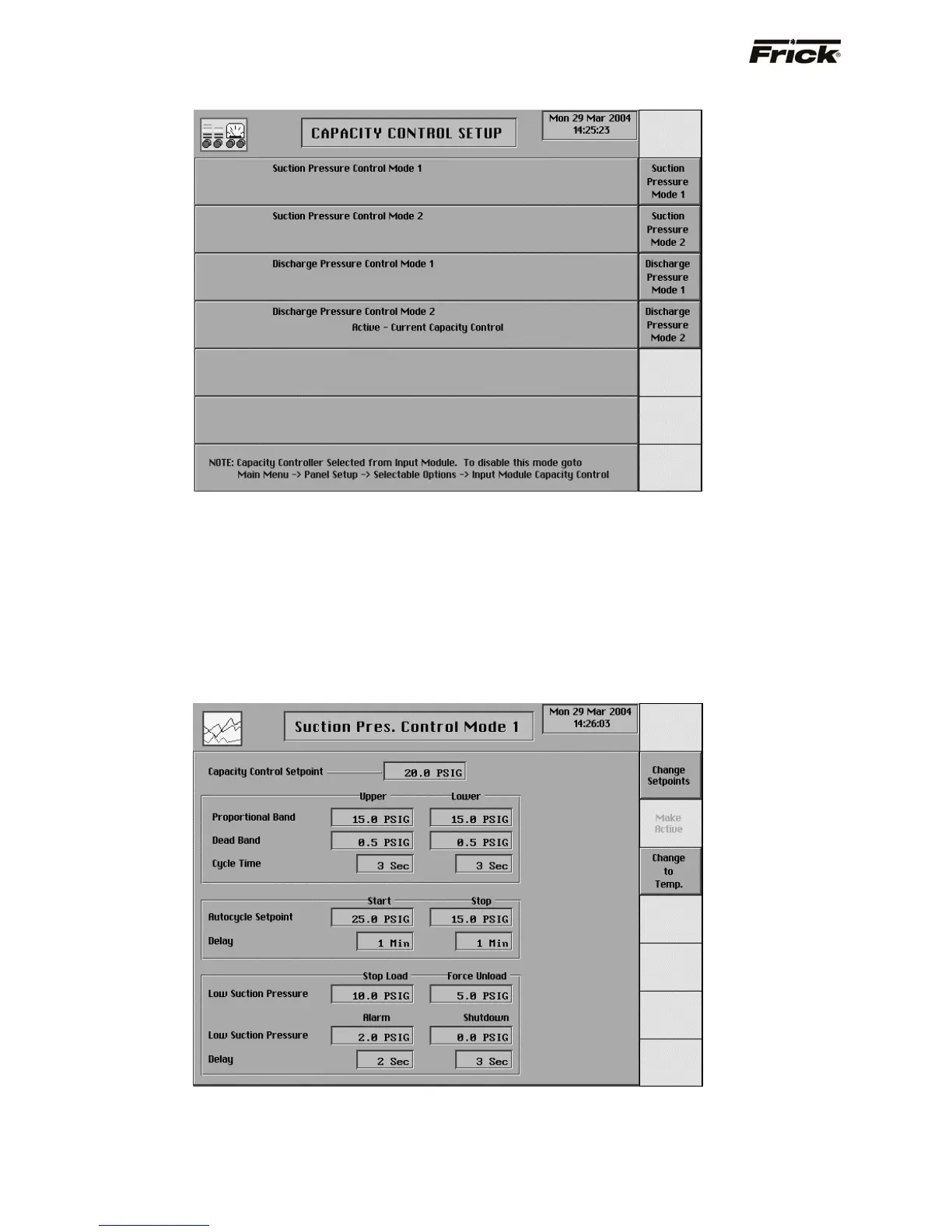
CAPACITY CONTROL SETPOINTS
The Capacity Control selections that were enabled in
Panel Setup, are shown. Only two types of Capacity
Controls can be enabled in Panel Setup. Each type of
Capacity Control has a Mode 1 and a Mode 2 setpoint
screen.
The following is a list of all the different Capacity Control
setpoint screens:
• Suction Pressure Mode 1
• Suction Pressure Mode 2
• Process Temperature Mode 1
• Process Temperature Mode 2
• Discharge Pressure Mode 1
• Discharge Pressure Mode 2
• User Selectable Control Mode 1
• User Selectable Control Mode 2
Following is an example of a Capacity Control setpoint
screen:
Suction Pressure Control
The following setpoints are required for each of the
Capacity Control setpoint screens:
Capacity Control - This setpoint is used to control
the loading and unloading of the compressor when
the Slide Valve Position is in the Automatic (AUTO)
mode.
The Proportional Band setpoint determines a range of
Capacity Control values where pulsed output is used.



 To Next Page