FRICK
QUANTUM™ COMPRESSOR CONTROL PANEL S90-010 O
OPERATION Page 7
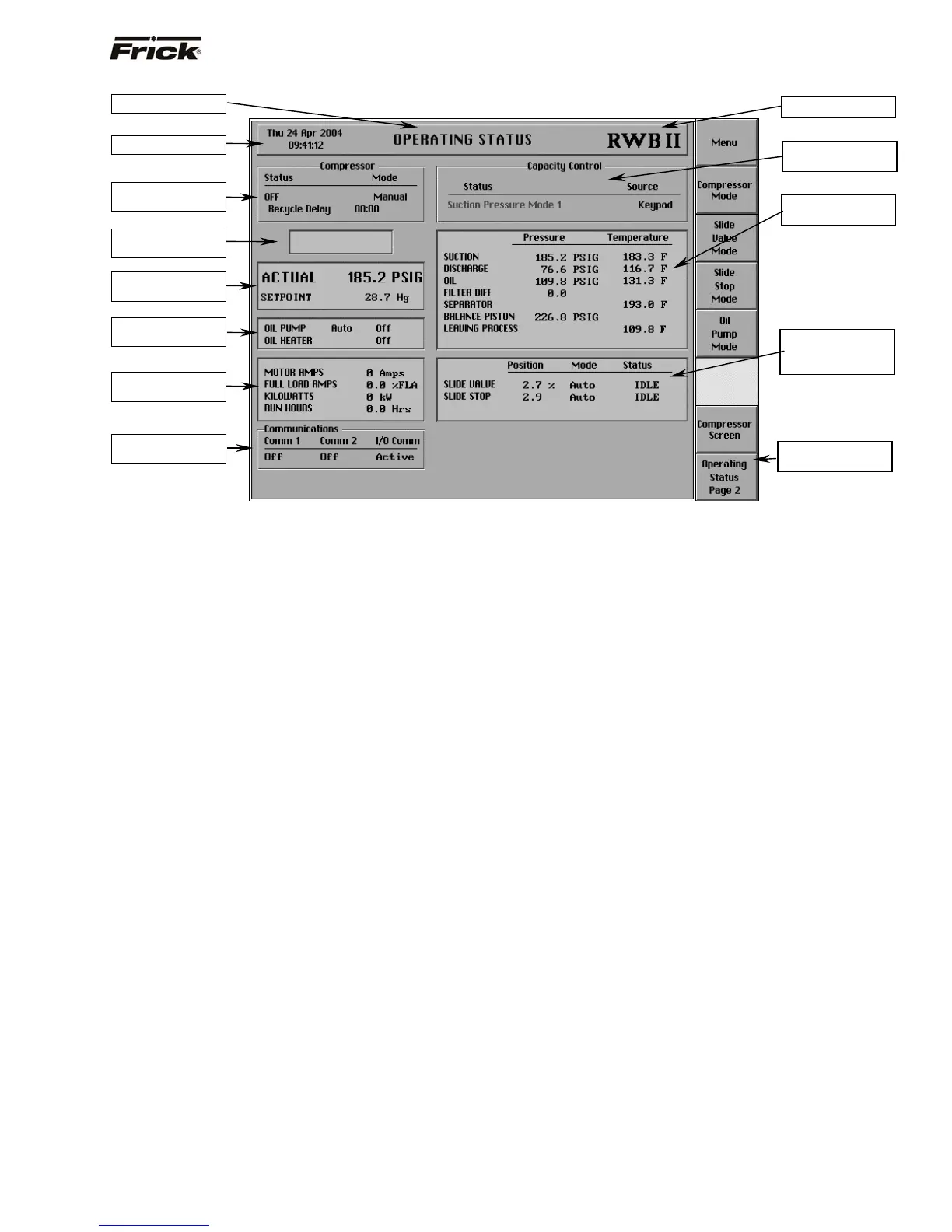
SCREEN DESCRIPTION - OPERATING STATUS
Also called the Home screen. The most important
information about the compressor unit and the subsystems
operation is displayed here. This screen is shown when
power is first turned on and when a key is pressed after
the screen saver has turned off the backlight. The
Operating Status screen is continuously updated and
provides a variety of information with regard to the current
condition and performance of the compressor unit and
subsystem.
The following information is shown on the left side of this
screen:
COMPRESSOR DATA BOX:
Shows the present operating status of the compressor
and from what source it has been initiated:
Status - One of the following messages is
shown:
• Off
• Starting
• Running
• Stopping 00:00
• Slide Valve Too High
• High Differential Pressure
• Permissive Started
Mode - One of the following messages is shown:
• Manual - A compressor manual start or
stop command was sent.
• Automatic - The compressor auto
command was sent. The compressor
starting and stopping is being controlled
from automatic cycling control setpoints
at the panel. The automatic cycling
control setpoints of the active capacity
control are used.
• Remote - The compressor remote
command was sent. The compressor
starting and stopping is through the
serial Com-2 channel. Note: If there is a
shutdown in response to a safety
setting, a compressor in Remote or
Automatic mode is placed into Manual
mode requiring operator intervention.
Recycle Delay - This message shows the
remaining time in minutes for Recycle Delay. If
the compressor has started and shuts down
within the recycle time delay setpoint period, the
Recycle Delay will prevent the compressor from
starting until the delay time expires. This time
delay is intended to prevent damage to the
compressor motor from successive restarts.
Note: The remaining recycle delay time can be
cleared from the Motor Control screen.
Pumpdown Delay - This message shows the
remaining time in minutes for Pumpdown delay. If
the compressor is in Pumpdown, the Pumpdown
Delay will prevent the compressor from stopping
until the delay time expires or the Suction
Pressure falls below the On when above
Pumpdown setpoint. This time delay is intended
to provide enough time to remove the refrigerant
gas.
Note: While in Pumpdown, the delay time and
the On when above setpoint can be overridden to
force the compressor to stop by pressing the
[Compressor Stop] screen command key again.
COMPRESSOR ALARM STATUS BOX:
The Alarm Status is displayed in the indented box
below the Compressor status box. The status box
is blank with no message if there are no alarms
or shutdowns present.
Screen Title
Date and Time
Compressor Status
Box
Compressor Alarm
Status Box
Process Actual and
Set
oint Values
Oil Lubricate Device
Status Box
Motor Indication
Status Box
Communications
Status Box
Compressor Model
Capacity Control
Box
Sensor Indication
Box
Slide Valve / Slide
Stop or Capacity
Status Box
Operator Selection
Keys



 To Next Page