S90-010 O FRICK
QUANTUM™ COMPRESSOR CONTROL PANEL
Page 70 OPERATION
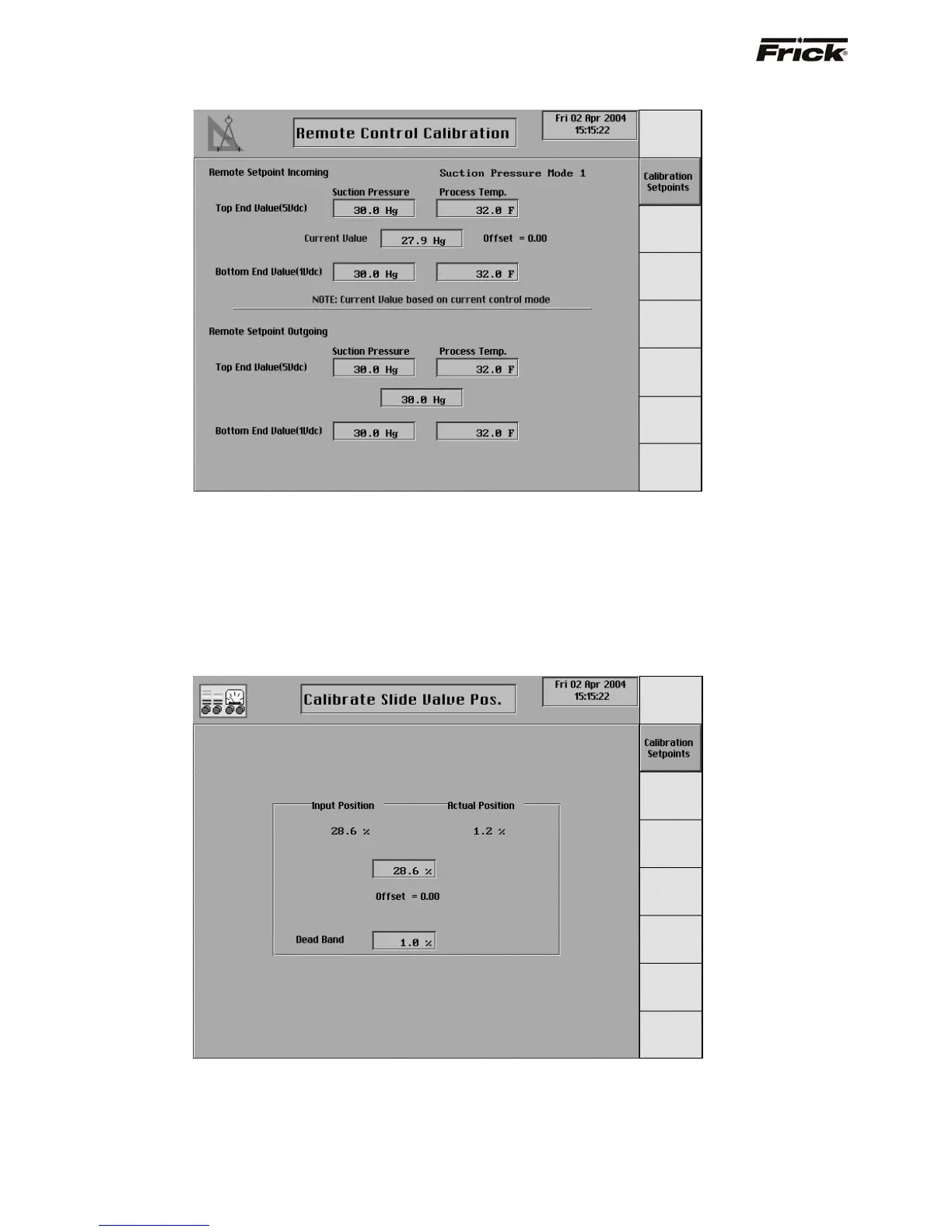
Remote Control Calibration
This screen will show if the Remote Control Setpoint was
enabled in Panel Setup. This screen is used to calibrate
the analog signal of the Remote Control Setpoint input and
the Remote Control Setpoint output. The Remote Setpoint
Incoming is used to calibrate the analog signal of the
Remote Control Setpoint input. Enabling [Remote
Setpoint] from the Selectable Options on the Panel
Setup screen, selects the Remote Setpoint Incoming as
the capacity control setpoint. The active Capacity Control
mode is shown because the current value is based on this
control value. The Remote Setpoint Outgoing is used to
calibrate the analog signal of the Remote Control Setpoint
output. The Remote Setpoint Outgoing is the
corresponding calibrated output signal of the current active
Capacity Control setpoint.
Calibrate Slide Valve Position
This screen will show if Slide Valve Position Control was
enabled in Panel Setup. This screen is used to calibrate
the analog signal of the Remote Slide Valve Position input.
Selecting [Remote Slide Valve] from the Slide Valve
mode screen command keys on the Operating Status
screen, selects a remote (4-20 ma) signal to control the
Slide Valve.



 To Next Page