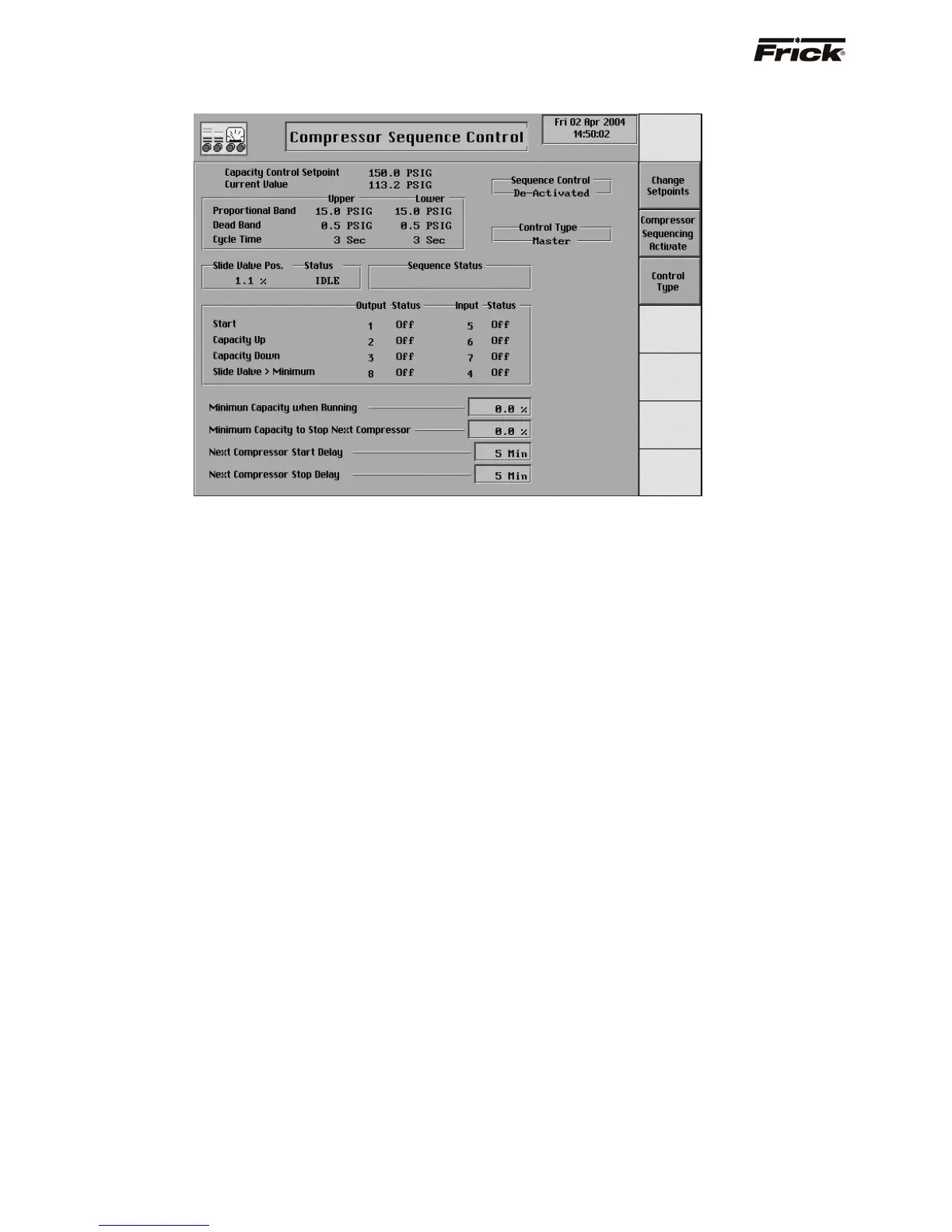
Compressor Sequence Control (MODE 2)
This screen is shown if the Compressor Sequencing Mode
2 option was selected in Panel Setup. This option is not
applicable for standard Frick products. It is only available
for Gram compressors. Compressor Sequencing setpoints
are based on the suction level that the compressors to be
sequenced are operating on. The compressors must be on
the same suction level because each suction level has its
own settings to maintain. The settings on this screen are
used to sequence the compressors when a compressor is
in the remote mode of operation and in remote Slide Valve
mode and not in shutdown. This sequence control is only
used for compressors with a variable Slide Valve. The
panels selected for compressor sequence control mode 2
must be connected via the proper hardware connection.
Compressor Sequence Status
The active capacity control setpoints and Capacity Control
reading are shown here for referencing.
The following data is displayed for this compressor:
Sequence Control:
• Activated - This compressor is being
controlled from the Compressor Sequencing
Mode 2 control logic.
• De-Activated - This compressor is not being
controlled from the Compressor Sequencing
Mode 2 control logic.
Control Type:
• Master - The panel is selected as the Master
for compressor sequencing control. The
Master is able to control one or more
subsequent Slaves.
• Slave - This panel is selected as a Slave for
compressor sequencing control. The Slaves
will be controlled by the setpoint of the
Master.
Slide Valve Pos. - The actual % reading of the Slide
Valve position.
Slide Valve Status - One of the following could be
shown:
• Load - Indicates the compressor is being
told to load.
• Unload - Indicates the compressor is being
told to unload.
• Idle - Indicates the compressor is neither
being told to load or unload.
Sequence Status - One of the following text strings
could be shown:
• Off in Remote Start
• Off in Manual Start
• Off in Autocycle Start
• Off in Recycle Delay
• Shutdown
• Running in Remote Start
• Running in Manual Start
• Running in Autocycle Start
• Not in Remote Start
• Slide Valve not in Remote
Output Status (Digital Board 2):
• Start (Output 1) - This output is energized to
signal the next panel to start the compressor.
This output is de-energized to signal the next
panel to stop the compressor.
S90-010 O FRICK QUANTUM™ COMPRESSOR CONTROL PANEL
Page 54 OPERATION



 To Next Page