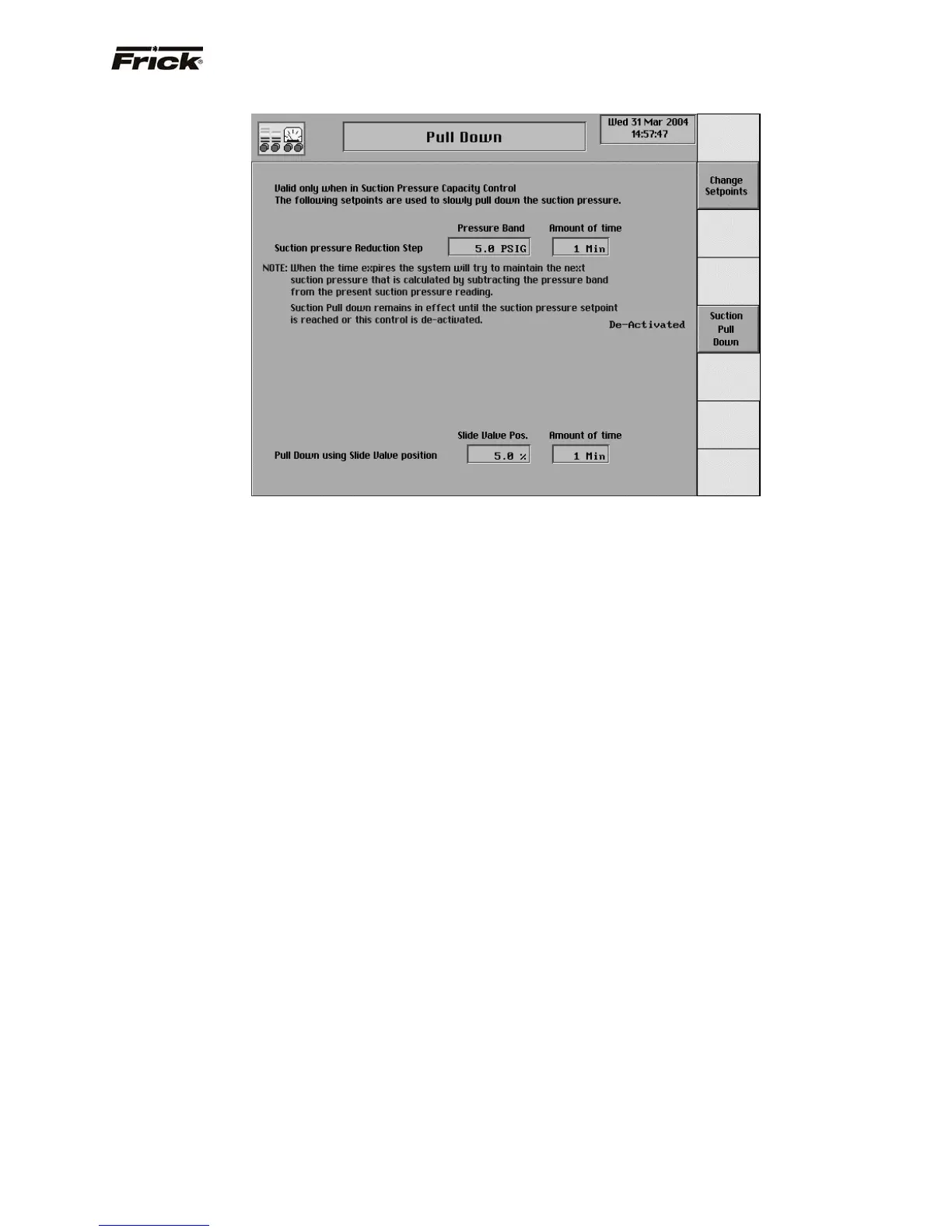
Pull Down
This screen is shown if the Pull Down option was selected
in Panel Setup. Pull Down is only valid when in Suction
Pressure Capacity Control. With this option enabled, the
Suction Pressure can be slowly lowered in steps from the
Starting Suction Pressure setpoint to the Suction Pressure
Capacity Control setpoint. Slowly walking the pressure
down prevents rapid drops in system pressure that causes
violent boiling of refrigerant in the system. When the
Suction Pull Down feature is activated and the compressor
is started, the Capacity Control setpoint is changed to the
current Suction Pressure. After the Amount of Time
setpoint has timed out the Capacity Control setpoint is
changed again. The Capacity Control setpoint is reduced
by the amount of the pressure band. The system steps
down to this setpoint and stays there until the time-out
period has again elapsed. Then the Capacity Control
setpoint is reduced again. The Capacity Control setpoint
changes regardless of whether the system is following it or
not. The Suction Pressure Pull Down feature is re-
activated every time the machine is started unless it is de-
activated.
This screen has the following setpoints:
Suction Pressure Reduction Step Pressure Band -
This is the amount of Suction Pressure that will be
used to step down the system. This value is
subtracted from the starting Suction Pressure to
provide a Capacity Control setpoint. The Capacity
Control setpoint continues to be calculated by
subtracting the pressure band from the previously
calculated Capacity Control setpoint until the Suction
Pressure reading reaches the operator entered
Capacity Control setpoint.
Suction pressure Reduction Step Amount of Time
– This is the time in minutes the Suction Pressure is
maintained at each step during Suction Pressure pull
down.
Pull Down using Slide Valve Position
• Slide Valve Position - The percentage of
travel that the Slide Valve is permitted to
load upon Compressor starting, and
thereafter determined by the Amount of Time
setpoint. For example, if this setpoint is 5%,
and the Amount of Time setpoint is 1 Minute,
then the Slide Valve will be permitted to load
5% of its stroke every minute, until such time
as the compressor has reached capacity. It
would take 20 minutes for the Slide Valve to
fully load to 100% at this rate. When the
Slide Valve is not moving, the following
message will be displayed on the Operating
Status screen Stop Load - Slide Valve
Pulldown: xx% where xx is the Slide Valve
Position percentage. Once capacity has
been achieved, this function is ignored, until
such time as the compressor is restarted.
• Amount of Time - The amount of time
between when the Slide Valve is permitted to
move. See Slide Valve Position description.
Note: It is recommended to use Suction Pull Down when
using Suction Pressure Mode 1 or 2, for best results, use
Slide Valve Pull Down.
FRICK
QUANTUM™ COMPRESSOR CONTROL PANEL S90-010 O
OPERATION Page 61



 To Next Page