S90-010 O FRICK
QUANTUM™ COMPRESSOR CONTROL PANEL
Page 68 OPERATION
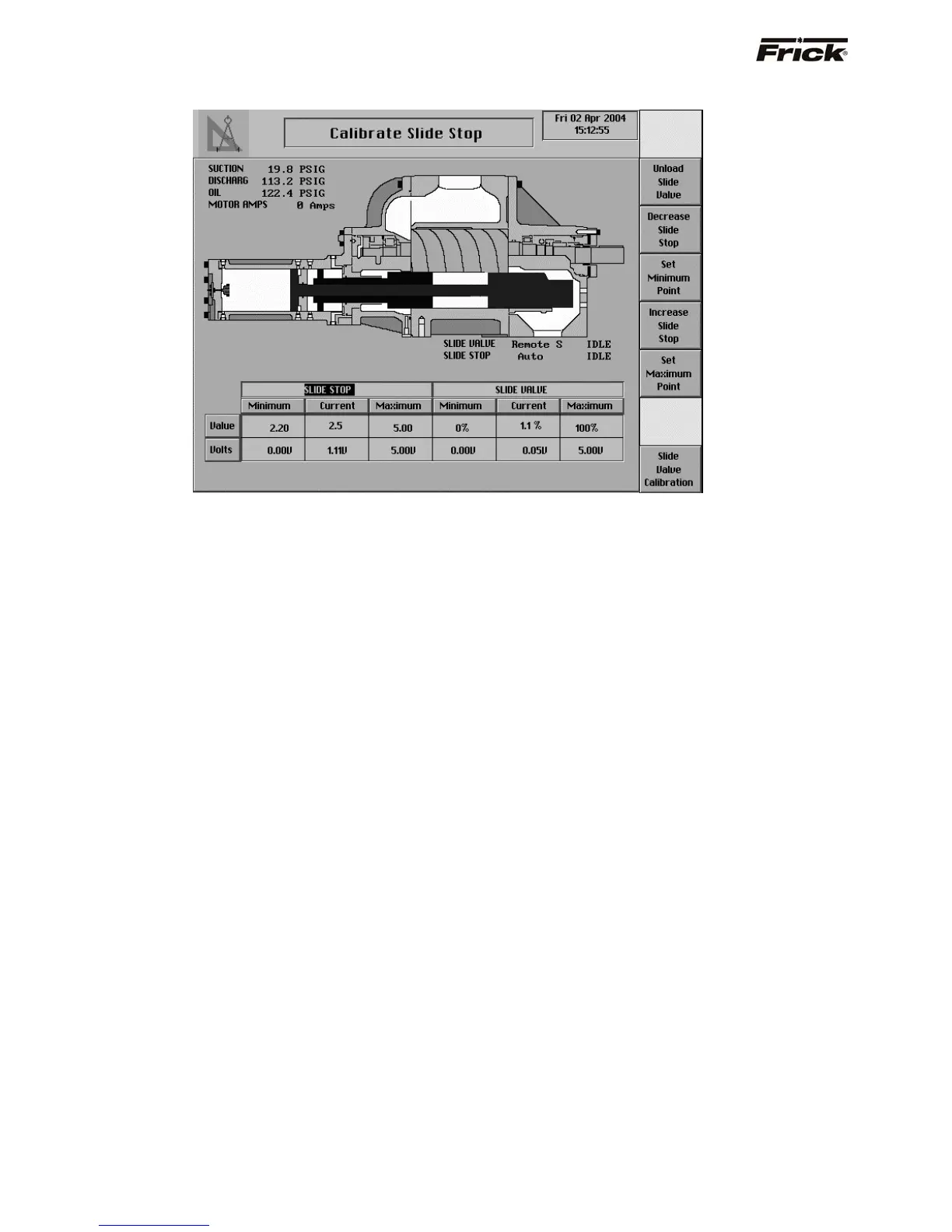
Calibrate Slide Stop
The Calibrate Slide Stop screen is shown if it applies to
the compressor model (Reference Compressor Model
Differences). It shows a pictorial representation of a Slide
Valve and Slide Stop. The Slide Valve and Slide Stop
status information, the Motor Amps reading, and the
Suction, Discharge, and Oil Pressure readings are shown
here for quick reference. The screen heading and the
high-lighted heading in the table, both depict what is
presently selected to be calibrated. The Slide Stop should
be calibrated prior to calibrating the Slide Valve.
Calibrating the Slide Stop requires setting the minimum
and maximum Slide Stop. The minimum Slide Stop value
represents the furthest most position the Slide Stop can be
decreased to. The maximum Slide Stop value represents
the furthest position the Slide Stop can be increased to.
The current reading is the reading that changes when
increasing or decreasing the Slide Stop. An invalid reading
is indicative of the need to calibrate. The volts reading
corresponds to the metered voltage that is measured
when the Slide Stop is at the displayed position. The
screen keys are positioned in the order they should be
used. (The RWB model 355 and 283 are exceptions to this
sequence order. With these the [Decrease Slide Stop]
should precede the [Unload Slide Valve]). The following
keys are provided:
[Unload Slide Valve] - The initial selection of this key
will cause the Slide Valve position to continuously
unload. Selecting this key again will stop the Slide
Valve at the current position. The Slide Valve position
should be unloaded until it does not interfere with
decreasing the Slide Stop.
[Decrease Slide Stop] - The initial selection of this
key will cause the Slide Stop to continuously
decrease. Selecting this key again will stop the Slide
Stop at the current position. To decrease the Slide
Stop to the minimum point, it is necessary that the
Slide Valve position be decreased until the Slide Stop
will no longer decrease.
[Set Minimum Point] - This key should be selected
when the Slide Stop is at the minimum position or
lowest voltage reading. The minimum Slide Stop
value of 2.2 will then be set as the current Slide Stop
value.
[Increase Slide Stop] - The initial selection of this
key will cause the Slide Stop to continuously increase.
Selecting this key again will stop the Slide Stop at the
current position.
[Set Maximum Point] - This key should be selected
when the Slide Stop is at the maximum position or
highest voltage reading. The maximum Slide Stop
value of 5.0 will then be set as the current Slide Stop
value.
[Slide Valve Calibration] - Shows the Slide Valve
calibration screen.



 To Next Page