190-01115-01 G3X™/G3X Touch™ Avionics Installation Manual
Rev. AV Page 30-17
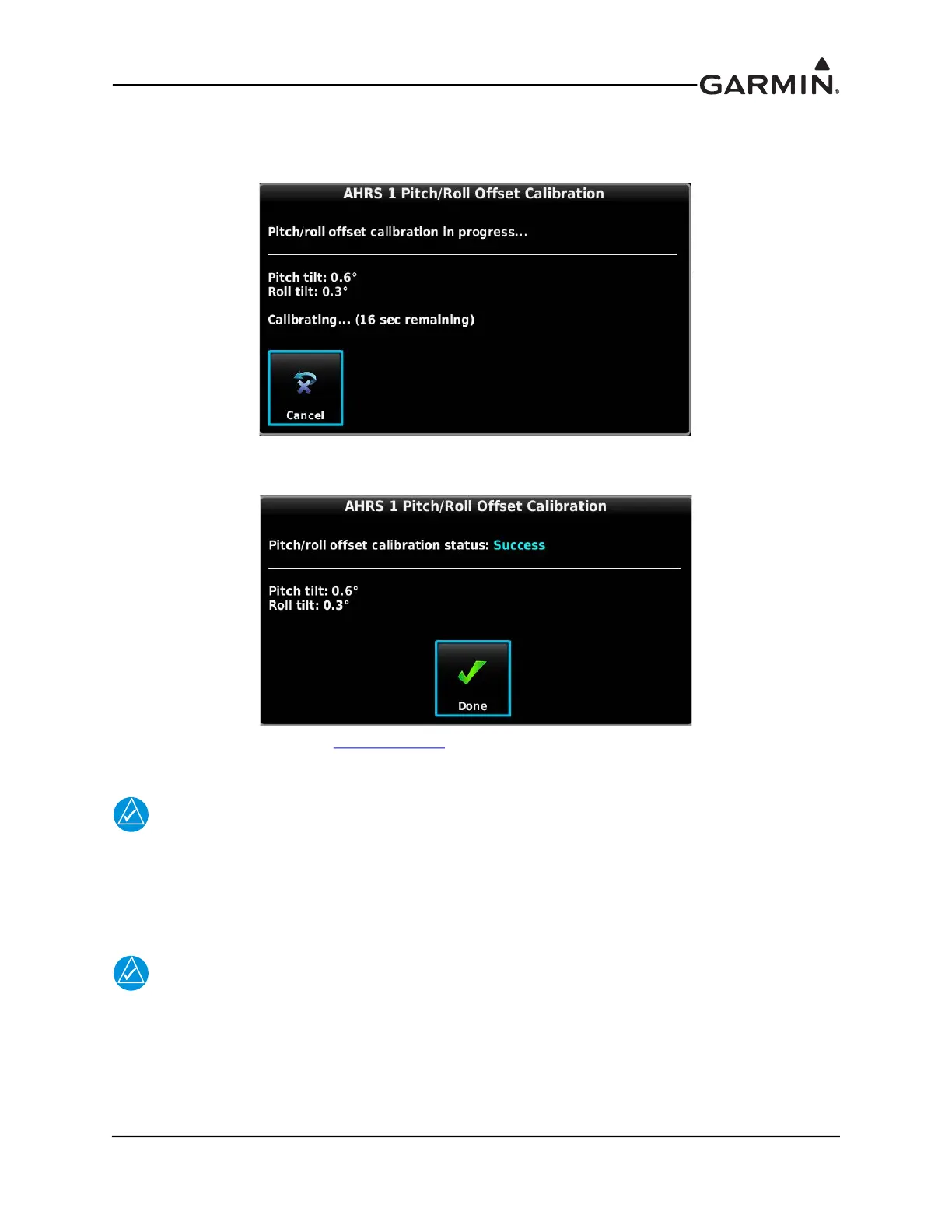
6. “Pitch/roll offset calibration in progress” appears on the display along with calibration
information. The GSU 25 pitch/roll offset procedure has a 30 second countdown timer that resets
if the aircraft moves. The GSU 73 pitch/roll offset procedure completes in a few seconds.
7. When the calibration has completed “Success” or “Failure” will be displayed, press the DONE
softkey to return to the ADAHRS Calibration screen.
The Magnetometer Calibration (Section 30.4.8.3
) must be completed after each pitch/roll offset
calibration.
NOTE
The pilot may adjust the displayed pitch attitude in normal mode by using the PFD Setup
page (see G3X Touch Pilot’s Guide,190-01754-00). The maximum amount of pitch display
adjustment available in Normal Mode is +/- 2.5°. This feature should not be used to
compensate for a non-conforming GSU 25/GSU 73 installation that does not meet the
requirements of Calibration Procedure Pitch/Roll Offset Compensation.
NOTE
If an additional ADAHRS is installed in the aircraft, or the mounting location of an
existing AHRS is changed, the pitch/roll offset compensation procedure must be performed
again for all installed AHRS units before moving the aircraft. This applies equally to all
AHRS units, including the GSU 25, GSU 73, and G5 backup display.



 To Next Page