190-01115-01 G3X™/G3X Touch™ Avionics Installation Manual
Rev. AV Page 30-216
30.4.32.26.1 GAP 26 Alert Configuration (-20 version of GAP 26 only)
If the discrete output (bare blue wire) from the control box is connected to one of the EIS discrete input
pins on the GEA 24 or GSU 73, the status of the GAP 26 heater can be displayed in one of three ways
(following), depending on user preference:
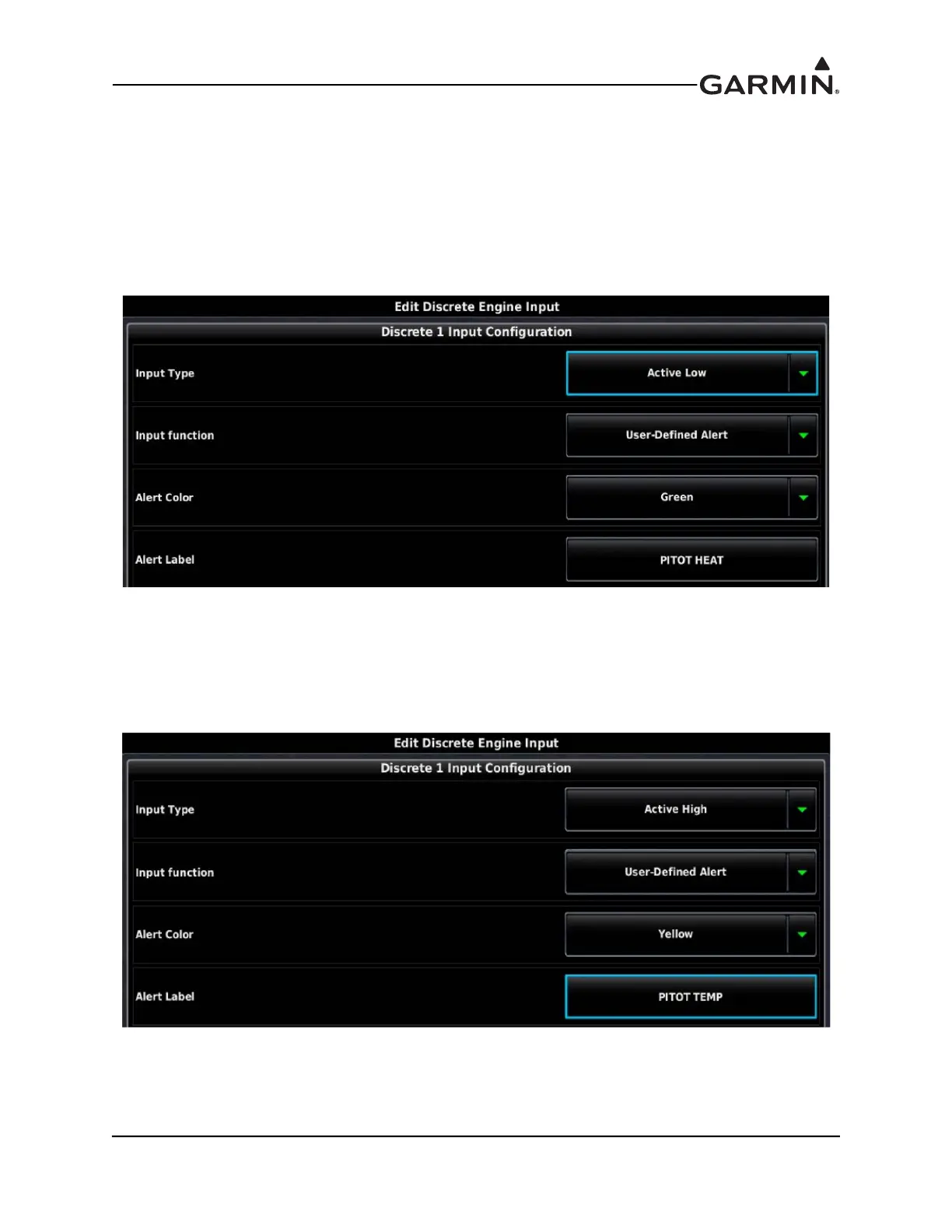
1. The discrete input configuration shown in Figure 30-63 will result in a green "PITOT HEAT"
indication that will appear on the PFD any time the GAP 26 heater is powered and the probe
temperature is above approximately 25° C (77° F). If pitot heat is powered off or inoperative, the
green "PITOT HEAT" indication will not appear.
Figure 30-63 GAP 26 Alert Configuration
2. The discrete input configuration shown in Figure 30-64 will result in a yellow "PITOT TEMP"
alert that will appear on the PFD any time the GAP 26 heater is powered off, or if it is powered on
but the probe temperature is below approximately 25° C (77° F). If pitot heat is powered and the
probe temperature is sufficiently high, the yellow "PITOT TEMP" alert will not appear.
Figure 30-64 Configuration #2



 To Next Page