190-01115-01 G3X™/G3X Touch™ Avionics Installation Manual
Rev. AV Page H-123
H.4.19.3.1 Common Configuration Options
Many of the items listed in the Engine/Airframe Input Configuration section of the Engine Configuration
Page have the same (or similar) configuration options, this section describes those similar configuration
options.
Gauge Configuration – Nearly all of the configuration options (except Discrete 1– 4, Engine Time, &
Total Time) have a Gauge Marking and a Gauge Display Range section. These gauge options are uniform
for all applicable items and are described below.
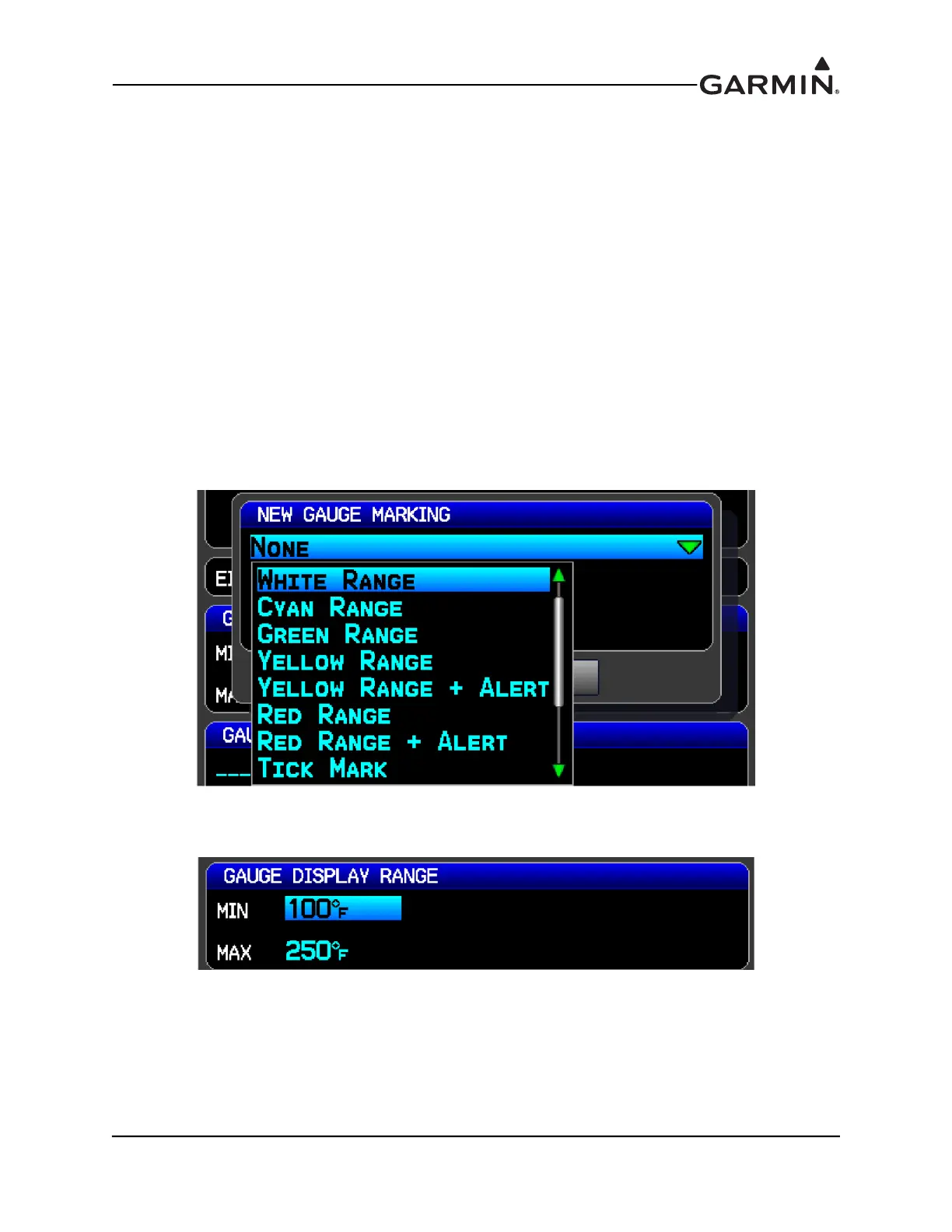
Gauge Markings – Used to select the desired color displayed on the applicable gauge. The Yellow Range
+ Alert and Red Range + Alert settings will issue a CAS (Crew Alerting System) on-screen alert anytime
the value is within that range. The Red Range + Alert settings will issue a CAS audible and on-screen alert
anytime the value is within that range. The following are the available gauge marking options:
White Range Cyan Range Green Range
Yellow Range Yellow Range +Alert Red Range
Red Range + Alert Tick Mark Cyan Line
Green Line Yellow Line Red Line
Gauge Display Range – The Gauge Display Range allows for setting the minimum and maximum values
of each gauge.


 To Next Page