Two persons are required to hold the fan up to avoid fan dropping.
Step 6 (Applicable only to the NetCol8000-A045/A090) Remove the cover from the fan
connection box using a security torx hex key.
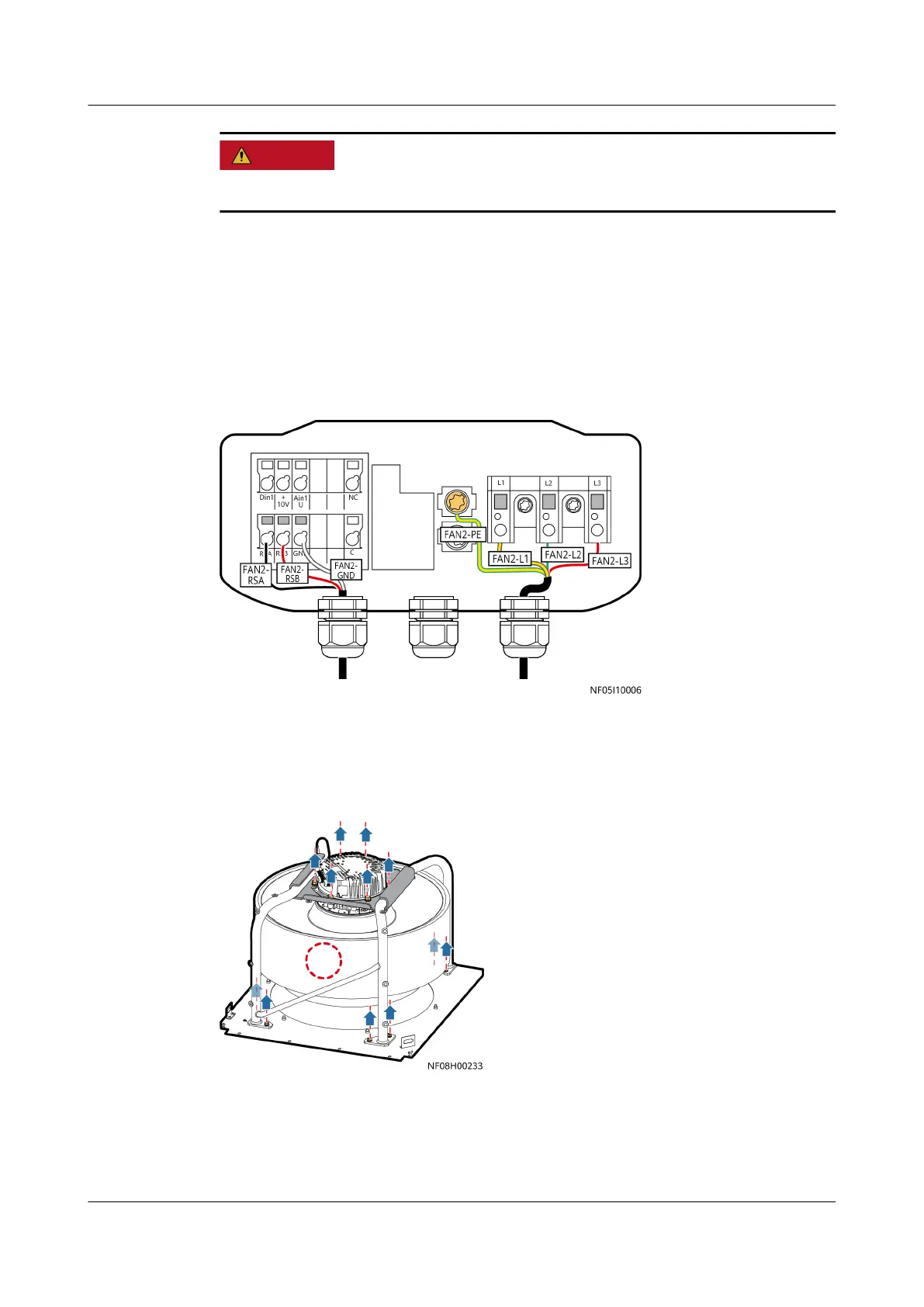
Step 7 (Applicable only to NetCol8000-A045/A090) Open the fan connection box. Hold
the area marked by gray in the following gure using a small-sized at-head
screwdriver, remove the signal cable and power cable shown in the following
gure, and then remove the screw in the area marked by yellow (the PE cable)
using a
at-head screwdriver.
Figure 11-21 Cable connections
Step 8 Remove the six screws that secure the top of the fan support to the fan, and
remove the eight screws that secure the bottom of the fan support to the fan
base.
Figure 11-22 Removing a fan
Step 9 Reinstall the fan and connect the cable.
Step 10 Turn on the general switch and fan switch. The display module lights up. Choose
Alarms > Query Act. Alarms and tap Indoor fan 2 communication failure (used
as an example) to display the Details screen.
NetCol8000-A(045, 055, 060, 090, 120) In-room Air
Cooled Smart Cooling Product
User Manual 11 Parts Replacement
Issue 05 (2020-10-10) Copyright © Huawei Technologies Co., Ltd. 279







 To Next Page