WSB-9152 PICMG 1.0 SBC
Page 91
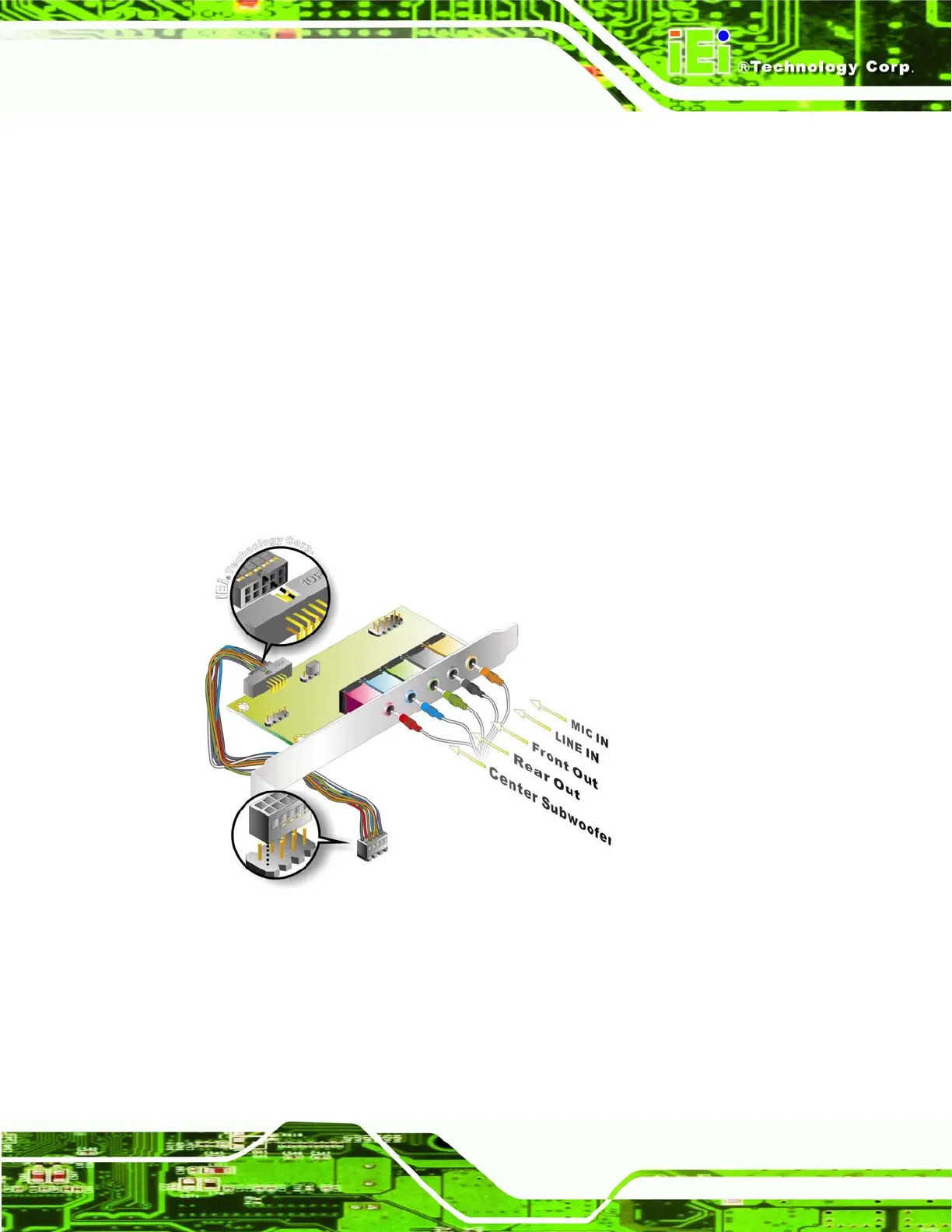
a microphone. The remaining four audio jacks, Line-In, Front-Out, Rear-Out, and Center
Subwoofer, connect to speakers. To install the audio kit, please refer to the steps below:
Step 1: Connect the audio kit cable. The audio kit is shipped with a cable that
connects the audio kit to the WSB-9152. Connect the cable to the connector on
the back of the audio kit. Make sure the pins are properly aligned (i.e. pin 1
connects to pin 1).
Step 2: Locate the audio connector. The location of the 10-pin audio connector is
shown in Chapter 3.
Step 3: Align pin 1. Align pin 1 on the onboard connector with pin 1 on the audio kit
cable connector. Pin 1 on the audio kit cable connector is indicated with a white
dot. See
Figure 5-13.
Figure 5-14: 7.1 Channel Audio Kit
Step 4: Mount the audio kit onto the chassis. Once the audio kit is connected to the
WSB-9152, secure the audio kit bracket to the system chassis.
Step 5: Connect the audio devices. Connect one speaker to the line-in audio jack, one
speaker to the line-out audio jack and a microphone to the mic-in audio jack.



 To Next Page