6 - USE AND OPERATION Master 80 UP HyperFlexible
EN
6 - Pag. 5 / 5
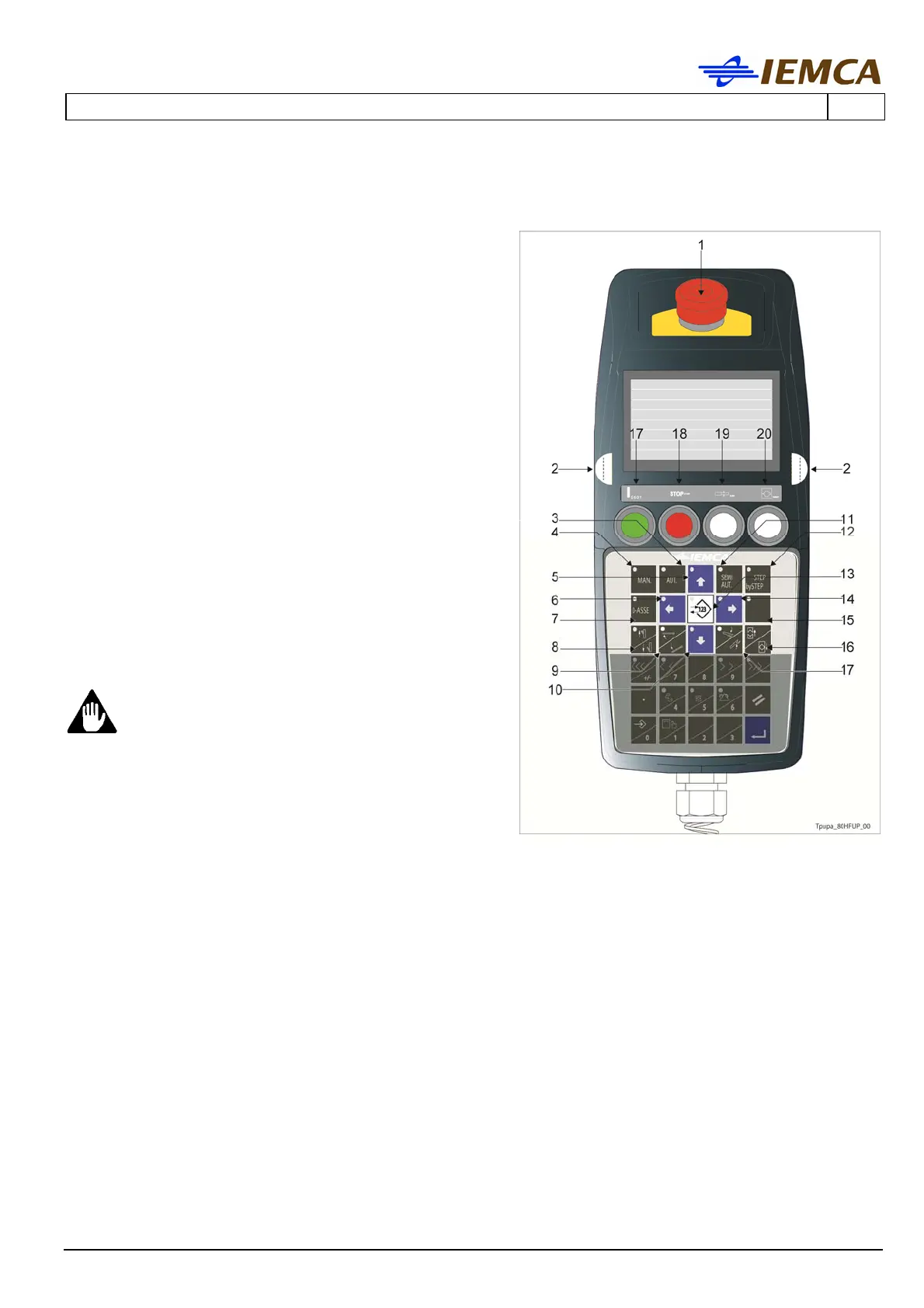
6.2 KEYBOARD CONTROL DESCRIPTION
1 It stops the bar feeder: manually release the
push-button in order to restart.
2 Start buttons: opposite buttons enabling the
keys for some functions. Press both buttons and
simultaneously the button corresponding to the
desired function.
3 Selects the automatic mode.
4 Selects the manual mode.
5 Multifunction
- Allows scrolling the page upwards.
- Moves the selection cursor upwards.
- Increases by one the value set in the date
and time programming mode.
6 Multifunction
- Selects the previous parameter.
- Moves the selection cursor leftwards.
7 It resets the "BAR FEEDER ZERO SETTING" of
the carriage.
Hold down both start buttons and then the
key; release both buttons and the key when
the carriage starts moving towards the "BAR
FEEDER ZERO SETTING" position.
WARNING - CAUTION:
List of causes that require to carry out
the 0-Axis in manual mode.
Carrying out the manual 0-Axis
periodically is recommended.
If the bar pusher axis is moved by means
of the crank with the bar feeder powered
off (no power supply).
If the feeding chain is tightened (by means of the mechanical chain tightener,
see Operation and Maintenance Manual, "Feeding chain - Adjustment").
8 Bar elevator upstroke/downstroke (LED on when the elevators are in their high position).
9 Lifts/lowers the remnant dropping chute (LED on with chute in "up" position).
10 Multifunction
- Allows scrolling the page downwards.
- Moves the selection cursor downwards.
- Decreases by one the value set in the date and time programming mode.
11 Selects the semiautomatic mode.
Press the button to select a mode and press again to deselect it.
12 Activates the "step by step" operating cycle: every time the button is pressed, one step is
performed.






 To Next Page