INSTALLATION and CONNECTION
3
41
UHK-430/CCU-430 1710 VER2 (E)
3.3 Connecting the CCU and Camera Head
■
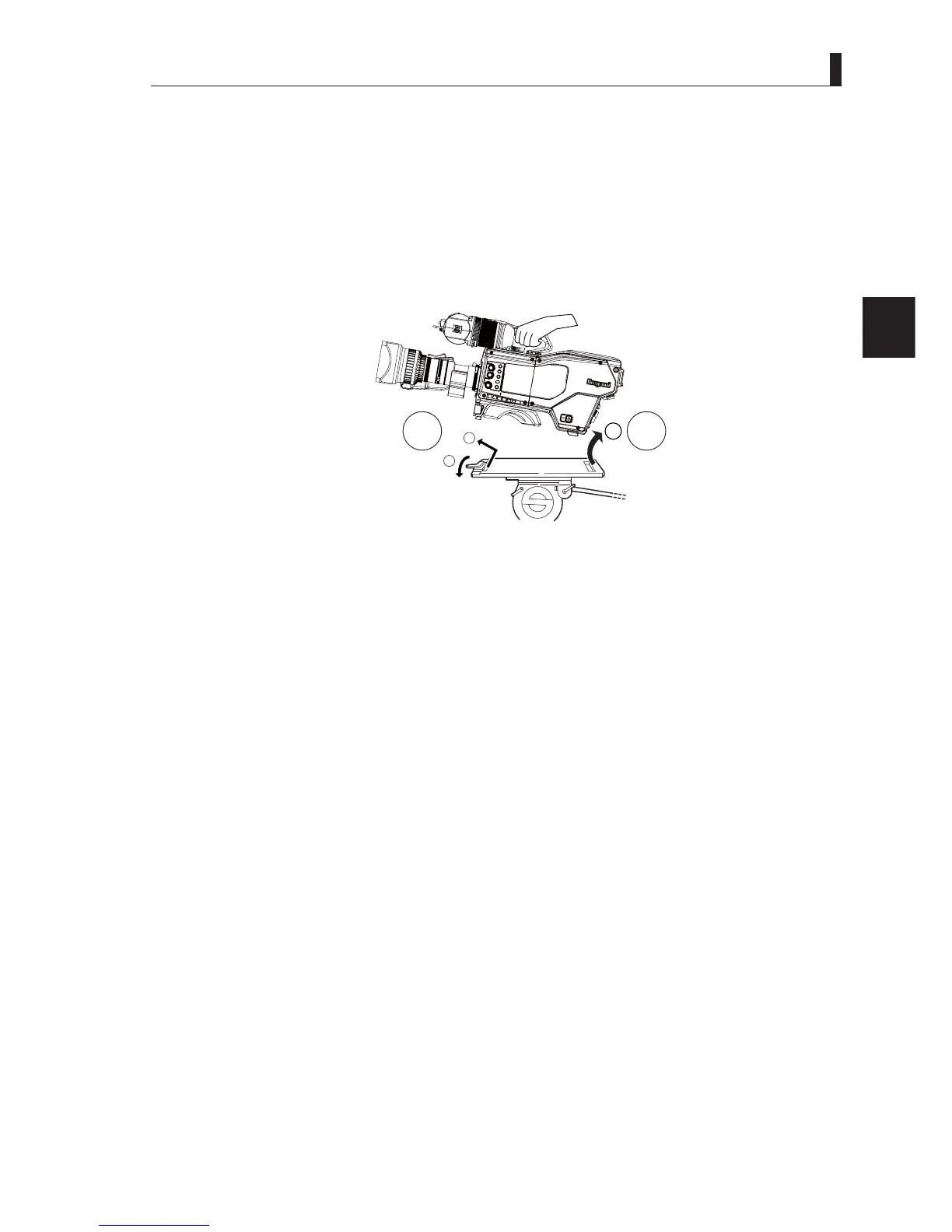
Dismounting the Camera from the Tripod
This section explains how to dismount the camera from a tripod.
1 Press the red button on the lock lever to release the lock.
Be sure to hold the camera handle when dismounting so that the camera does not fall.
2 Slightly lift the front part of the camera and push it forward to remove the rear edge. Then, lift the camera to
dismount from the tripod.
CC
U
OF
F
E
X
T
P
OWE
R
F
IL
T
E
R
H
EA
D
F
2
F
1
M
I
C
I
N
CO
M
/
ND
P
GM
/C
C
ME
NU
V
F
CH
AR
OK
X
!
Mount plate
Camera right view
1
2
Caution:
If you try to pull the camera towards the back without removing the rear edge, the camera wedge or tripod plate may be
GDPDJHG7RGLVPRXQWWKHFDPHUDEHVXUHWRUHOHDVHWKHORFNOHYHU¿UVWDQGSXVKWKHIURQWSDUWRIWKHFDPHUDIRUZDUGWR
remove the rear wedge, and then lift the camera to dismount (2)
.



 To Next Page