4 - 75
<Step 3>
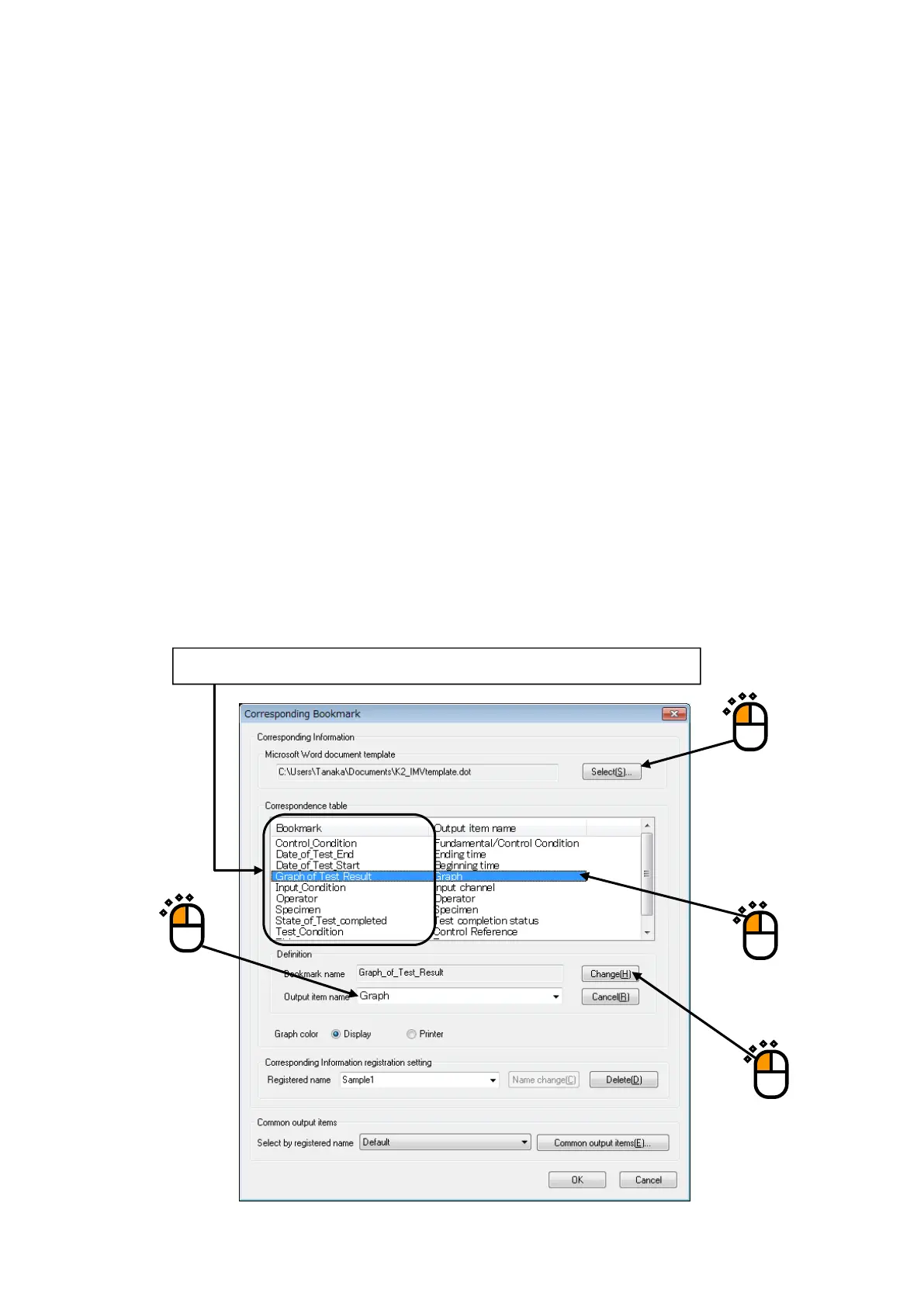
Press [Select] to specify a Template file of Microsoft® Word to be used (①).
(The Template file to be used is needed to be made beforehand.)
When the Template file is selected, Bookmarks set in the Template file are listed in
‘Correspondence Table’.
Next, the Output Item is to be made correspondence with Bookmarks.
Select a Bookmark name to be set among the list of ‘Correspondence Table’ (②). And specify an
Output Item from the list of ‘Output Item name’ (③). Press the [Change] button in Correspondence
Definition(④).
Available Output Items vary in each applications as SINE/RANDOM.
<Graph Data>
The graphs displayed at generating reports are treated as the objective for ‘Graph’ among Output
Items. When other graph data (‘Operation’, ‘Response’, etc.) is specified as output item, the graph
data is outputted to the bookmark automatically even if the data is not displayed as a graph.
The setting of color and lines of the graph are selected from the items specified by “Option” →
“Graph color setting”.
①
②
④
③
When the Template file is selected, the Bookmarks set to the Template are listed.



 To Next Page