4 - 73
4.9.3 Report Generator (Auto-generating function of the testing result report)
The function of Report Generator is for generating a report of testing result automatically when
the test operation is completed.
Usually, it has a lot of trouble in generating the report of testing result for attaching the graphs
and adding the description of test information. However, to use the function of Report Generator,
the operator may be saved dramatically from the trouble in generating reports and the efficient
operation can be realized.
In the K2, the information that is the definition contents, the testing results and the graphs can be
used by linking with Bookmarks of Microsoft® Word. The numeral values, the letters and the
graphs specified as Bookmarks can be attached to the report automatically when these Bookmarks
are described in Template files of Microsoft® Word.
The forms of testing result reports used frequently are recommended to be saved in a Template
file of. So that the same forms of testing result reports can easily be made by one-click. Forms of
testing result reports can be customized for the operator depending on his purpose by using
Microsoft® Word.
Microsoft® Word is required to use this function.
Note) This function supports only for Microsoft® Word 2010, Microsoft® Word 2013 ,
Microsoft® Word 2016 and Microsoft® Word 2019.
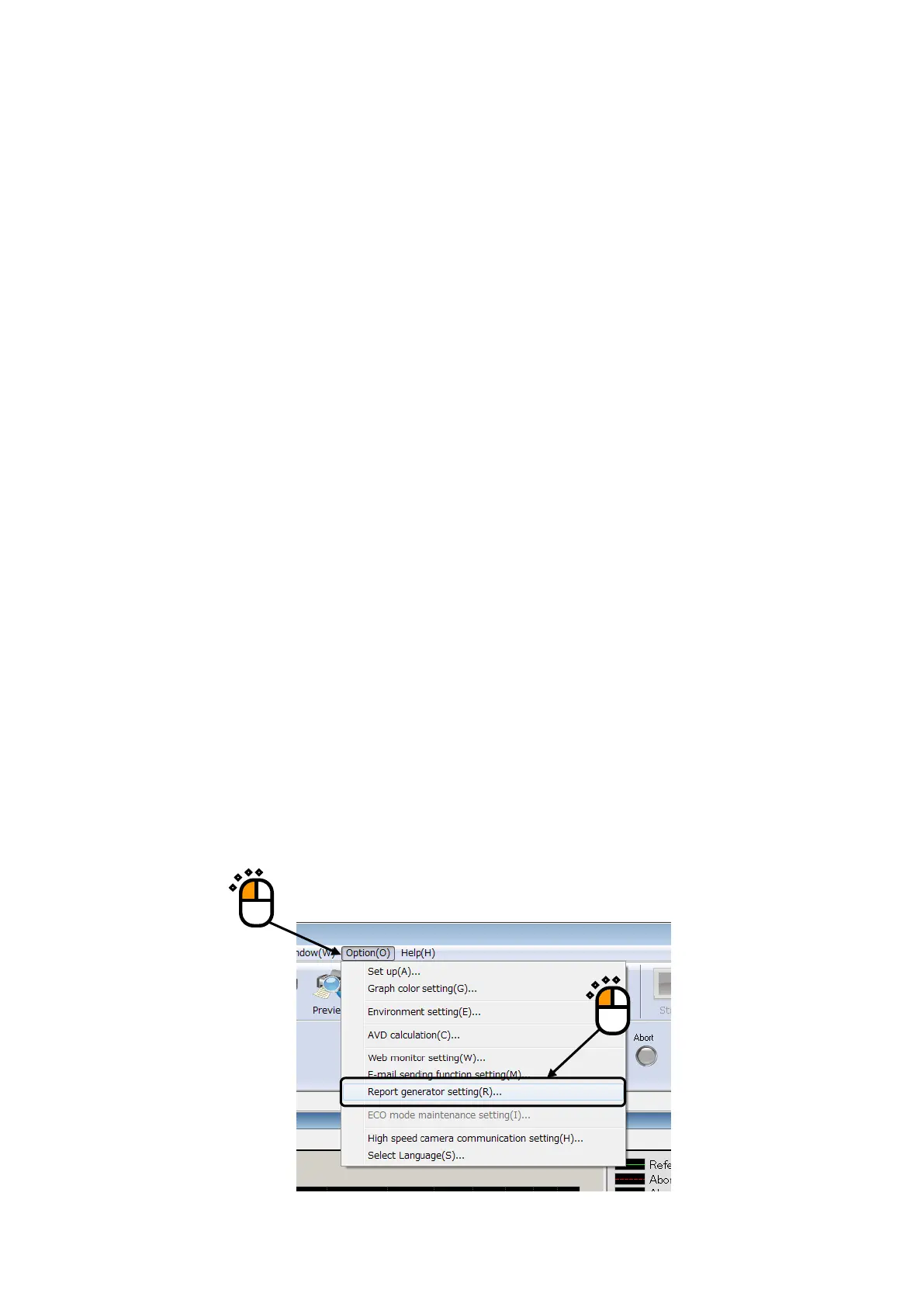
<Procedure (to set Report Generator)>
<Step 1>
Select “Option” from the Menu Bar. And, click “Report Generator setting”.
①



 To Next Page