–
113
–
No. Item
Setting range
Edit unit
Initial display
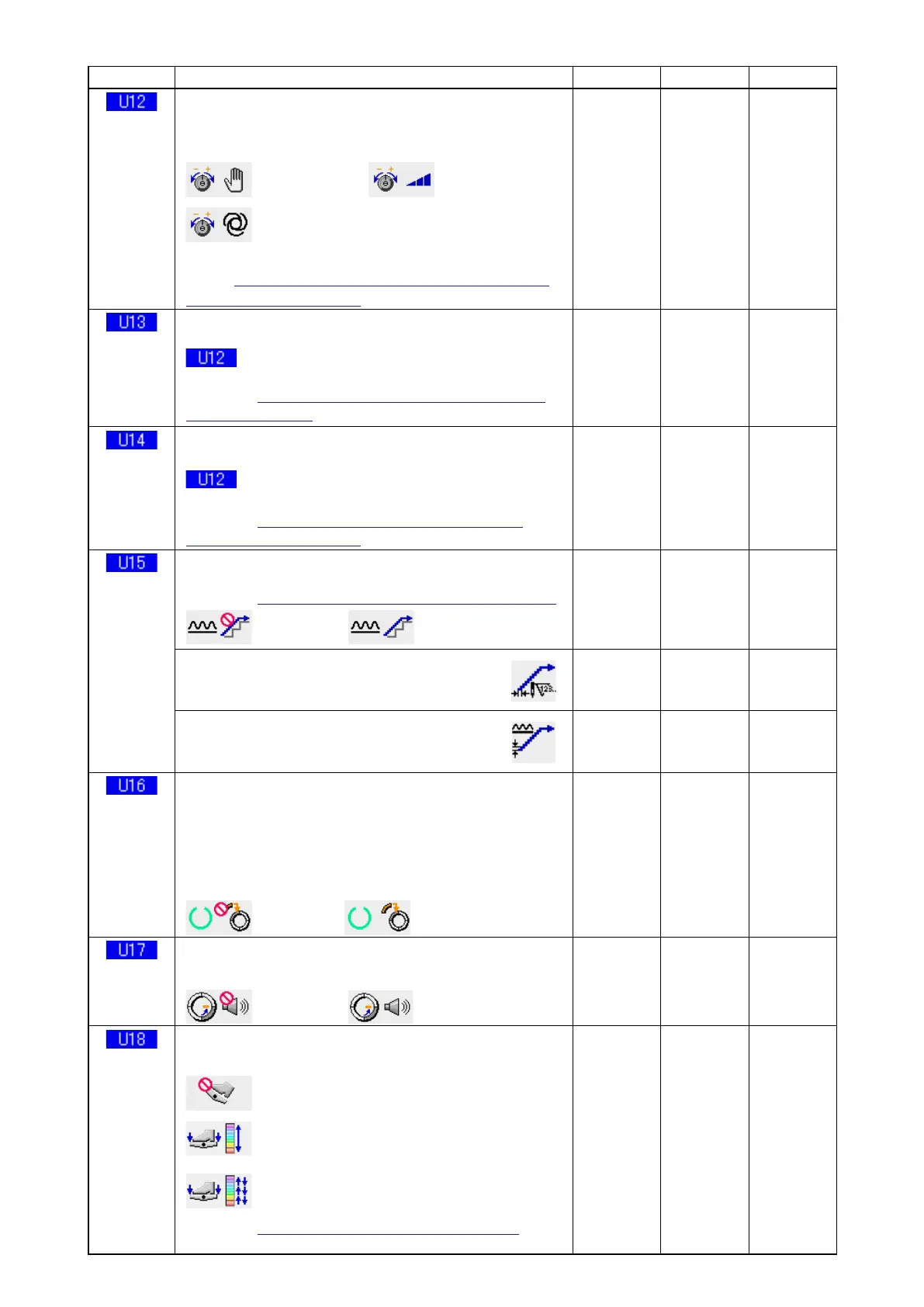
Compensation tension mode selection
Select from among manual (numerical value), manual (level)
and automatic.
: Numerical value : Level
: Automatic
For setting procedure of the manual (numerical value),
refer to
"14-3 (1) Explanation of compensation tension
manual (numerical value)"
.
– – – – – – Manual
numerical
value)
Compensation tension manual (level) setting
This item is displayed when "manual (level)" is selected in
Compensation tension mode selection. Compensa-
tion tension value for each level is set.
/
Refer to
"14-3 (2) Explanation of compensation ten-
sion manual (level)
.
– 200 to
200
1 Level 1)
10
Level 2)
20
Level 3)
30
Compensation tension automatic setting
This item is displayed when "automatic" is selected in
Compensation tension mode selection. Compensa-
tion tension value for each shirring amount range is set.
/
Refer to
"14-3 (3) Explanation of compensation
thread tension automatic"
.
Shirring
amount
– 4 to 35
Compensation
tension value
– 200 to 200
– – – – – –
Shirring smoothing function setting
Use of shirring smoothing function is selected.
/
Refer to
"14-4 Explanation of the shirring smoothing function"
.
: Unused : Use
– – – – – – Unused
Number of stitches of shirring smoothing function setting
Number of stitches of shirring
smoothing function is set.
1 to 20 1 stitch 1 stitch
Shirring smoothing function shirring amount setting
Shirring amount of shirring smoothing function
is set.
1 to 35 1 1
Data storing function at the time of sewing
Whether storing data or not when data is changed in the
sewing screen is selected.
*
By setting, storing/no storing of partial shirring amount,
compensating partial shirring amount, or stop detailed
information is changed over.
: No storing : Storing
– – – – – – Storing
Sound output at the time of changeover of step selection
Whether buzzer sounds or not when step is changed over is selected.
: No sound : Sound
– – – – – – No sound
Auxiliary pedal use selection
Use of auxiliary pedal is selected.
– – – – – – Use
2
: Unused
: Use
1
Shirring amount changes according to
the depressing amount of auxiliary pedal.
: Use
2
Shirring amount increases by +1 by depressing the
front part of auxiliary pedal and decreases by -1 by
depressing the back part of auxiliary pedal.
/
Refer to
"10-1 Changing the detailed set value"
for the
manual mode.



 To Next Page