–
147
–
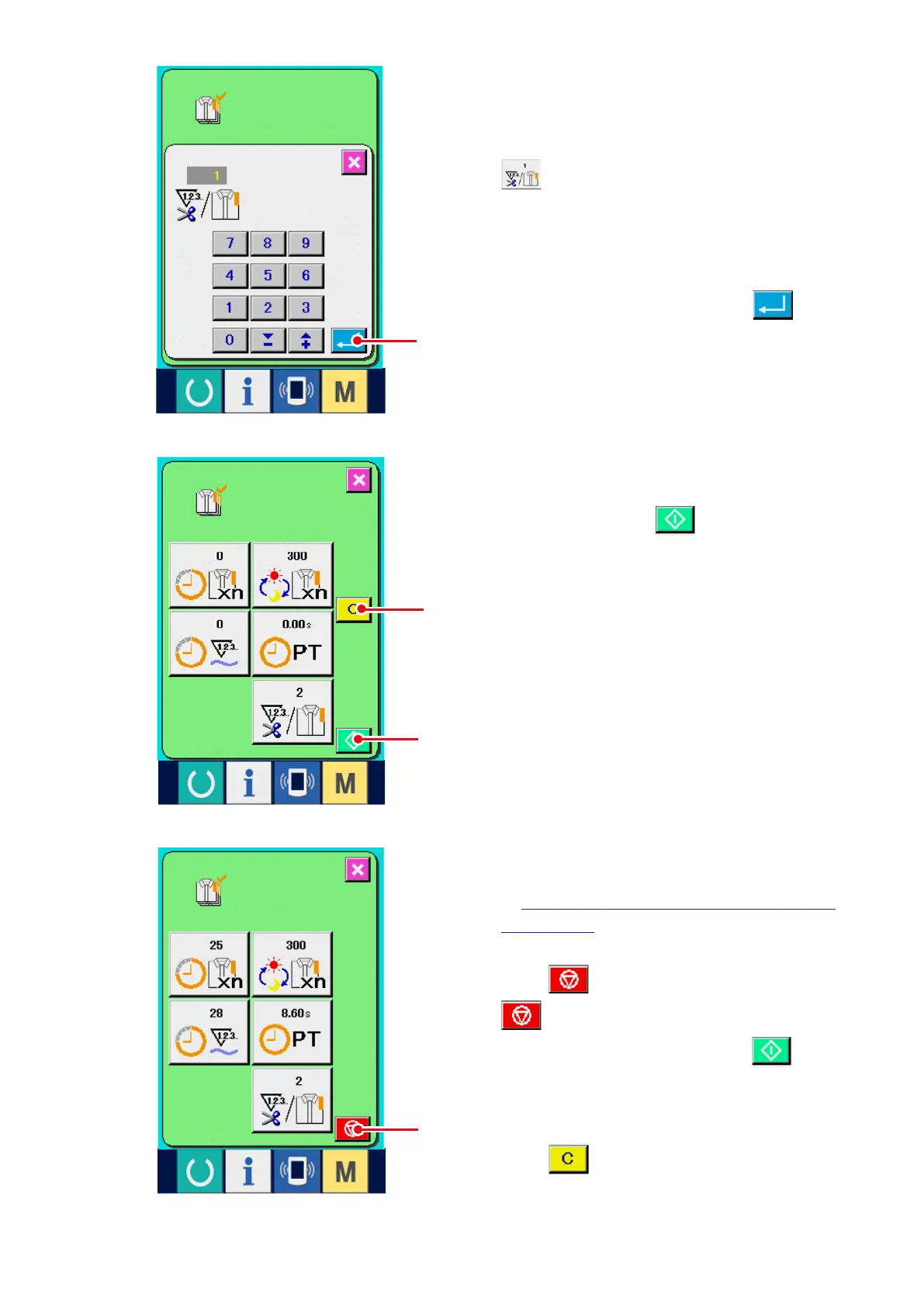
4) Input the number of times of thread trimming.
Next, input the number of times of thread
trimming per process.
When number of times of thread trimming button
5
in the previous page is pressed, the
number of times of thread trimming input screen
is displayed.
Input the value you desire with ten keys or UP/
DOWN buttons.
After the input, press ENTER button
6
.
* When the input value is "0", count of the
number of times of thread trimming is not
performed. Use this function by connecting
the external switch.
6) Stop the count.
Display the production control screen referring
to
"17-4 Observing the production control
information"
.
When the count is being performed, STOP
switch
8
is displayed. When STOP button
8
is pressed, the count is stopped.
Aft e r the s top, S TART bu t t on
7
is
displayed at the position of STOP button. When
continuing the count, press START button again.
The counted value is not cleared until CLEAR
button
9
is pressed.
7
6
8
9
5) Start the count of number of pieces of
production.
When START button
7
is pressed, the
count of number of pieces of production is
started.



 To Next Page