10 Creating your own styles | 121
Step by step:
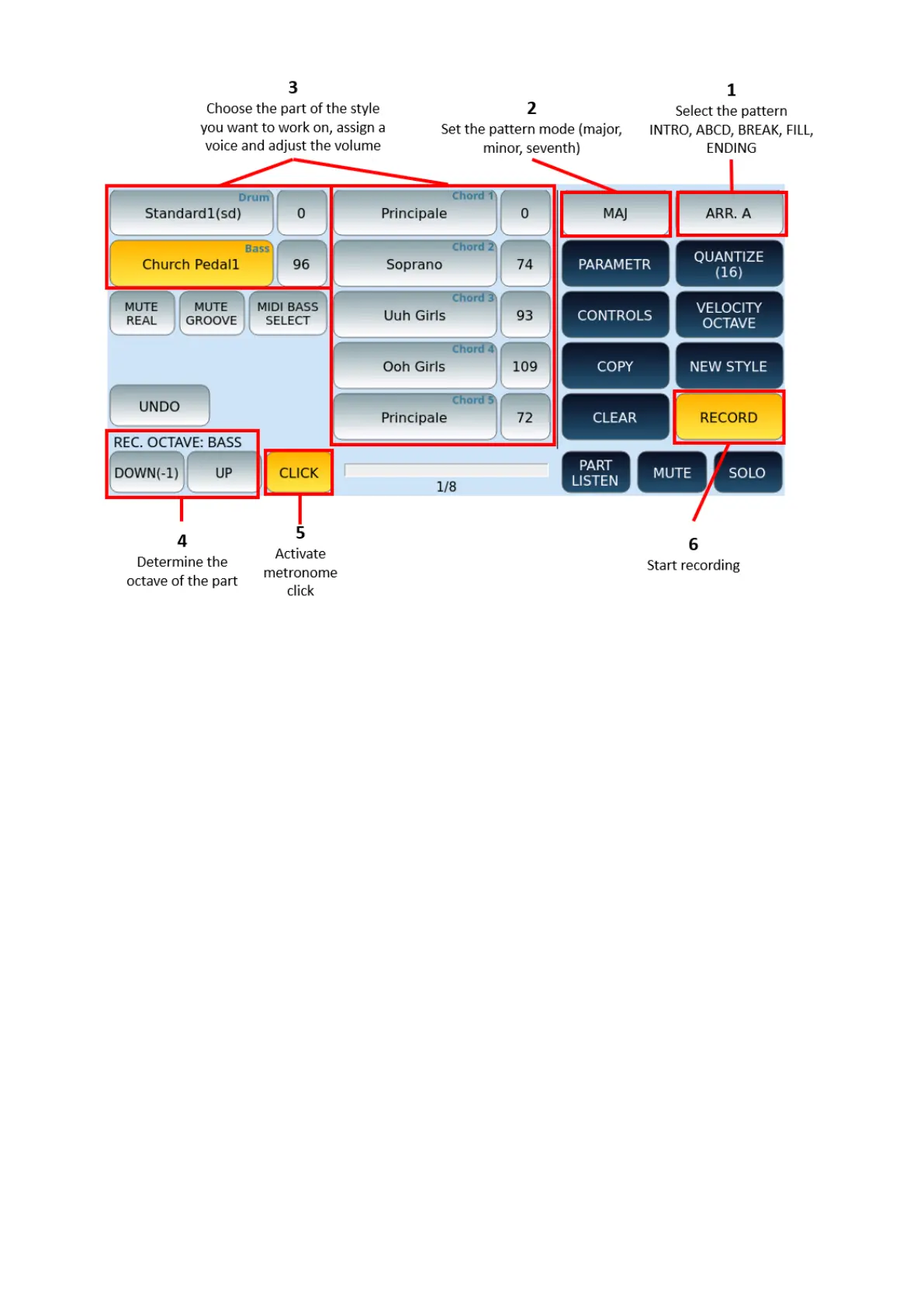
1. Select the pattern of the style you want to record on (INTRO1, 2, 3, ABCD, BREAK,
ENDING 1, 2, 3)
2. Excluding the percussive parts, you must set the way (major, minor, seventh) with
which you will play the part to be recorded.
3. Choose the style part (DRUM, BASS, CHORD 1-5).
o Press and hold the corresponding button to open the VOICE selection page
to assign to the part.
o Adjust the volume using the button next to it and the data knob.
4. Touch buttons on the DOWN/UP screen to adjust the octave of recording.
5. Activate metronome click or not.
6. Make sure the RECORD icon is active and press the START button on the panel to
record.
7. The style section is reproduced: everything you play with your hands on the
keyboard is recorded.
8. When you finish recording, press START again to stop.



 To Next Page