Konica Minolta 240f 4-49
4.5 Internet fax transmission (Internet fax)
4
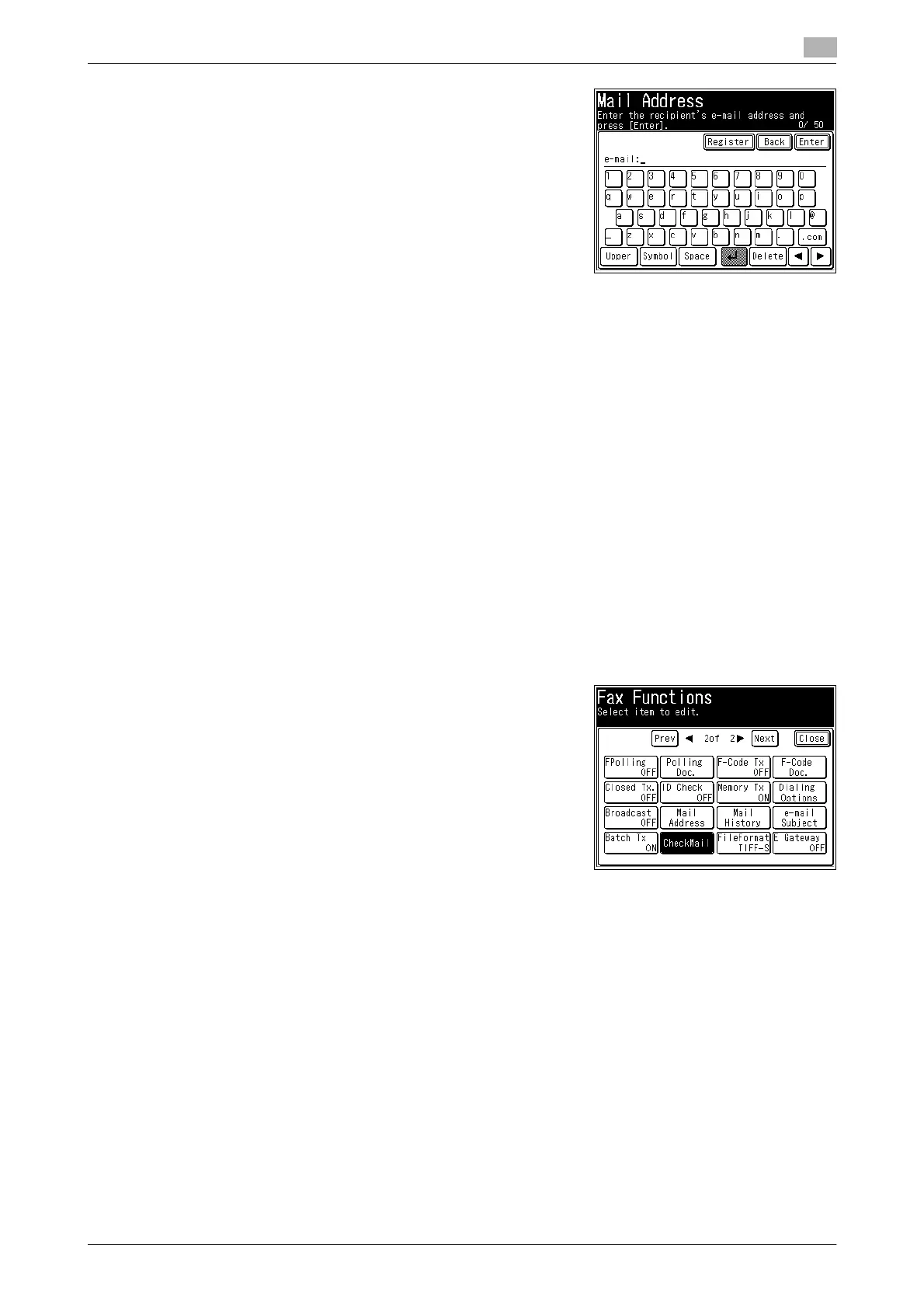
4 Enter the e-mail address, and press [Enter].
% To send to the destination machine without going via a
mail server, enter an IP address.
% To specify multiple destinations, repeat steps 2 and 3.
% Up to 50 characters can be entered for an
e-mail address.
% Destinations can also be specified using other methods.
For details, refer to page 6-3.
5 Press [Close].
6 Press <Start>.
% If you loaded the document in the ADF, this concludes the procedure.
% If you loaded the document on the document glass, load the next document, and press [Next Doc].
Press [Tx Start] to start transmission.
4.5.2 Receiving internet faxes
There are two methods for receiving internet faxes using POP; automatic reception performed at a specified
interval, and manual reception performed by the user.
Manual reception
If you receive only a few documents each day, or you want to check the reception immediately, use manual
reception.
1 Press <Fax>.
2 Press [Advanced].
3 Press [CheckMail].
Automatic reception
For details on setting to automatically receive e-mail at a specified interval, refer to Chapter 3, "Setting the
E-mail Transmission Environment" in the User’s Guide Message Board Operations.














 To Next Page