Security functions
5
5-34 Konica Minolta 240f
5.5
5.5 Security functions
5.5.1 Restricting fax destinations (Closed transmission)
When closed transmission is set, fax messages can only be transmitted to machines that are the same as
this product. If a passcode is set, faxes can only be transmitted to machines that are the same product that
also have a security function and have the same passcode registered.
d
For details on passcodes, refer to Chapter 3, "Closed Communication" in the User's Guide Administrator Op-
erations.
You can also set to always enable closed transmission. For details, refer to Chapter 3, "Closed Communica-
tion" in the User's Guide Administrator Operations.
When using manual transmission (transmission using a handset of an external phone or the [Monitor] func-
tion), the closed transmission function is disabled, even if you set it to ON.
1 Load the document, and press <Fax>.
2 Press [Advanced].
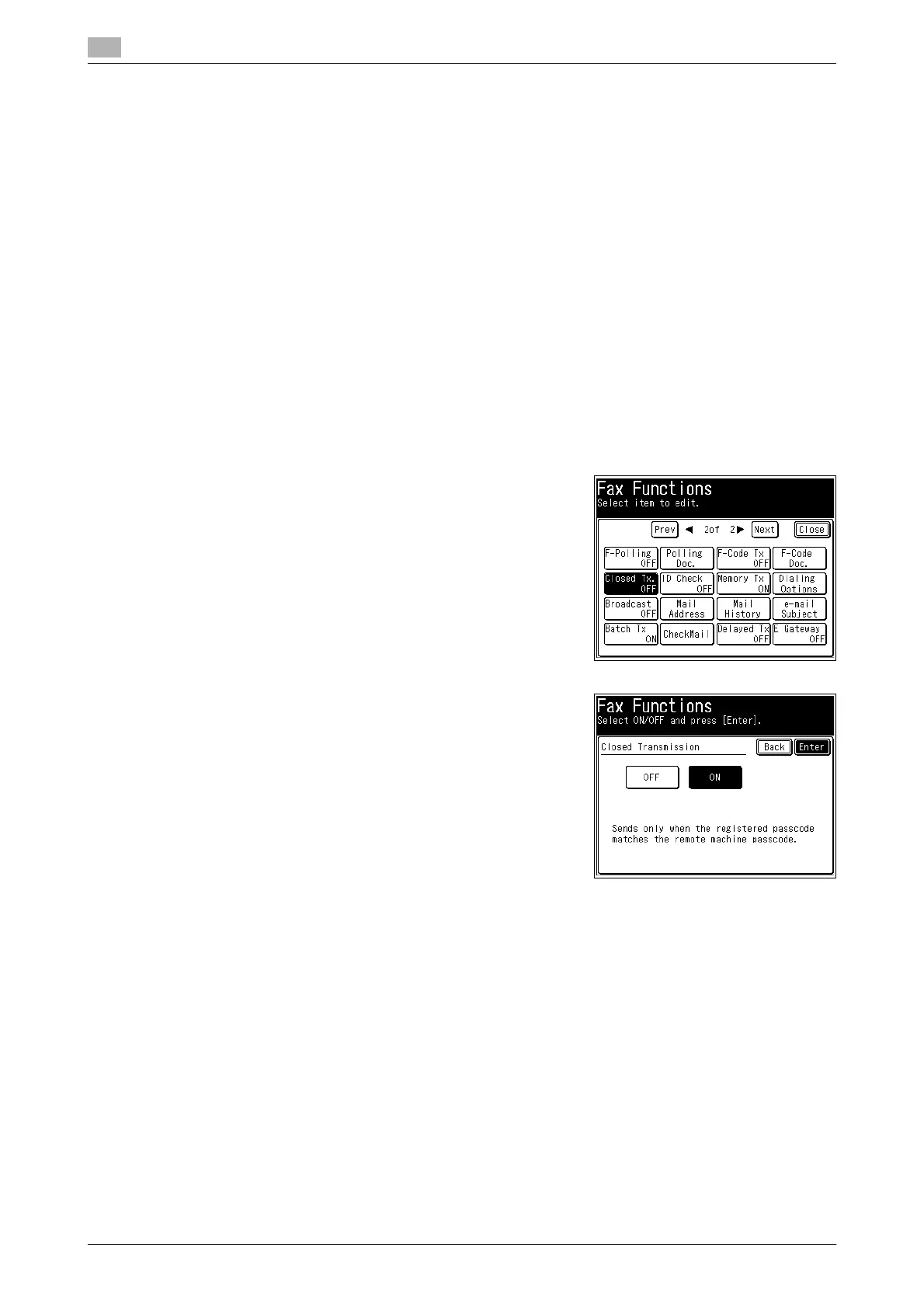
3 Press [Closed Tx.].
4 Select [ON], and press [Enter].
% If you select [OFF], the closed transmission setting is dis-
abled.
5 Press [Close].
6 Specify the destination, and press <Start>.
% For details on specifying the destination, refer to page 6-3.














 To Next Page