Konica Minolta 240f 5-13
5.3 Various fax functions
5
7 Specify the destination, and press <Start>.
% For details on specifying the destination, refer to page 6-3.
d
After scanning the document, you can check or delete the reserved transmission by pressing <Job Confirm.
) Fax Cancel>. For details, refer to page 4-22.
To change the specified time after scheduling the transmission, you need to delete the scheduled transmis-
sion and then set it again.
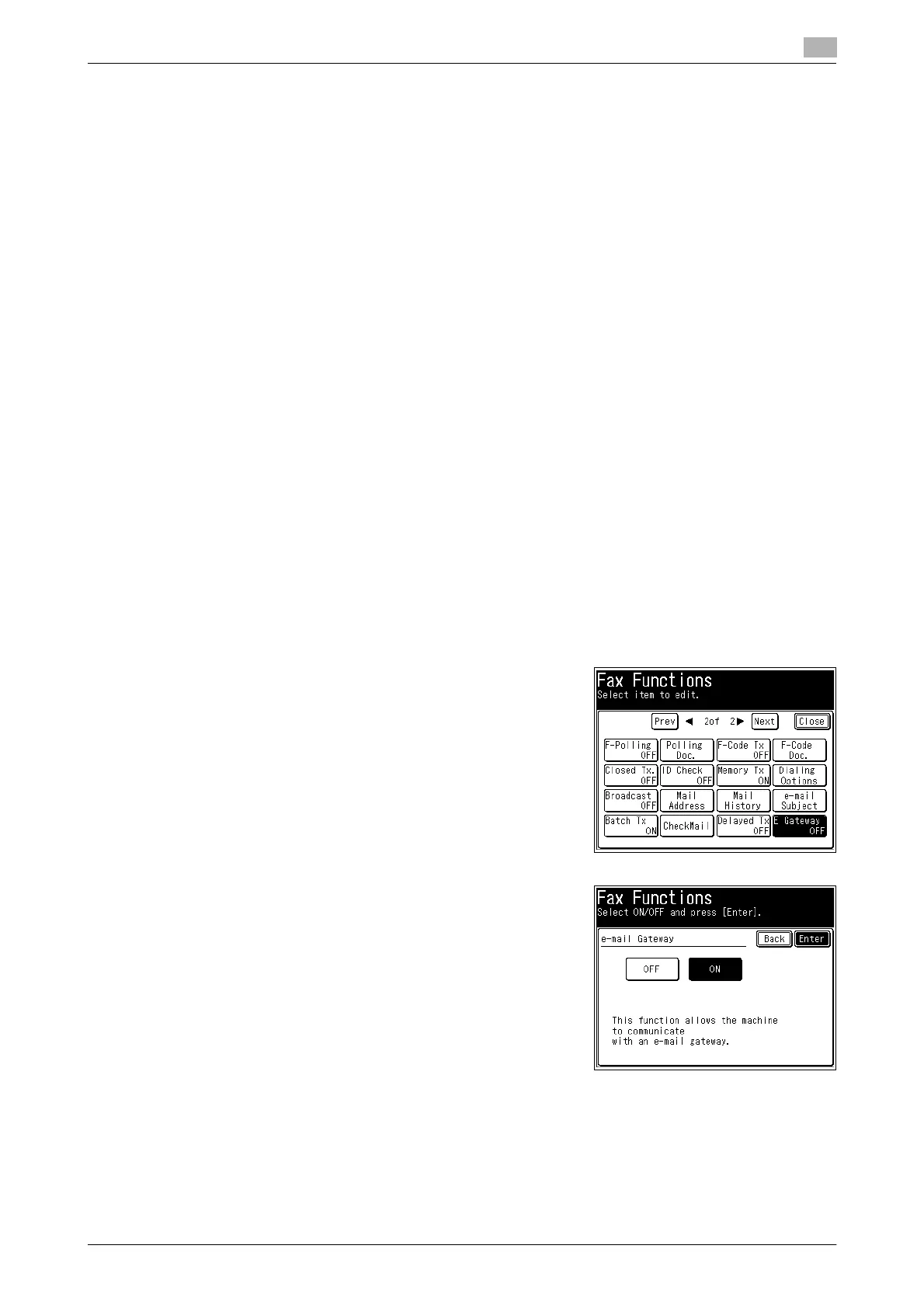
5.3.4 Transmitting faxes to a fax server (E-mail gateway)
You can transmit to a fax server as if you were transmitting to a regular telephone line. The e-mail gateway
settings need to be registered in advance.
For details on registering an e-mail gateway, refer to Chapter 3, "Specifying the Network Settings" in the Us-
er's Guide Administrator Operations.
d
This function cannot be used in the following cases:
Real time transmission
Polling reception.
F-Code transmission
Closed transmission
ID check transmission
1 Load the document, and press <Fax>.
2 Press [Advanced].
3 Press [E Gateway].
4 Select [ON] and press [Enter].
% Press [OFF] to disable the e-mail gateway settings.
5 Press [Close].
6 Specify the destination, and press <Start>.
% For details on specifying the destination, refer to page 6-3.














 To Next Page