Konica Minolta 240f 8-35
8.2 Specifying default settings
8
8.2.2 Specifying default e-mail transmission settings
You can change the default Internet Fax and Scan to E-Mail settings. For information on the items and set-
tings that can be specified, refer to page 8-36, page 8-36, and page 8-37.
Setting example
Here the procedure for changing the default file format used when attaching a scanned document to an e-
mail for transmission (Scan to E-Mail) is described as an example.
1 Press <Setting>.
2 Press [Default Settings].
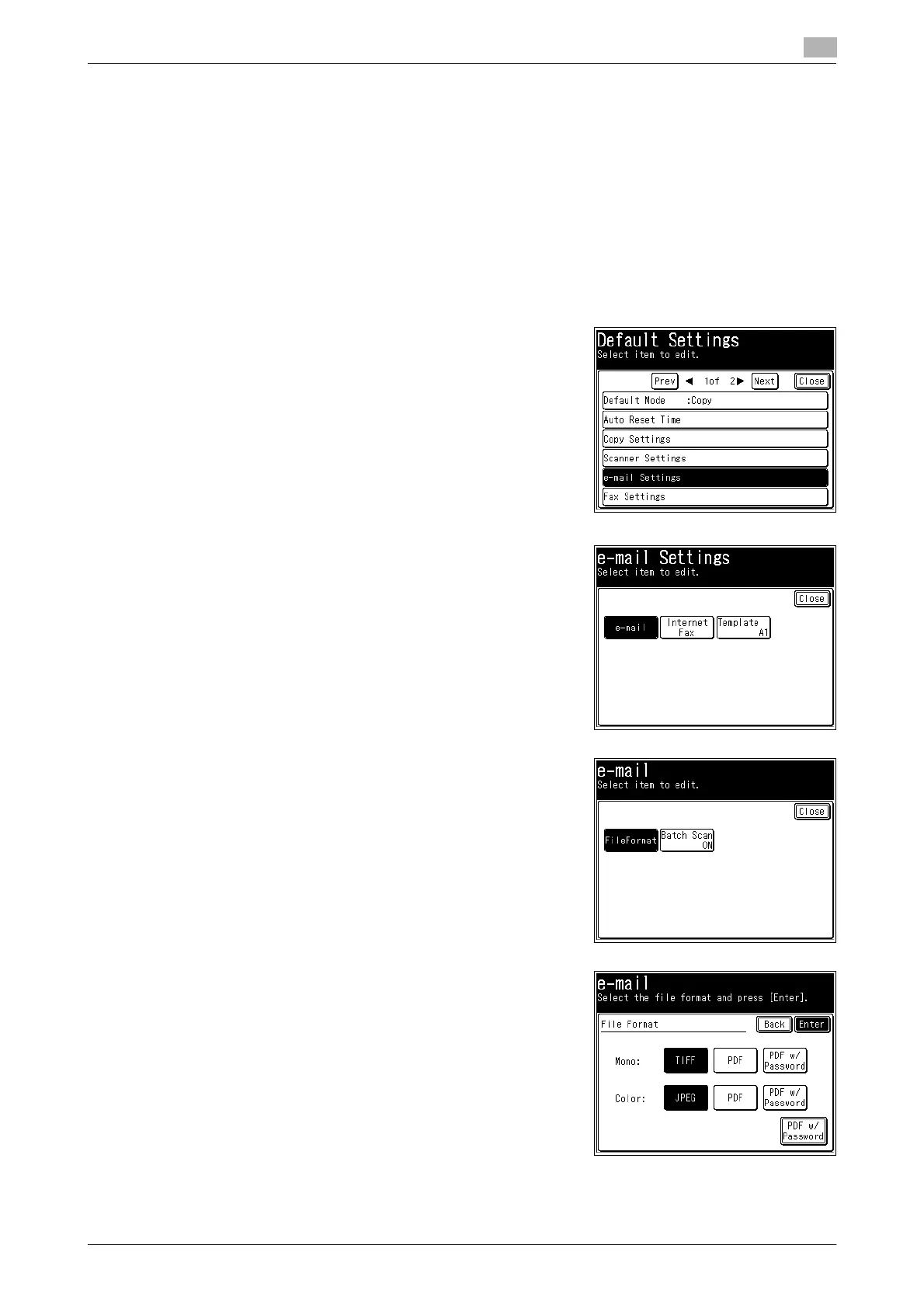
3 Press [e-mail Settings].
4 Press [e-mail], [Internet Fax], or [Template].
In this example, [e-mail] is selected.
% For information on the items and settings that can be spec-
ified, refer to page 8-36, page 8-36, and page 8-37.
5 Select the item to set.
In this example, [FileFormat] is selected.
6 Select the default value, and press [Enter].
In this example, the default file format for monochrome scan-
ning is changed to [TIFF] and color scanning to [JPEG].














 To Next Page