Advanced scan features
3
3-8 Konica Minolta 240f
3.2
3.2.4 Scanning the next document (Next Doc.)
You can transmit or save separate documents scanned in a row as a single set of data. Since you can scan
using both the document glass and the ADF, this is useful for transmitting / saving a combination of docu-
ments such as an invoice and a map together.
d
The next document settings can be set separately for the ADF and the document glass (FBS).
1 Load the document, and press <Scan>.
2 Press [Advanced].
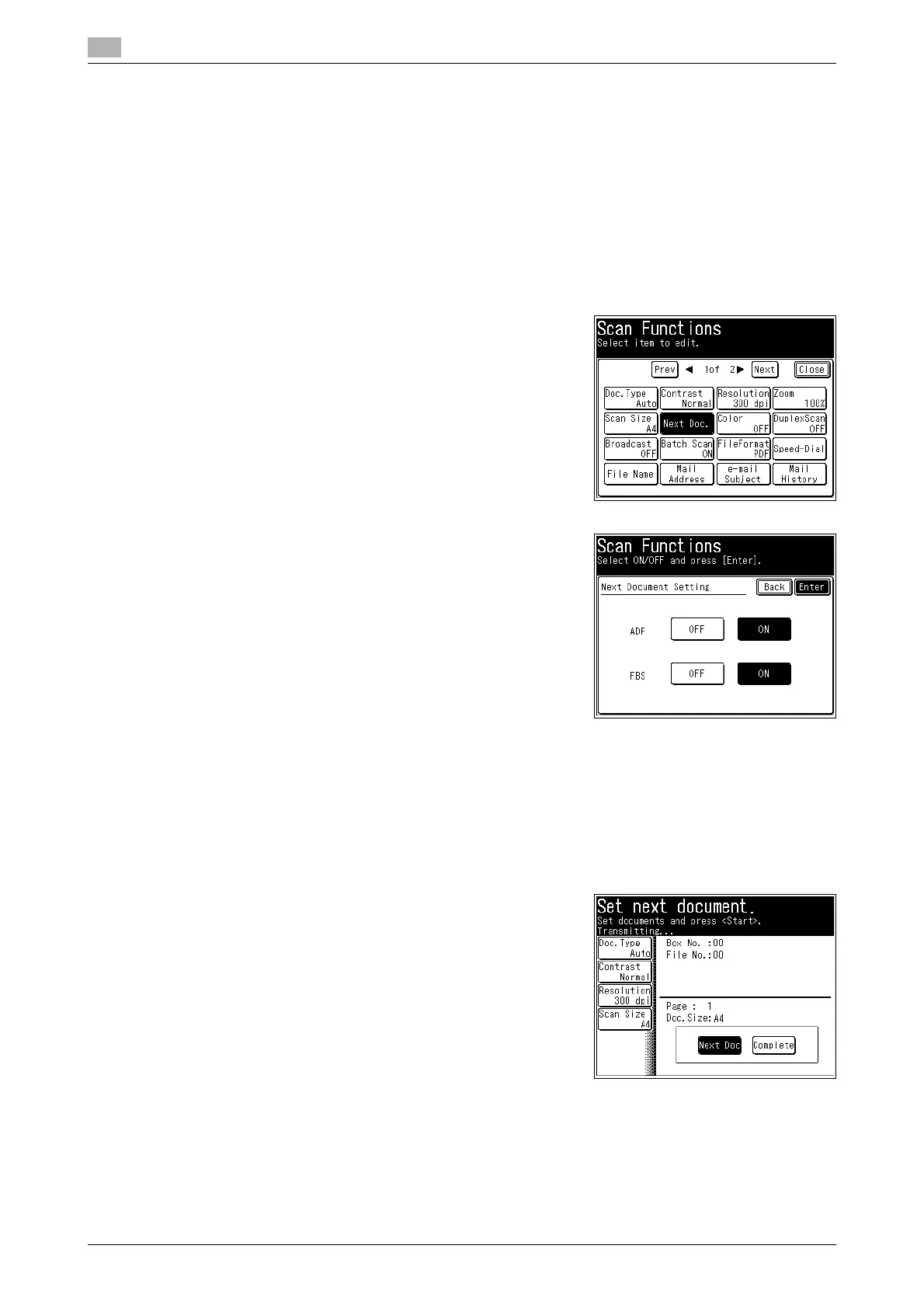
3 Press [Next Doc.].
4 Select [ON], and press [Enter].
% If you select [OFF], the next document setting is disabled.
5 Press [Close].
6 Specify the destination, and press <Start>.
% For details on the procedure, refer to page 2-3.
% When the loaded documents have been scanned, the message "Set next document" is displayed.
7 Load the next document to scan.
8 Press [Next Doc] or <Start>.
% When the loaded documents have been scanned, the
message "Set next document" is displayed.
9 If you want to scan another document, repeat steps 7 to 8.
10 When you have finished scanning all the documents, press [Complete].














 To Next Page