Various fax functions
5
5-12 Konica Minolta 240f
5.3
13 Press [Enter].
% To print the specified cover page to check it, press [Print], and then [Yes]. Proceed to step 15.
14 Press [Close].
15 Specify the destination, and press <Start>.
% For details on specifying the destination, refer to page 6-3.
5.3.3 Specifying the transmission time (Delayed transmission)
You can use this function to specify the date and time to perform transmission.
- You can specify a time and date up to a month ahead. The document for delayed transmission is stored
in memory until the specified time, at which point transmission will start.
- If real time transmission is specified, the document will remain loaded until the specified time, so you
will not be able to copy, scan, or transmit other faxes.
- This function can be also specified in combination with other functions (such as broadcast, polling, F-
Code transmission, and F-Code polling).
1 Load the document, and press <Fax>.
2 Press [Advanced].
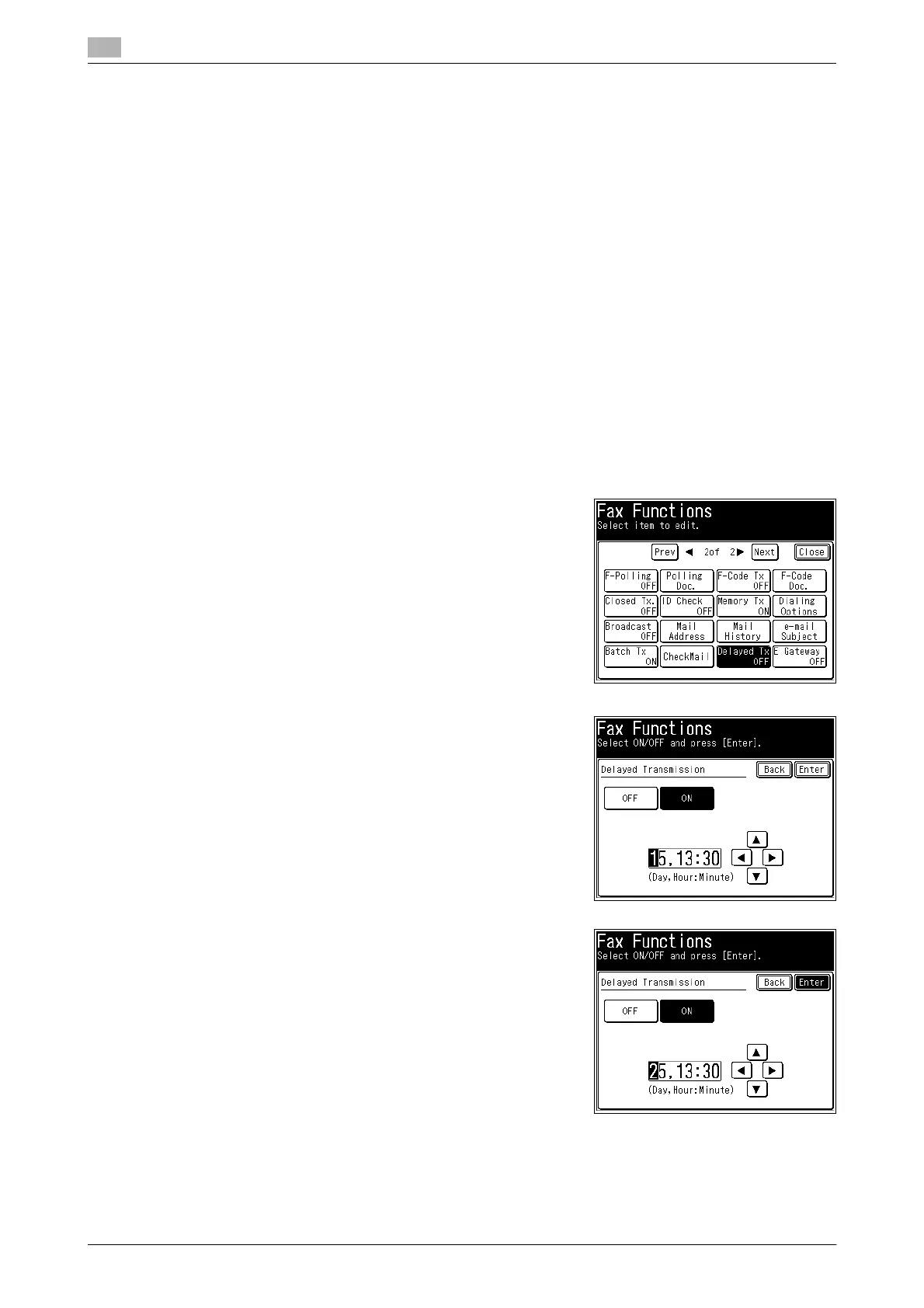
3 Press [Delayed Tx].
4 Select [ON].
% Press [OFF] to disable delayed transmission. If you select-
ed [OFF], press [Enter] and proceed to step 6.
5 Enter the transmission date and time, and press [Enter].
% Enter the time in the entry box in the 24 hour format.
% You can use [+], [,], [*], [)], and the numeric keys.
6 Press [Close].









 To Next Page