Basic faxing
4
4-18 Konica Minolta 240f
4.2
4.2.5 Basic transmission settings
You can set the resolution and contrast in accordance with the document and its text, and insert a dial num-
ber.
d
You can also change the default settings, as necessary. For details, refer to page 8-38.
Setting the resolution
Set the resolution to scan with according to the document.
1 Load the document, and press <Fax>.
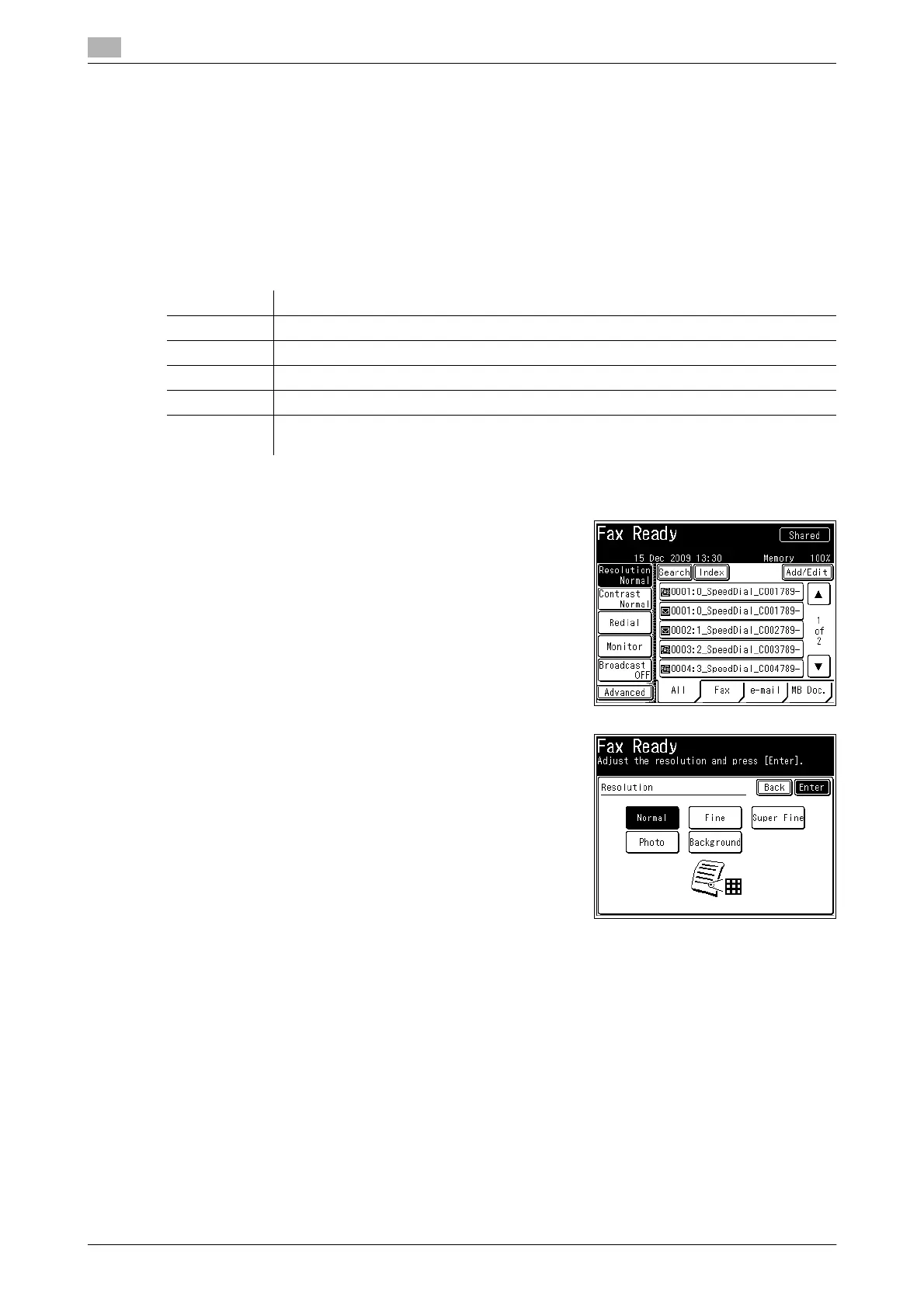
2 Press [Resolution].
% If [Resolution] is not displayed, press [Advanced] and then
select [Resolution].
3 Select the desired resolution, and press [Enter].
4 Specify the destination, and press <Start>.
% For details on specifying the destination, refer to page 6-4.
% If you loaded the document in the ADF, this concludes the procedure.
% If you loaded the document on the document glass, load the next document, and press [Next Doc].
Press [Tx Start] to start transmission.
d
The Super Fine mode may not be supported by the destination machine. In this case, the optimal resolution
will be automatically selected.
The communication time differs according to the selected resolution.
Option Description
Normal Select to scan a document with normal text.
Fine Select to scan a document with small text, such as a newspaper.
S-Fine Select to scan a document with detailed illustrations or fine text.
Photo Select this to scan photos.
Background Select this to scan while erasing the background (background pattern or color) of the
document.














 To Next Page