Konica Minolta 240f 7-5
7.1 Checking the transmission result (Transmission report)
7
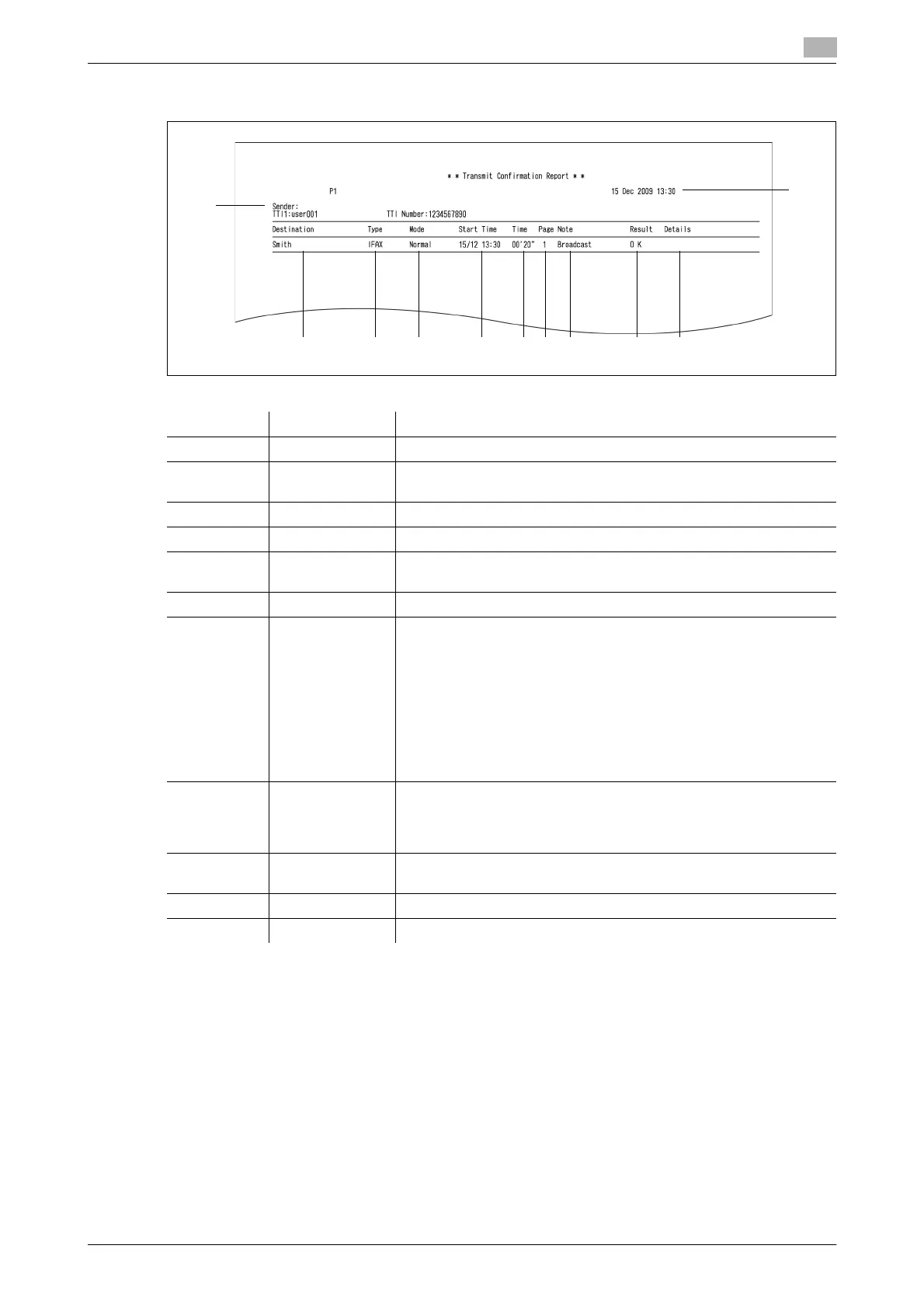
7.1.2 Reading the transmission report
*1 When a communication error code and error message is printed, confirm the content of the error and
perform the transmission again. For details, refer to Chapter 5, "Error Messages" in the User's Guide
Administrator Operations.
Number Item Description
1 Destination The destination name, fax number, or e-mail address
2 Type FAX: For fax transmission
IFAX: For Internet Fax transmission
3 Mode The resolution used for the communication
4 Start Time The time the communication started
5 Time The time that elapsed from when the communication started until
when the communication ended
6 Page The number of pages transmitted
7 Note The type of communication is printed for the following types of com-
munication:
•Manual Tx
• Polling Tx
• F-Code Tx
• Broadcast Tx
• PC-Fax Tx
• PC-Fax F-code Tx
•Archive Tx
• Rerouted Fax Tx
8 Result OK: Completed normally
*: ECM Mode transmission
#: Super G3 transmission
Code: The communication error code
*1
9 Details Blank when the communication ends without an error
When a communication error occurs, the error message is printed
*1
10 Sender The user name (only when a user is logged in)
11 – The date and time the report was printed
123456789
10
11














 To Next Page