F-code communications
5
5-26 Konica Minolta 240f
5.4
7 Press [Yes].
% The F-code box list can also be printed from [F-Code Box List] in [List] after pressing <Setting>.
5.4.2 Transmitting using sub-addresses (F-code transmission)
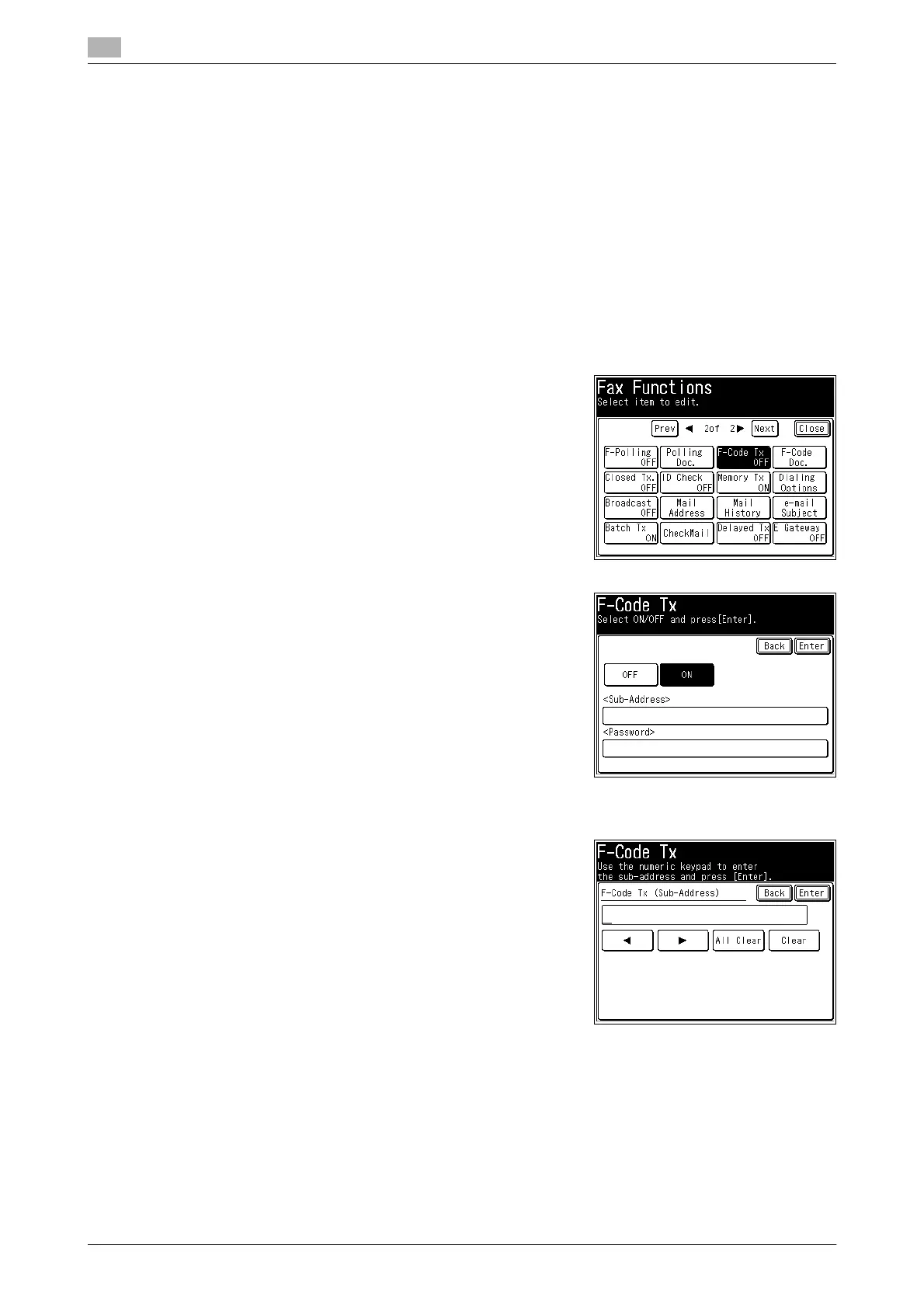
F-code transmission
Entering sub-addresses and passwords enables secure F-code box transmission and
F-code bulletin box transmission to be performed. First check the sub-address and password of the box reg-
istered in the other machine.
1 Load the document, and press <Fax>.
2 Press [Advanced].
3 Press [F-Code Tx].
4 Select [ON].
% Press [OFF] to disable the F-code communication settings.
Press [Enter] to complete the procedure.
5 Press the sub-address entry box.
6 Enter the sub-address registered in the other machine using
the numeric keys, and press [Enter].
% Up to 20 digits can be entered for a sub-address.
% To delete one of the entered characters, press [Clear].
% To delete all of the entered characters, press [All Clear].
7 If a password is set, press the password entry box.
% If a password is not set, proceed to step 9.














 To Next Page