Advanced scan features
3
3-22 Konica Minolta 240f
3.2
3.2.10 Attaching a file (Attachment)
You can attach a file on the network (data from Word or Excel, etc.) when transmitting or saving a scanned
document.
d
This function can be used in the following cases:
Scan to e-mail
Scan to PC Folder
Scan to FTP Server
1 Load the document, and press <Scan>.
2 Press [Advanced].
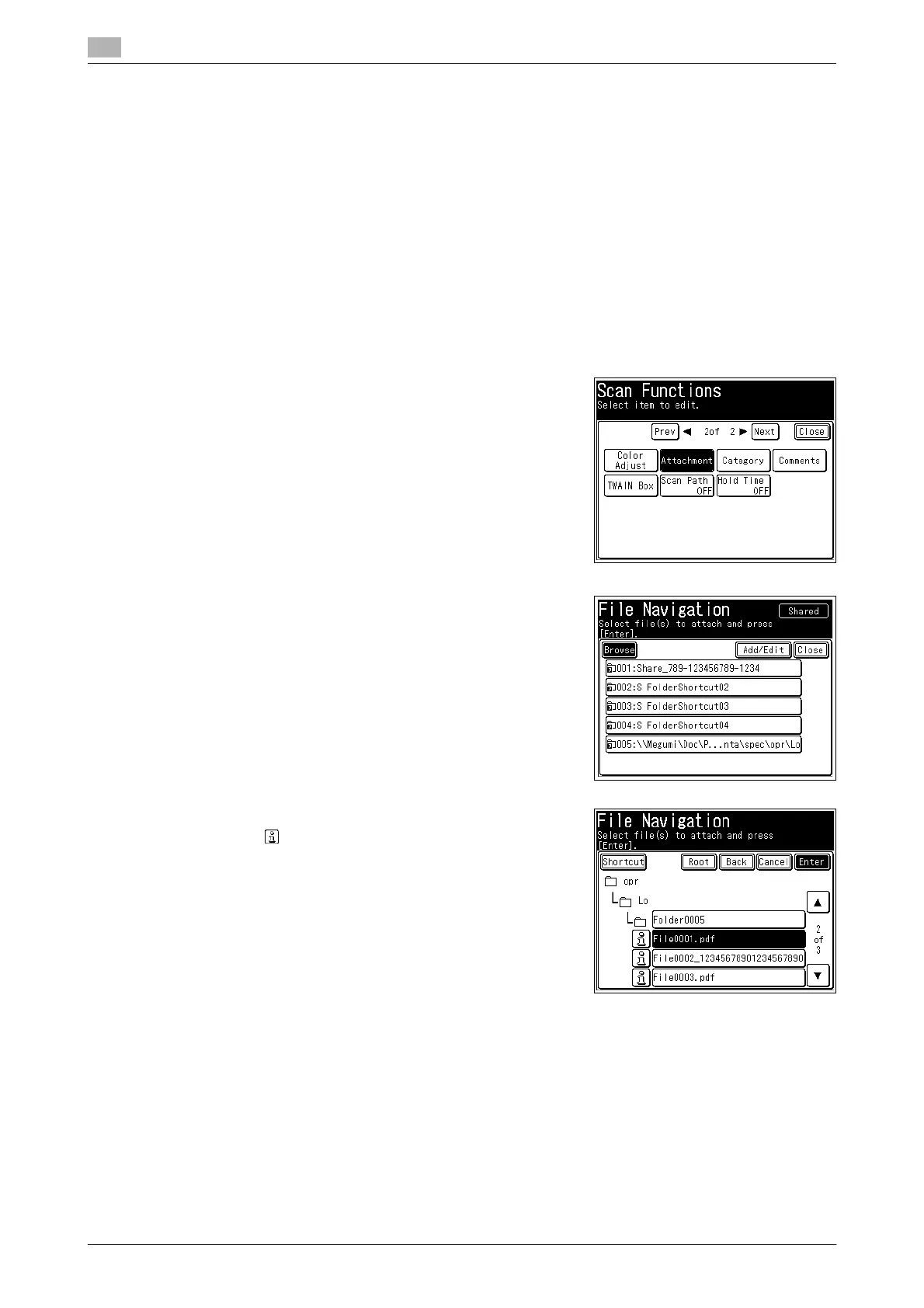
3 Press [Attachment].
4 Press [Browse], and search the network for the folder where
the file you want to attach is located.
% If folder shortcuts are registered, select the shortcut for the
folder where the file you want to attach is located.
5 Specify the file to attach, and press [Enter].
% Press to display detailed information for the file. To
close the detailed information screen, press [Close].
6 To continue to attach files, press [Shortcut] and repeat steps 4 to 5 of the operation.
% If you do not want to attach another file, proceed to step 7.
7 Press [Close] twice.
8 Specify the destination, and press <Start>.
% For details on the procedure, refer to page 2-3.














 To Next Page