Konica Minolta 240f 7-11
7.2 Managing the communication history
7
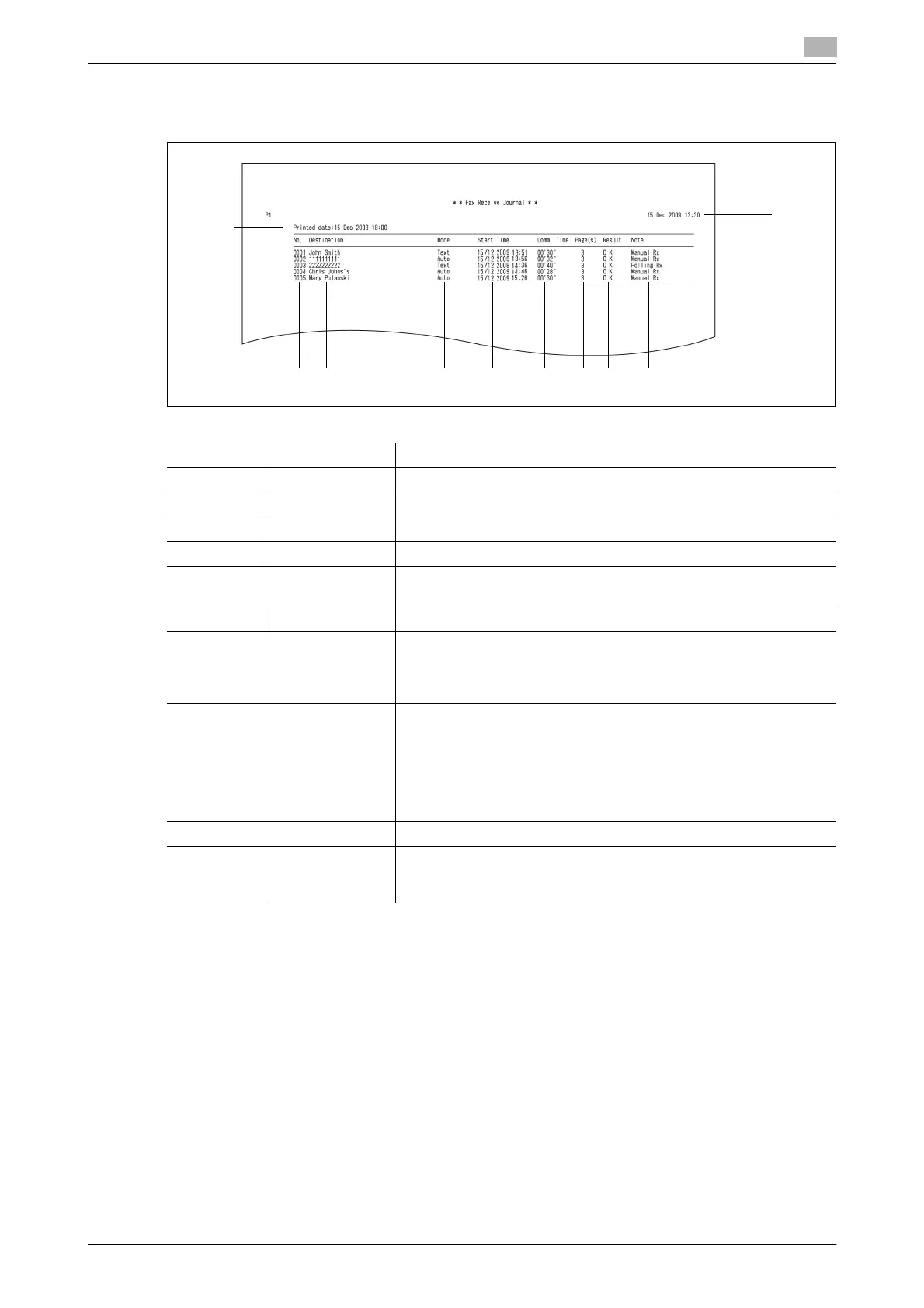
- Reception Journal
Example print
*1 When a communication error code is printed, confirm the content of the error and perform the transmission
again. For details, refer to Chapter 5, "Error Messages" in the User's Guide Administrator Operations.
*2 Only printed for a daily communication report.
Number Item Description
1 No. The job number
2 Destination The sender's name or fax number
3 Mode The resolution used for the communication
4 Start Time The time the communication started
5 Time The time that elapsed from when the communication started until
when the communication ended
6 Page The number of pages transmitted
7 Result OK: Completed normally
*: ECM Mode reception
#: Super G3 reception
Code: The communication error code
*1
8 Note The type of communication is printed for the following types of com-
munication: Nothing is printed for other types of communication.
•Manual Rx
•Polling Rx
• F-code polling Rx
• Received in F-code Secure Box
• Received in F-code Bulletin Box
9 Printed date
*2
The date and time that the journal report was printed
10 – The date and time that the journal report was printed, or the date and
time that communication history started to be stored for a daily com-
munication report
12 3 4 5 67 8
9
10














 To Next Page