Ch.3 Sequence of Examination
< 58 >
REGIUS Console CS-3 OPERATION MANUAL Ver. 1.10 2005.2
One of two examination suspension screens may be displayed depending on the type of system.
- Systems where photography for all examinations is carried out at one location.
- Systems where a suspended examination is continued at a different location.
Examination Suspension
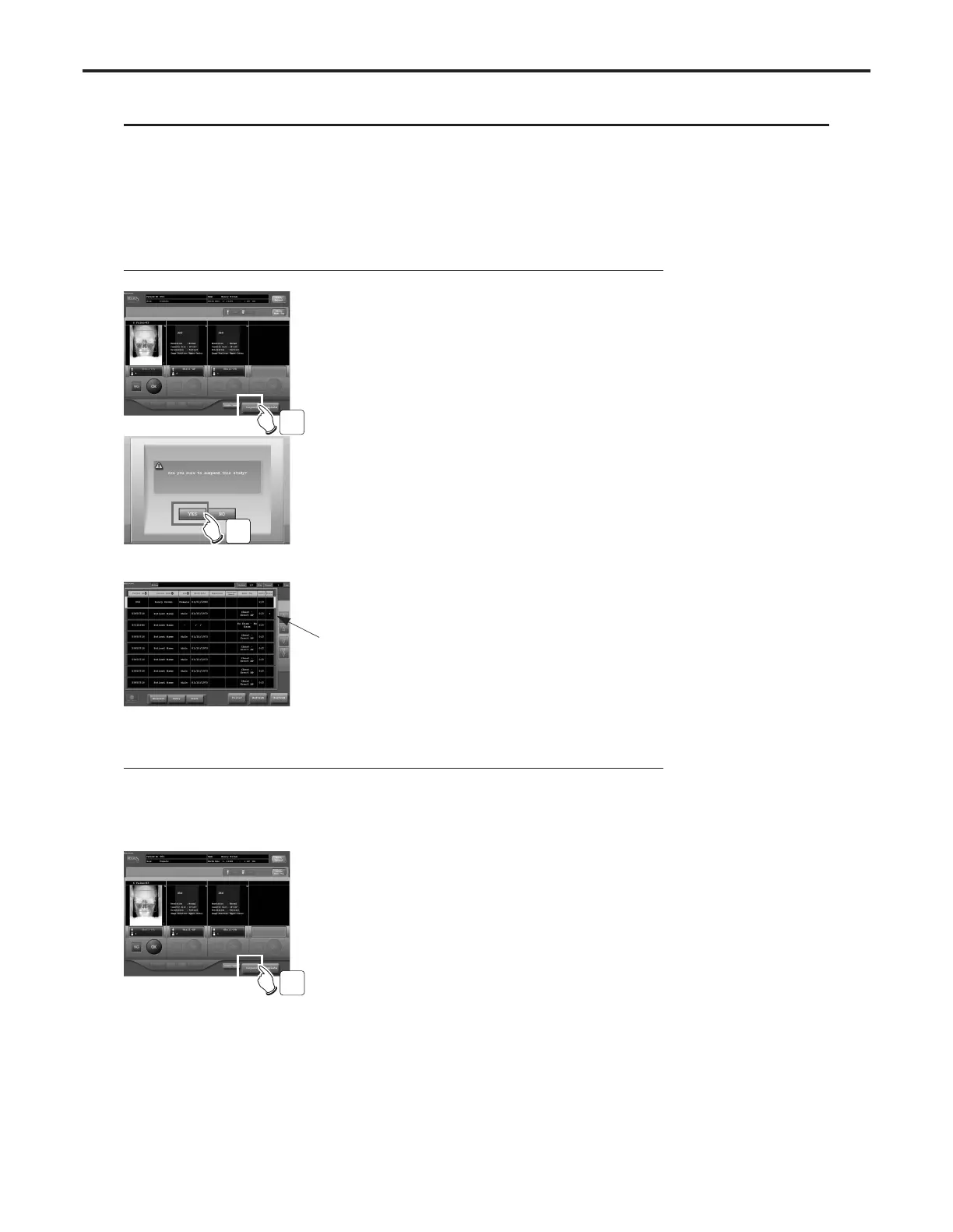
Systems where photography for all examinations is carried out at one location.
1 Touch the [Suspend] button on the examination
check screen.
•A message requesting confirmation of suspension
will be displayed.
2 Touch the [YES] button.
• The examination check screen will be closed and
the display returned to the examination list screen.
"
*
" is displayed.
Systems where a suspended examination is continued at a different location.
In systems where the same examination list is displayed on multiple CS-3 units and
examinations for which all photography has not been completed and may be carried
out in another photography room, the following procedure should be followed to
suspend examinations.
1 Touch the [Suspend] button on the examination
check screen.
•A message requesting confirmation of suspension
will be displayed.
1
2
1



 To Next Page