4-5. Using the driving support systems
X Rear view & panoramic view
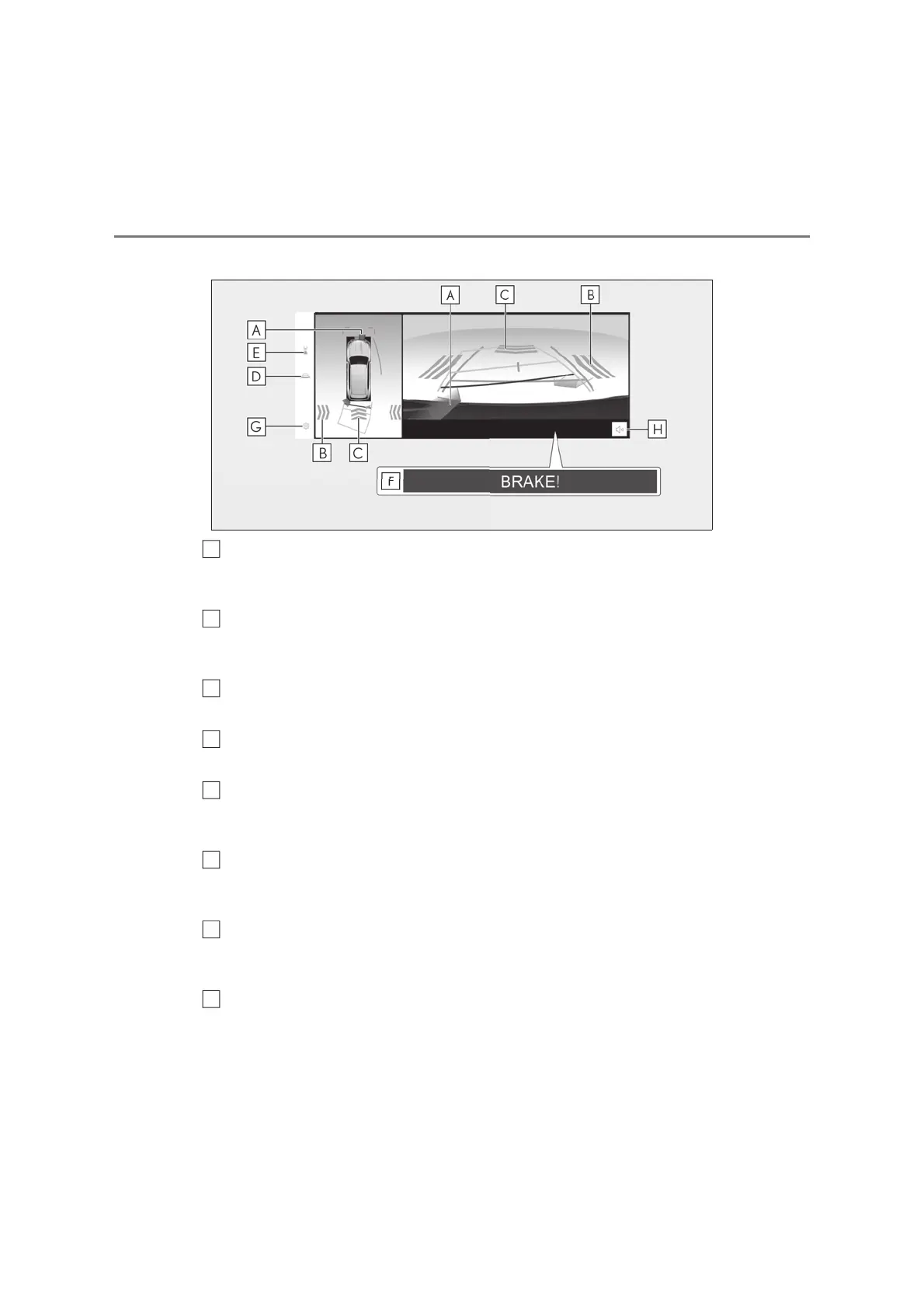
Lexus parking assist-sensor
When a sensor detects a stationary object, the direction of and the approximate distance to
the stationary object are displayed and the buzzer sounds.
Rear Cross Traffic Alert
*
When a sensor detects a vehicle approaching from the rear, the direction of the vehicle
approaching from the rear is displayed and the buzzer sounds.
Rear Camera Detection
Displayed automatically when a pedestrian is detected.
Guide line switching button
Select to switch the guide line mode. (oP.382)
Display mode switching button
Each time the display mode switching button is selected, the mode will change between the
rear view & panoramic view mode and the wide rear view & panoramic view mode.
Parking Support Brake
*
When the system determines that the possibility of a collision with detected target objects
is high, a warning message is displayed.
Setting button
Changes settings, such as the automatically display cornering view, the vehicle body color,
the Lexus parking assist-sensor detection distance. (oP.390)
Lexus parking assist-sensor mute button
This button temporarily mutes the Lexus parking assist-sensor sound.
*
: If equipped
A
B
C
D
E
F
G
H



 To Next Page