4
4-5. Using the driving support systems
Driving
stationary objects to the rear
• Vehicles or bicycles approaching from
the rear that change lanes suddenly
• When a vehicle or bicycle is approaching
while traveling to the side of a wall, sign
or similar stationary object
• When the back door is open
• When a bicycle carrier or other acces-
sory is installed to the rear of your vehicle
• When a vehicle or bicycle is approaching
at high speed
• When towing a trailer
• When the vehicle is stopped on a steep
incline
• When the vehicle is stopped partway
around or at the endpoint of a curve
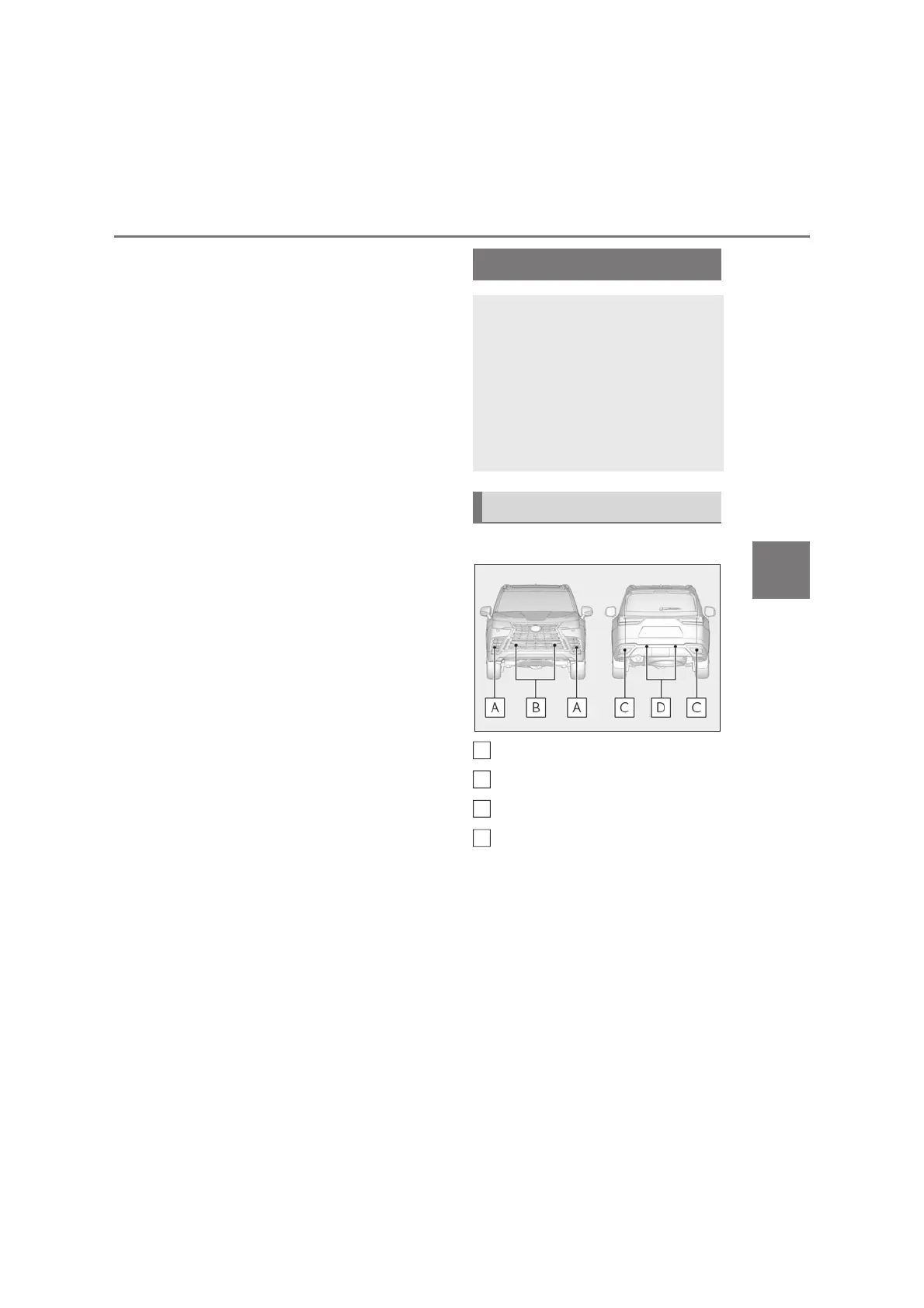
Q Types of sensors
Front corner sensors
Front center sensors
Rear corner sensors
Rear center sensors
Q Display (Multimedia Display)
When the sensors detect an object,
such as a wall, a graphic is shown on
the Multimedia Display depending on
the position and distance to the object.
(As the distance to the object becomes
short, the distance segments may
blink.)
A simplified image is displayed on the
Lexus parking assist-sensor
The distance from your vehicle to
objects, such as a wall, when paral-
lel parking or maneuvering into a
garage is measured by the sensors
and communicated via the Multi-
media Display and a buzzer. Always
check the surrounding area when
using this system.
System components
A
B
C
D



 To Next Page