23
Magtrol Model DSP7000 Dynamometer Controller
Chapter 3 – Installation/Configuration
SETUP
3.2.3 HySTereSiS DynaMoMeTer wiTH TranSDuCer SeTup
3.2.3.1 Hardware Connection
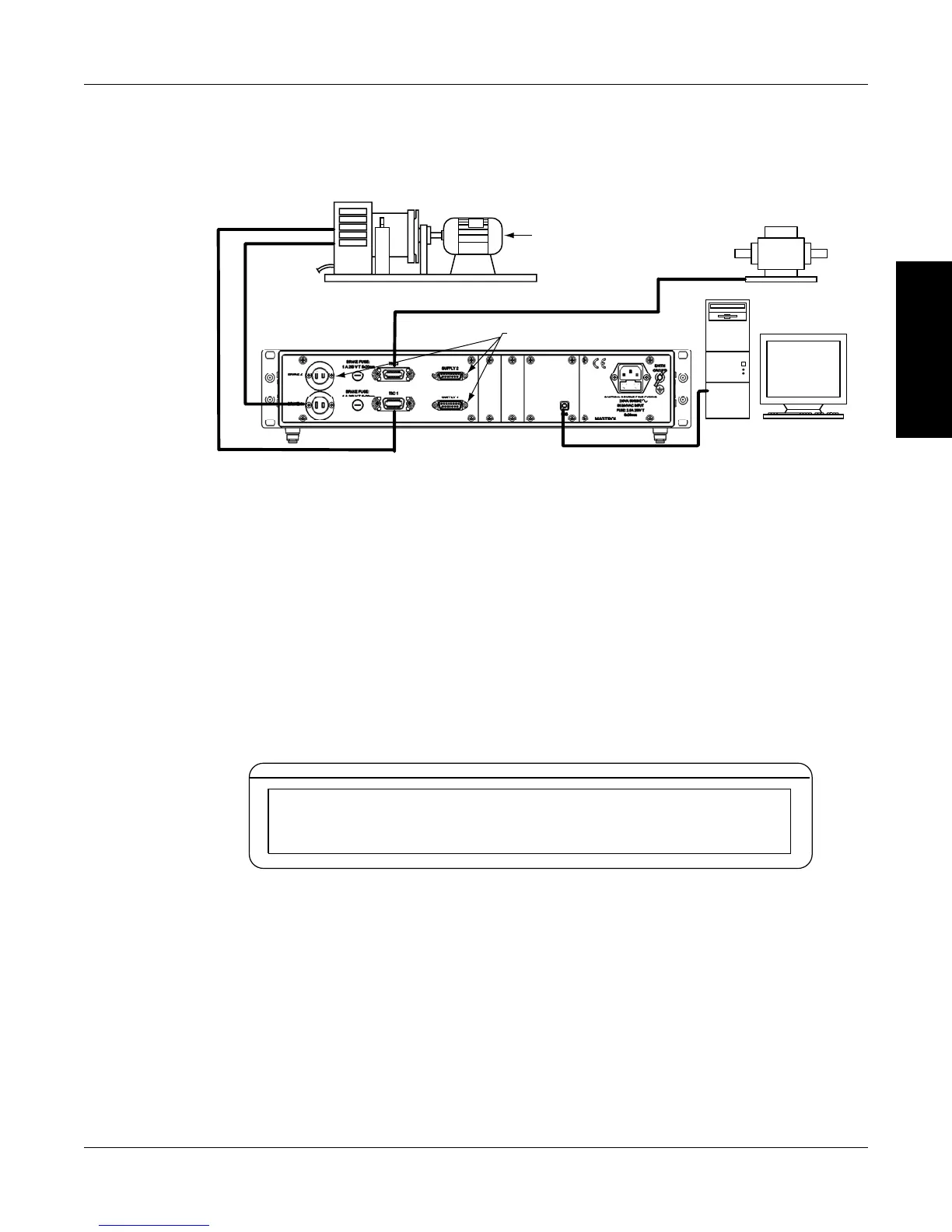
Motor
Under
Test
TM Torque Transducer
AC Mains
Hysteresis Dynamometer (HD)
DSP7002
DYNAMOMETER
CONTROLLER
No Connection
USB
PC
M-TEST
Figure 3–10 Hysteresis Dynamometer with Torque Transducer Setup
3.2.3.2 Software Conguration
1. Turn on the DSP7000. Set up TSC1 as described in section 3.2.2 - Hysteresis Dynamometer
Setup. Press TSC to switch to TSC2 setup and proceed to the dynamometer configuration
menu. See Section 3.2.1 – Dynamometer Configuration Menu.
2. Press POWER UNITS until TM/TF is reached for TSC2.
3. Press TORQUE UNITS until HB is reached.
4. Press MAX SPEED button and use and buttons and Decrease/Increase dial to set
desired scale factor for TSC2.
5. Press SCALE I to add a filter if desired.
6. Press SHIFT. The display should appear as follows:
POWER
BRAKE STATUS SET POINT SET POINT PID
TORQUE SPEED USER DISPLAY
TSC2 MAX TORQUE NOMINAL SPEED
X.XXX XXXX.X
Figure 3–11 Torque Transducer Setup Menu
7. Press the TORQUE UNITS button and use and buttons and Decrease/Increase dial to
set desired max torque. Press the SCALE P button and use and buttons and Decrease/
Increase dial to set desired nominal speed.
8. Press SHIFT 3 times to return to the main menu.


 To Next Page
 Loading...