27
Magtrol Model DSP7000 Dynamometer Controller
Chapter 3 – Installation/Configuration
SETUP
3.2.6 eDDy-CurrenT or powDer Brake DynaMoMeTer wiTH Torque TranSDuCer SeTup
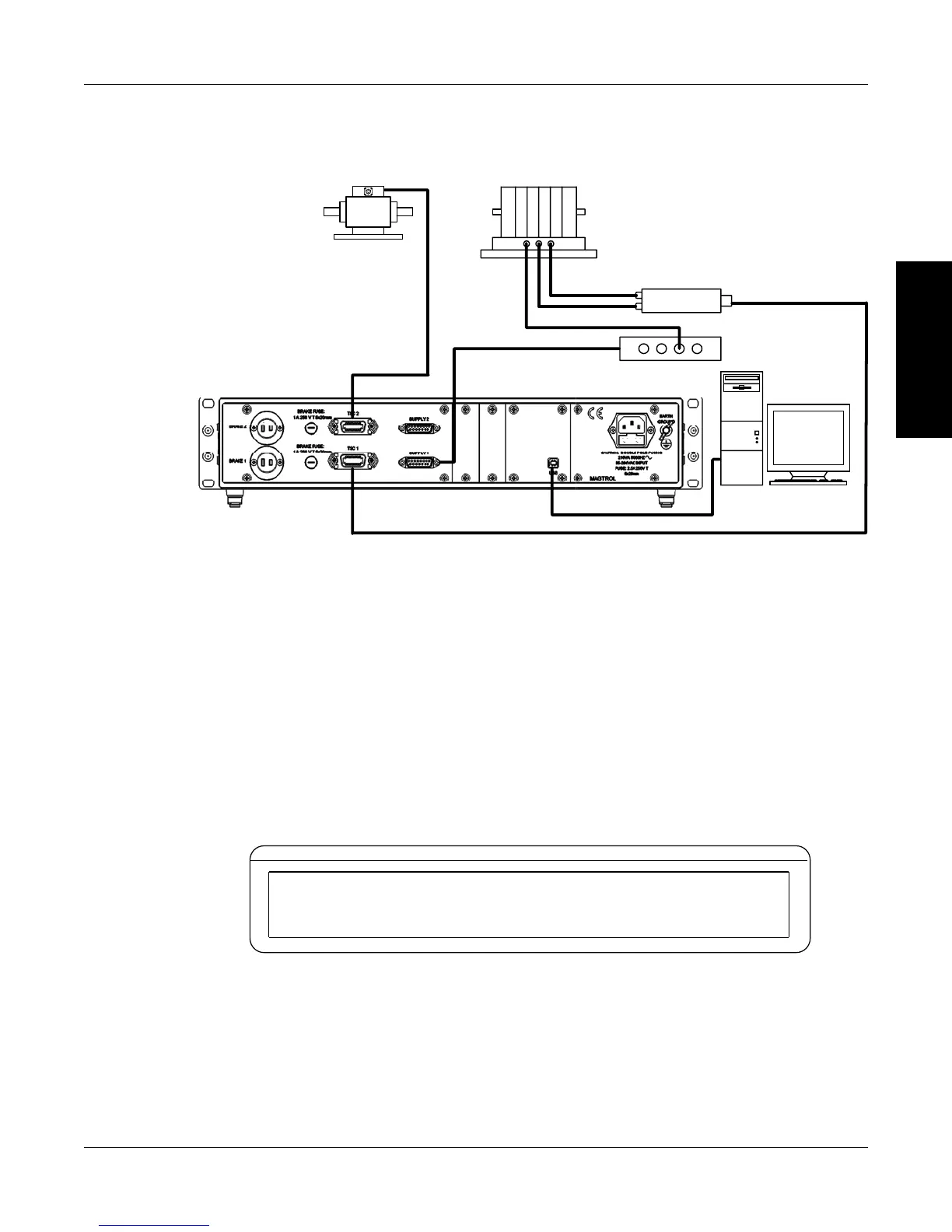
3.2.6.1 Hardware Connection
TM Torque
Transducer
USB
PC
M-TEST
DSP7002 Dynamometer Controller
Excitation
Torque
TSC 401
Torque-Speed
Conditioner
DES Power Supply
Speed
OR Powder Brake (PB)
Dynamometer
Figure 3–18 Eddy-Current or Powder Brake Dynamometer with Torque Transducer Setup
3.2.6.2 Software Conguration
1. Turn on the DSP7000. Set up TSC1 as described in section 3.2.5 Eddy-Current or Powder
Brake Dynamometer Setup. Press TSC to swtich to TSC2 setup and proceed to the
dynamometer configuration menu. See Section 3.2.1 – Dynamometer Configuration Menu.
2. Press POWER UNITS until TM/TF is reached.
3. Press TORQUE UNITS until WB or PB is reached.
4. Press MAX SPEED button and use and buttons and Decrease/Increase dial to set
desired scale factor.
5. Press SCALE I to add a filter if desired.
6. Press SHIFT. The display should appear as follows:
BRAKE STATUS SET POINT SET POINT PID
TORQUE SPEED USER DISPLAY
TSC2 MAX TORQUE NOMINAL SPEED
X.XXX XXXX.X
Figure 3-19 TSC2 torque transducer setup menu
Press the TORQUE UNITS button and use and buttons and Decrease/Increase dial to
set desired max torque. Press the SCALE P button and use and buttons and Decrease/
Increase dial to set desired nominal speed. Press SHIFT 3 times to complete the initial setup
and return to the main menu.


 To Next Page
 Loading...