8
Pellerin Milnor Corporation
1. From the Loading/Discharging State windows (Figure 2: Example Loading State, page 9 ),
touch
. The Manual Override display (Figure 26: Manual Override Display, page 57 )
appears.
2. From the Manual Override display, touch Formula (F6). The Home display appears.
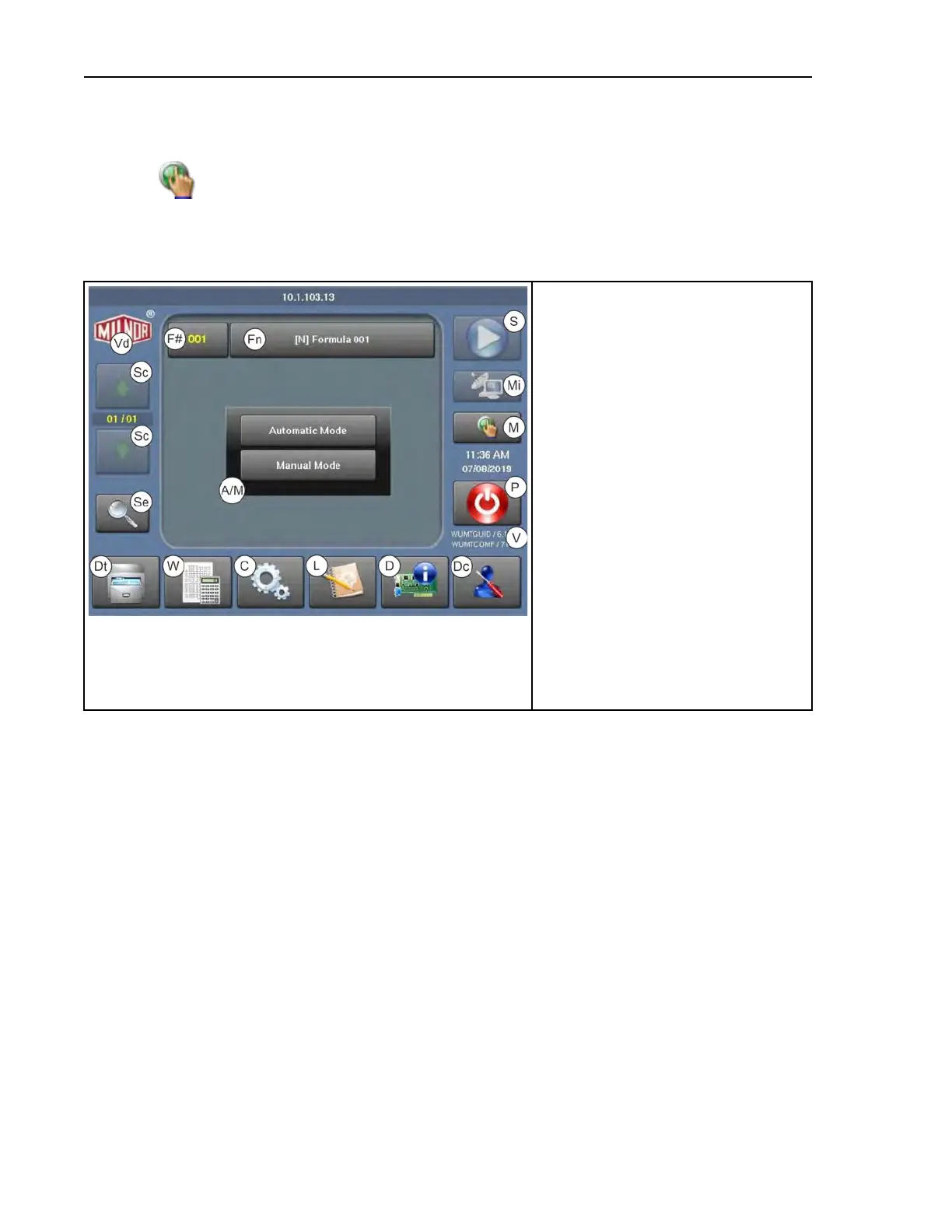
Figure 1. The Home Display
Legend
A/M. Select automatic or manual mode
C. Access the Configuration display
D. Access the Diagnostics displays
Dc. Display the Pellerin Milnor Corpo-
ration contact information
Dt. Access the Data Transfer display
Fn. The wash formula names
F#. The wash formula numbers
L. Access the Data Log displays
M. Activate manual mode
Mi. Run a formula from the Mildata
®
computer (currently unavailable on
WTB machines)
P. Turn machine power OFF
S. Run a formula
Sc. Scroll between pages to view more
formulas
Se. Search for a formula
V. The version data
Vd. View the software build
W. Access the Wash Formula Mainte-
nance display
1.1.2 About Automatic Mode
BNCLDO02.C03 0000277635 E.2 B.4 A.6 2/26/20 11:18 AM Released
When you first power-on the machine for morning startup (after evening shutdown, after a power
loss, after a safety circuit error, etc.) the controller prompts the operator to put the machine in au-
tomatic or manual mode, as shown in Figure 1: The Home Display, page 8 .
Preface












 To Next Page