3 Formula Maintenance
BNCLDP02 / 2020465
BNCLDP02 0000249012 B.3 11/12/20 1:32 PM Released
3.1 Formula Creation and Modification
BNCLJP04.C02 0000209632 E.2 B.3 D.3 1/2/20 1:22 PM Released
Wash formulas consist of steps, which consist of decisions. Add, change, and delete formulas,
steps, and decisions from the Wash Formula Maintenance display.
NOTE: The formula changes you make (add a new formula, delete a step, change a step
decision, etc.) are recorded in the data logs. See Section 4.2.3 : Configuration and Pro-
gramming History, page 44.
3.1.1 The Wash Formula Maintenance Display
BNCLJO06.C02 0000187082 E.2 B.3 D.3 1/2/20 1:22 PM Released
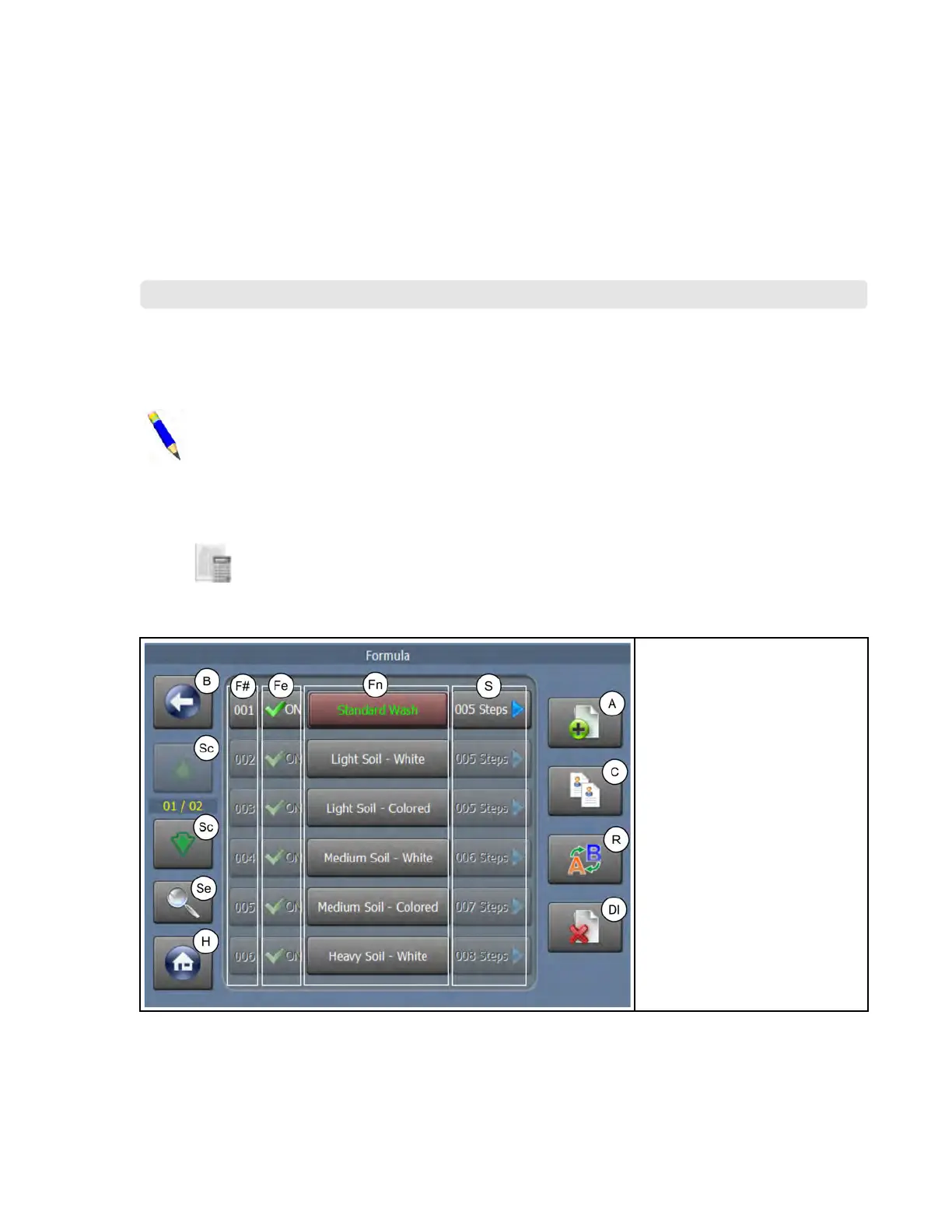
Touch on the Home display to view the display shown in the following figure. This display
is subsequently referred to as the Wash Formula Maintenance display.
Figure 11. The Wash Formula Maintenance Display
Legend
A. Add a new formula
B. Go back one level, to the
Home display
C. Copy a formula
Dl. Delete a formula
F#. Change a formula number
Fe. Enable/disable a formula
Fn. The wash formula names
H. Return to the Home display
R. Rename a formula
Sc. Scroll between pages
Se. Search for a formula
S. Access the Steps in a Wash
Formula display
3.1.1.1 To Add a New Wash Formula
BNCLJO06.T06 0000194241 E.2 B.3 D.3 1/2/20 1:22 PM Released
Create a new, empty wash formula without any steps (you must add steps).
Pellerin Milnor Corporation 27












 To Next Page