Pellerin Milnor Corporation 61
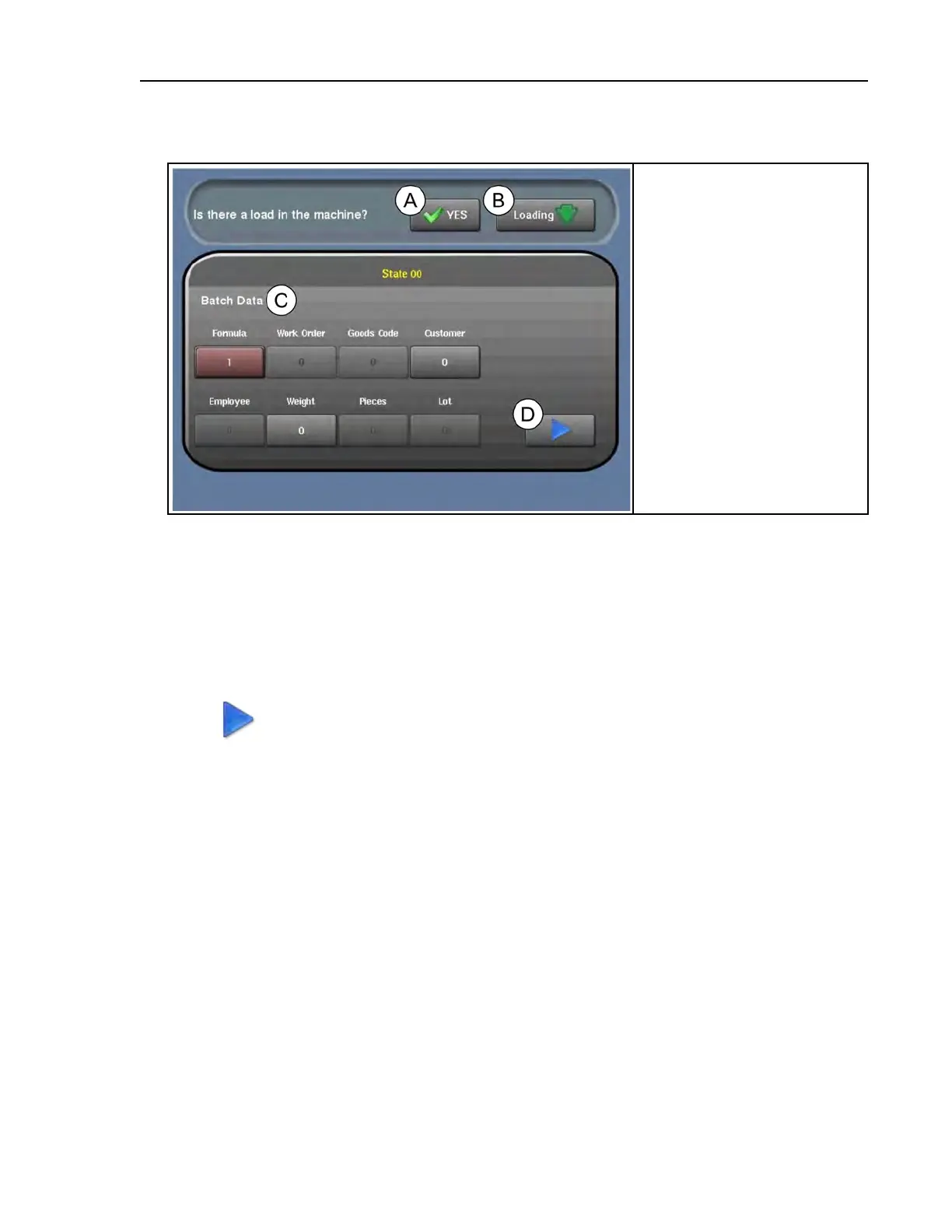
Figure 27. The Recovery Display
Legend
A...Toggle between “yes” and
“no” to answer the prompt,
“Is there a load in the
machine?”
B... Toggle between “loading”
and “discharging” to answer
the prompt, “Was the ma-
chine loading or discharging
when automatic operation
was interrupted?”
C...The batch data for the goods
in the machine (see Section
4.5.3.1 , page 61).
D...Start automatic operation
based on the batch data and
your answers to the prompts.
3. Enter the batch data for the goods in the machine. See Section 4.5.3.1 , page 61.
4. Choose whether the machine was loading or discharging when automatic operation was
interrupted.
• Touch the loading/discharging button (item B in the figure) so that it displays Loading if
an error occurred or the machine lost power while it was receiving goods.
• Touch the loading/discharging button (item B in the figure) so that it displays Discharg-
ing if an error occurred or the machine lost power while it was discharging goods.
5. Touch
to start automatic operation.
4.5.3.1 Batch Data
BNCLUT05.C01 0000247216 E.2 B.6 B.5 9/17/20 12:02 PM Released
As goods are transferred between devices in a laundry (loading device, washer-extractor, dis-
charge device, press, etc.), each device passes batch data and post-wash codes for those goods to
the other devices. Batch data and post-wash codes are passed either through the Miltrac™ con-
troller system or through allied data inputs and are used for two purposes:
• instructing the washer-extractor and other equipment (such as drying equipment) how to proc-
ess the goods
• accounting and record-keeping
In automatic operation, the washer-extractor processes goods using the batch data it receives from
the loading device. If the washer-extractor lost power or an error occurred while it was processing
goods, the operator must re-enter the batch data into the Recovery display.
The machine also reports production data to the Mildata
®
computer as well as error info.
Formula identifies the wash formula used in the tunnel. Goods Code can be used instead.
Troubleshooting












 To Next Page